ptcs-chart-zoom-range
Visual
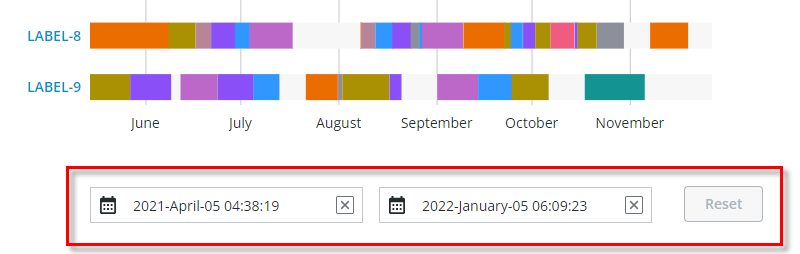
Example of the zoom input controls for selecting a range in the Schedule Chart (ptcs-chart-schedule) via date pickers. Zooming-in a range enables the Zoom Reset button.
Overview
ptcs-chart-zoom-range is a subcomponent of ptcs-chart-zoom, used to add zoom range input controls to charts. The component consists of a
pair of ptcs-chart-zoom-input subcomponents to pick start / end of the range, and a Zoom Reset button to restore the un-zoomed state.
Usage Example
            <ptcs-chart-zoom-range part="range-picker"
                disabled="[[disabled]]"
                type="[[type]]"
                min-value="[[minValue]]"
                max-value="[[maxValue]]"
                zoom-start="{{zoomStart}}"
                zoom-end="{{zoomEnd}}"
                start-label="[[rangeStartLabel]]"
                end-label="[[rangeEndLabel]]"
                hint-text="[[dateRangeHintText]]"></ptcs-chart-zoom-range>
Component API
Properties
| Property | Type | Description |
|---|---|---|
| type | Object | 'number', 'date', Array of labels |
| minValue | Object | Minimum value in data |
| maxValue | Object | Maximum value in data |
| zoomStart | Object | Start of the zoom range |
| zoomEnd | Object | End of the zoom range |
| startLabel | String | The label for the interval start |
| endLabel | String | The label for the interval end |
| disabled | Boolean | Is the control disabled? |
| hintText | String | Hint text for date range |
Styling
Parts
| Part | Description |
|---|---|
| pick | Start or end range picker control |
| reset | The Zoom Reset button |
State attributes
No state attributes.