ptcs-chart-zoom-interval
Visual
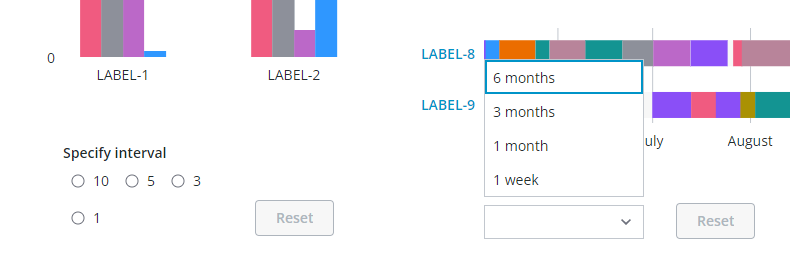
Examples of the Chart zoom input controls for selecting an interval in the Bar Chart (ptcs-chart-bar) via radio buttons and via a dropdown in the Schedule Chart (ptcs-chart-schedule). Zooming-in an interval enables the Zoom Reset button.
Overview
ptcs-chart-zoom-interval is a subcomponent of ptcs-chart-zoom, used to add zoom interval input controls to charts. The component consists
of a pair of ptcs-chart-zoom-input subcomponents to pick start / end of an interval, and a Zoom Reset button to restore the un-zoomed state.
The anchor point is either at the start or end of the interval, or an externally set anchor.
Usage Examples
A zoom interval control uses the following properties:
- control, specifies the UI control
- interval, specifies the interval(s)
- origin, specifies the interval anchor ("start" or "end")
- showAnchor, if true displays a UI control for re-assigning the interval anchor
This is a sample array for a "dropdown" interval:
[
    {label: 'A year',   duration: '1Y'}
    {label: '6 months', duration: '6M'}
    {label: '1 month',  duration: '1M'},
    {label: '5 days',   duration: '5d'}
]
When the interval type is "date" the generated interval should match the following syntax: <number><unit> (no whitespace between the number and unit)
The number can be any positive number, including an optional fraction.
The supported units are:
| Unit | Time |
|---|---|
| Y | Year |
| M | Month |
| W | Week |
| d | Day |
| h | Hour |
| m | Minute |
| s | Second |
| ms | Millisecond |
The zoom interval does not have a unit when the interval type is number or label.
Basic Usage
            <ptcs-chart-zoom-interval part="interval-picker"
                tabindex\$="[[_delegatedFocus]]"
                disabled="[[disabled]]"
                label="[[intervalLabel]]"
                control="[[intervalControl]]"
                origin="[[intervalOrigin]]"
                anchor="[[intervalAnchor]]"
                interval="[[interval]]"
                type="[[type]]"
                min-value="[[minValue]]"
                max-value="[[maxValue]]"
                zoom-start="{{zoomStart}}"
                zoom-end="{{zoomEnd}}"
                start-label="[[intervalFromLabel]]"
                end-label="[[intervalToLabel]]"
                show-anchor="[[showIntervalAnchor]]"></ptcs-chart-zoom-interval>
Component API
Properties
| Property | Type | Description |
|---|---|---|
| label | String | The label for the zoom interval control |
| control | String | The control type (dropdown, radio, or textfield) |
| interval | Object | Interval(s) for the interval control |
| origin | Object | Anchor point for the zoom interval ('start' or 'end') |
| anchor | Object | Externally specified anchor |
| value | Number | Specified interval |
| minValue | Object | Minimum value in data |
| maxValue | Object | Maximum value in data |
| zoomStart | Object | Start of the zoom interval |
| zoomEnd | Object | End of the zoom interval |
| showAnchor | Boolean | Display UI control for re-assigning the interval anchor? |
| startLabel | String | The label for the interval start |
| endLabel | String | The label for the interval end |
| disabled | Boolean | Is the control disabled? |
Styling
Parts
| Part | Description |
|---|---|
| pick | Start or end picker control |
| reset | The Zoom Reset button |
State attributes
| Attribute | Description | Part |
|---|---|---|
| control | 'dropdown', 'radio', or 'textfield' | :host |