Work Plans and Service Tasks
Work Plan and Service Task records can be linked to Job records to allow organizations to manage complex work that can require the dispatch of many tasks to technicians over a period of time. A Work Plan is a way to organize and track those tasks through to completion.
When Work Plan and Service Task scheduling is enabled for your Service Board tenant, Jobs with Service Tasks and Work Plans appear on the Job List with a See associated Service Tasks and Work Plans expansion link below their Job Cards.
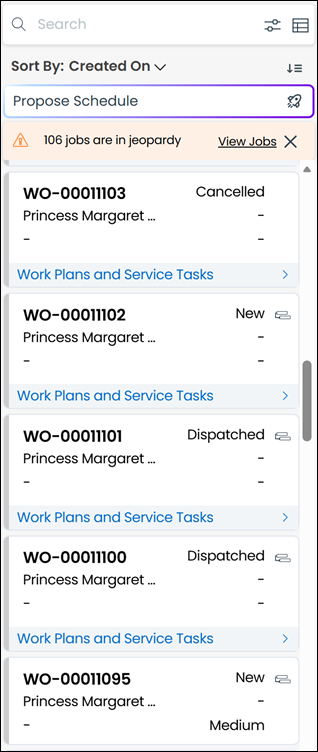
When you click the link, the associated Service Tasks and Work Plans appear below the Job Card.
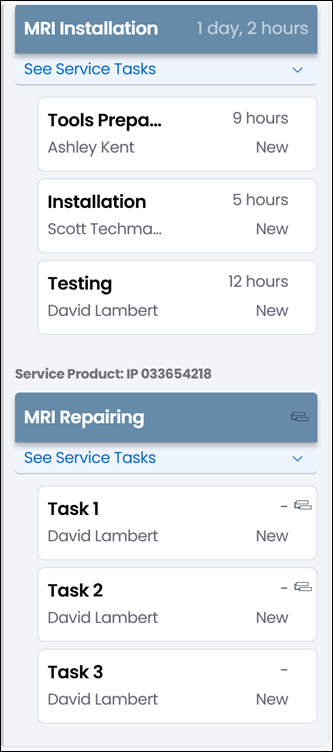
Service Product names appear as the associated Installed Product names, and are listed in alphabetical order. Associated Work Plans appear under the related Service Product, with the Display Title as its name. The total durations shown on Work Plan cards are the sum of the Estimated Duration values of the associated Service Tasks. Work Plans are listed in ascending order by the Sequence value specified in Salesforce Work Plan Assignment records.
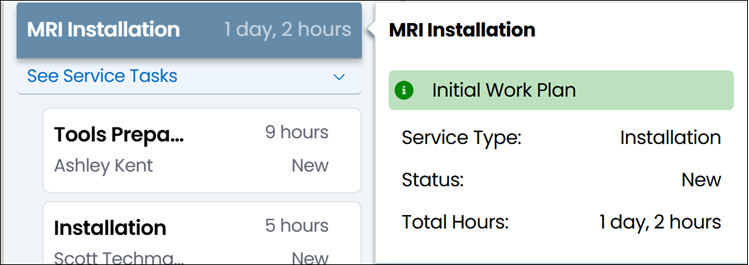
When you hover your mouse pointer over Work Plan cards, tooltips appear.
Below each Work Plan Card, you can click the See associated Service Tasks expansion link to show the related Service Tasks. If there are no Service Tasks to show, a No data to display message appears. Service Task Cards are listed in ascending order based on the Sequence value specified in Salesforce Service Task records, and show the following values:
• Service Task Title
• Estimated Duration
• Resource
• Status
You can configure the calculated Display Title and Display Description fields to appear on the Work Plan card. For more information, see Configuring Display Title for Work Plan Assignments and Configuring Display Description for Work Plan Assignments.
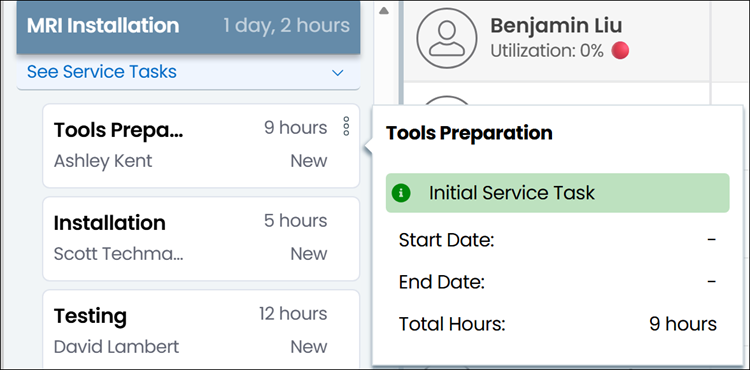
When you hover your mouse pointer over a Service Task card, tooltips appear.
Work Plans that are associated with Jobs but not with Service Products and Service Tasks that are associated with Jobs but not with any Work Plans appear in the General Service Tasks section under the See associated Service Tasks and Work Plans expansion link. The General Service Tasks section follows the same display conventions as Service Products. Service Tasks that are not associated with Work Plans always appear at the top of this section, followed by Work Plans.
Work Plans and Service Tasks in Classic Mode
 | The Classic user interface retires on November 8, 2026. All features are available in the Service Board Modern interface. We recommend switching to Service Board Modern at your earliest convenience to access the latest features. |
Work Plan and Service Task records can be linked to Job records to allow organizations to manage complex work that can require the dispatch of many tasks to technicians over a period of time. A Work Plan is a way to organize and track those tasks through to completion.
When Work Plan and Service Task scheduling is enabled for your Service Board tenant, Jobs with Service Tasks and Work Plans appear on the Job List with a See associated Service Tasks and Work Plans expansion link below their Job Cards.
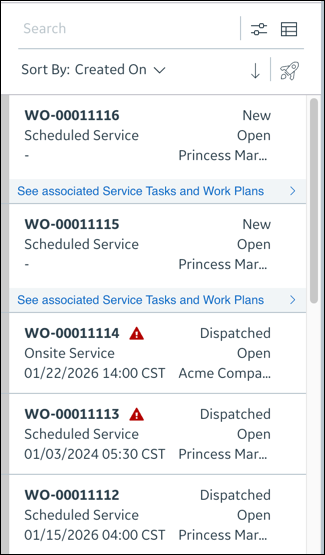
When you click the link, the associated Service Tasks and Work Plans appear below the Job Card.
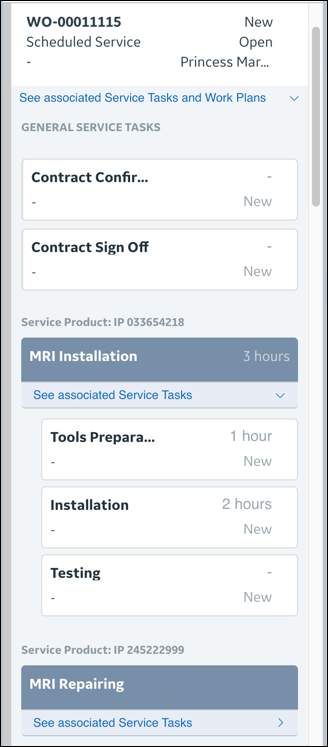
Service Product names appear as the associated Installed Product names, and are listed in alphabetical order. Associated Work Plans appear under the related Service Product, with the Display Title as its name. The total durations shown on Work Plan cards are the sum of the Estimated Duration values of the associated Service Tasks. Work Plans are listed in ascending order by the Sequence value specified in Salesforce Work Plan Assignment records.
When you hover your mouse pointer over Work Plan cards, tooltips appear.
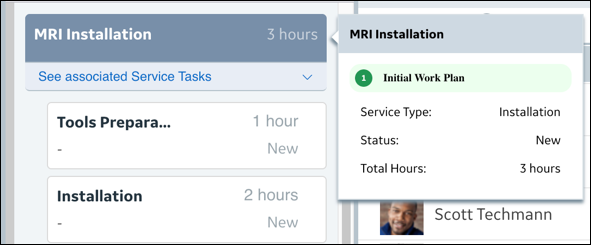
Below each Work Plan Card, you can click the See associated Service Tasks expansion link to show the related Service Tasks. If there are no Service Tasks to show, a No data to display message appears. Service Task Cards are listed in ascending order based on the Sequence value specified in Salesforce Service Task records, and show the following values:
• Service Task Title
• Estimated Duration
• Resource
• Status
You can configure the calculated Display Title and Display Description fields to appear on the Work Plan card. For more information, see Configuring Display Title for Work Plan Assignments and Configuring Display Description for Work Plan Assignments.
When you hover your mouse pointer over a Service Task card, tooltips appear.

Work Plans that are associated with Jobs but not with Service Products and Service Tasks that are associated with Jobs but not with any Work Plans appear in the General Service Tasks section under the See associated Service Tasks and Work Plans expansion link. The General Service Tasks section follows the same display conventions as Service Products. Service Tasks that are not associated with Work Plans always appear at the top of this section, followed by Work Plans.
Related Topics