Configuring Display Title for Work Plan Assignments
The Display Title of a Work Plan Assignment defines how the assignment is presented across Service Board user interfaces. It appears prominently as the title on the Work Plan card and is also reused when generating the name of the related service task appointment. As the title is visible to dispatchers and technicians, it plays a key role in quickly identifying the purpose of a work plan assignment.
The Display Title is implemented as a calculated field, which means its value is derived dynamically rather than entered and stored manually. By default, Service Board resolves this title using a predefined fallback logic to ensure that a meaningful value is always available, even when some source fields are empty. However, organizations may want to tailor this behavior, for example, to align with internal naming standards or improve clarity for field users. Service Board supports this by allowing administrators to modify the calculation logic through custom code.
How to derive the Display Title
By default, the Display Title for a Work Plan Assignment is calculated using the following fallback sequence:
1. The Title field on the Work Plan Assignment, if it is populated.
2. If the Title is not available, the Name of the related Work Plan.
3. If neither is available, the Name of the Work Plan Assignment itself.
This logic ensures that the Display Title is always generated, even when some related data is missing.
To configure the Display Title:
1. Go to > >
2. Locate and select the Display Title field used by the Work Plan Assignment.
3. In the field configuration page, open the Code tab.
4. In the Custom Code section, update the Groovy code.
5. Click Save Field and Close to save your changes.
6. Run Synchronize to apply the changes.
The Display Title value is regenerated automatically when any of the following events occur:
• A Work Plan Assignment record is saved or updated
• The Name of the related Work Plan is updated
• The related Work Plan record is deleted
 |
To immediately recalculate the Display Title field for all the existing records , follow the instructions in Recalculating Calculated and Rollup Fields.
|
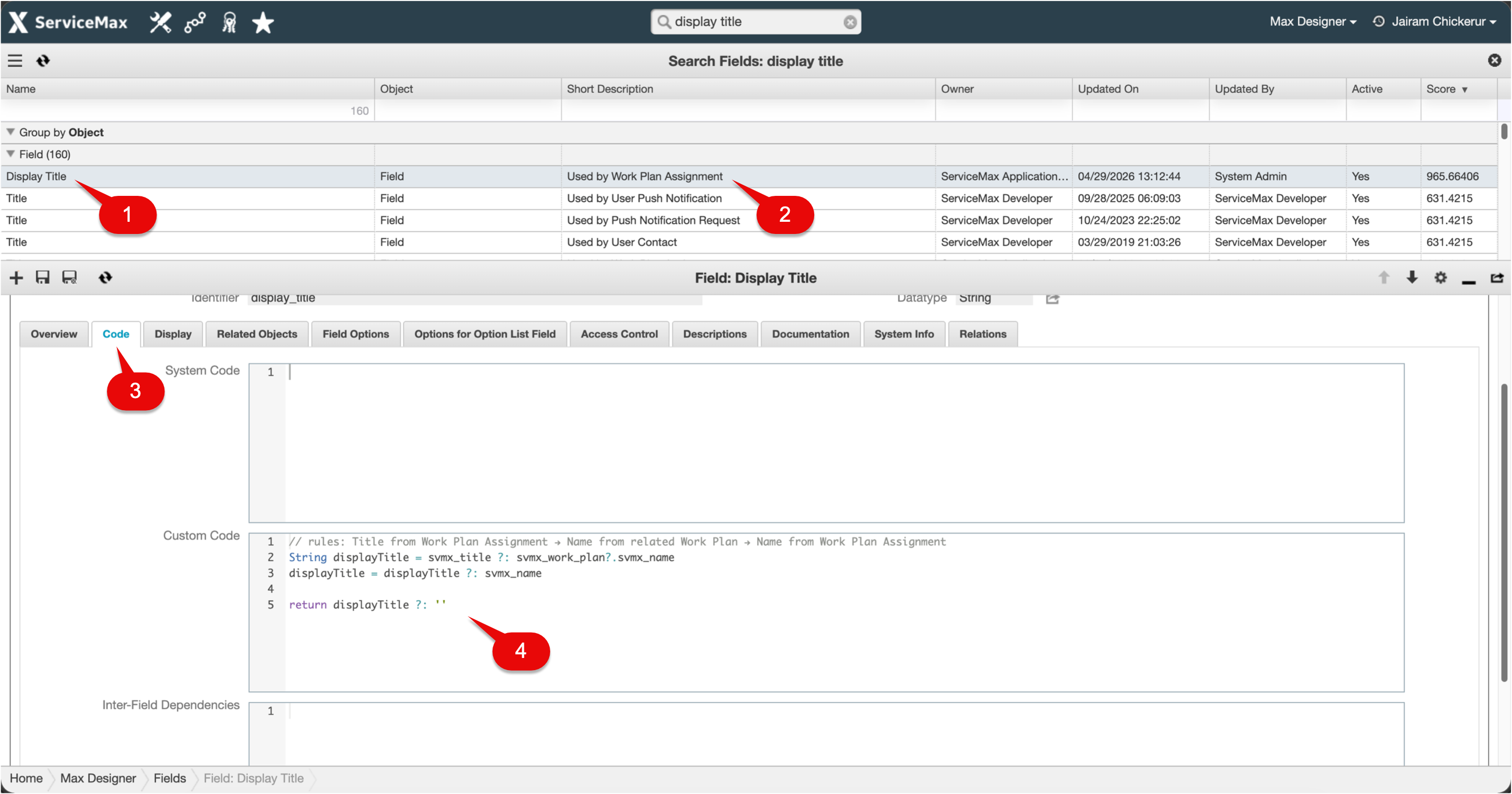
Callout Table
|
Callout
|
Description
|
|---|---|
|
1
|
Display Title field
|
|
2
|
Object that uses the selected field
|
|
3
|
Code tab
|
|
4
|
Custom code example for Display title
|
Related Topics