Configuring Display Description for Work Plan Assignments
The Display Description of a Work Plan Assignment provides additional contextual information that can be surfaced in the user interface, such as in a Work Plan Assignment tooltip. This description helps dispatchers and technicians quickly understand the nature or intent of the assignment without opening the full record.
The Display Description is implemented as a calculated field. Its value is derived dynamically based on available data from the Work Plan Assignment and its related Work Plan. This approach ensures that a meaningful description is always available while reducing the need for manual updates. For organizations with specific business requirements, the calculation logic can be customized using code to control which information is displayed and under what conditions.
How to derive the Display Description
By default, the Display Description for a Work Plan Assignment is calculated using the following fallback behavior:
1. The Description on the Work Plan Assignment, if it is populated.
2. If the Work Plan Assignment description is not available, the Description from the related Work Plan.
This fallback logic ensures that the tooltip or other UI surfaces can display a relevant description even when the assignment itself does not contain one.
To configure the Display Description:
1. Go to > >
2. Locate and select the Display Description field used by the Work Plan Assignment.
3. In the field configuration page, open the Code tab.
4. In the Custom Code section, update the Groovy code.
5. Click Save Field and Close to save your changes.
6. Run Synchronize to apply the changes.
The Display Description value is automatically recalculated whenever:
• A Work Plan Assignment record is saved or updated
• The Description of the related Work Plan is updated
• The related Work Plan record is deleted
 |
To immediately recalculate the Display Description field for all the existing records , follow the instructions in Recalculating Calculated and Rollup Fields.
To add the Display Description field to the Work Plan tooltip, follow the instructions in Configuring Work Plan and Service Task Tooltips.
|
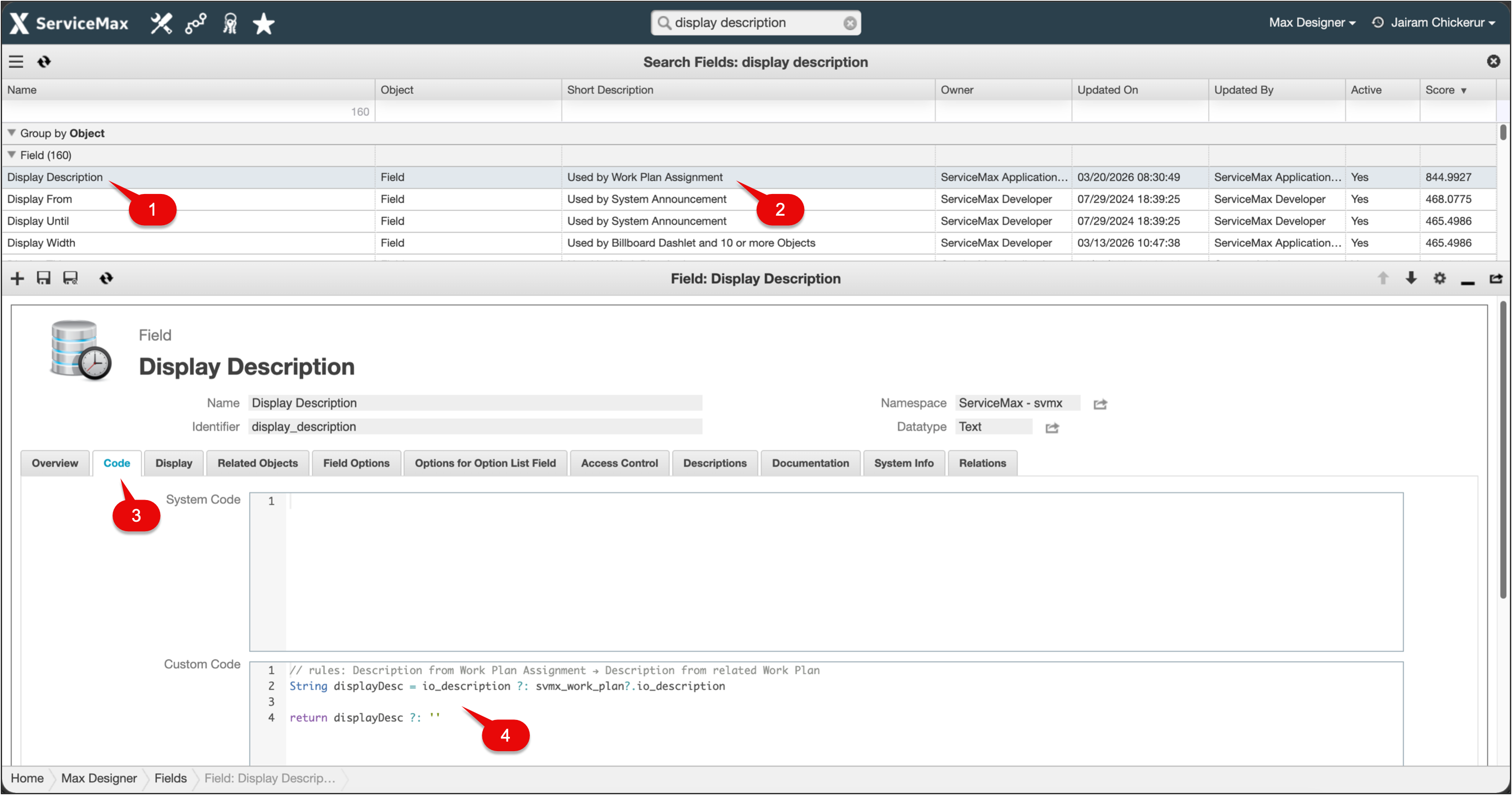
Callout Table
|
Callout
|
Description
|
|---|---|
|
1
|
Display Description field
|
|
2
|
Object that uses the selected field
|
|
3
|
Code tab
|
|
4
|
Custom code example for Display Description
|
Related Topics