Customizing AI Action
 |
Service Board AI is a separately licensed Production Beta feature. The feature is disabled by default, and you must purchase a ServiceMax AI license before you can enable this functionality.
|
Service Board provides out-of-the-box (OOTB) AI actions designed to support common service operations. To align these actions with your specific organizational needs, you can copy an existing OOTB AI action and customize it. This approach allows you to create new AI actions that inherit proven templates and configurations while adapting the instructions, behavior, and scope to match your unique business processes. Copying and customizing OOTB actions accelerates deployment, reduces configuration overhead, and helps maintain consistency across your AI-driven workflows.
To create a customized AI action, copy an existing OOTB action and modify it
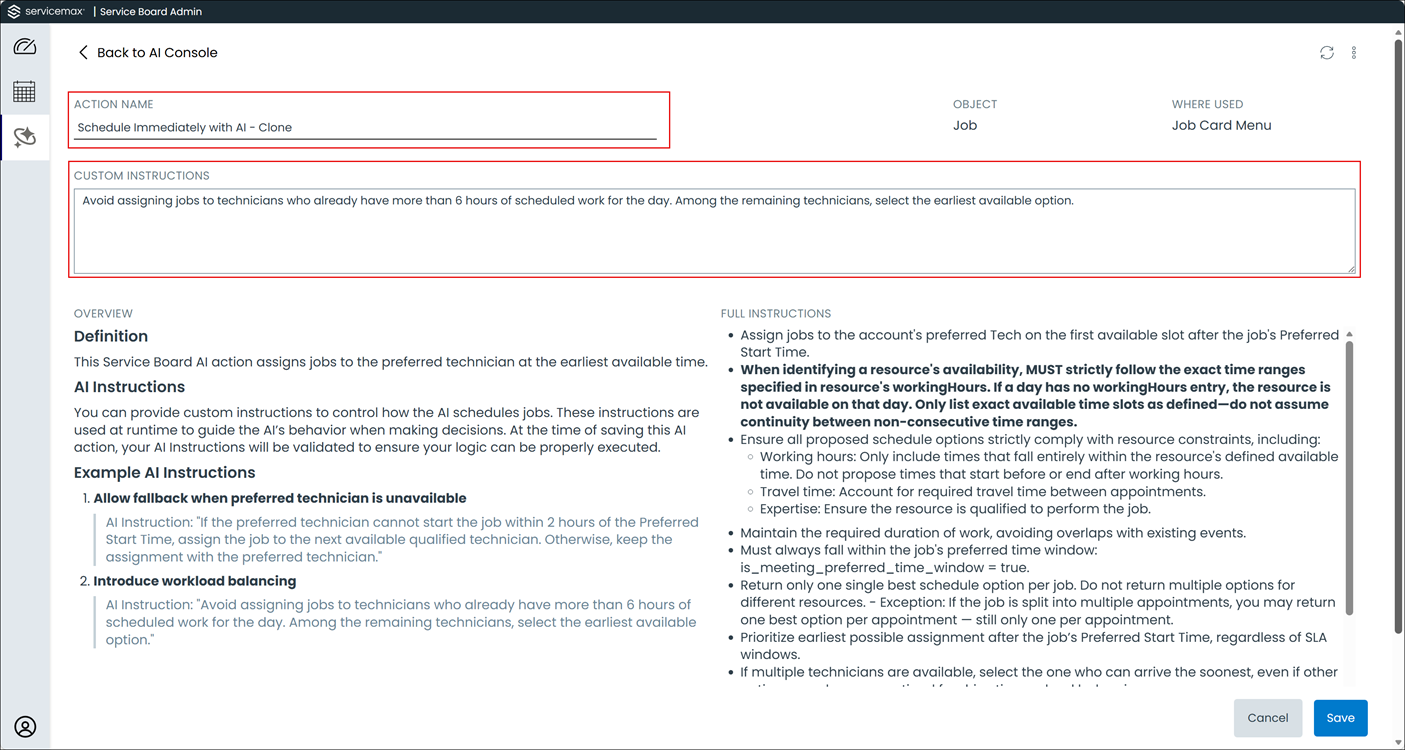
1. Click the Copy icon in the row for the action. The AI action form opens with a prepopulated settings from the original action.
2. Update the Action Name field with a descriptive name for the new action.
3. In the Custom Instructions field, enter the customized instructions for this AI action. These instructions define how this action behaves differently from the original OOTB action. Custom instructions work alongside the built-in application instructions to extend or override default behaviors and tailor the AI response to your specific requirements. For more information, see Guidelines for Writing Custom Instructions.
4. Click Save. The system navigates to the new action’s detail page.
Guidelines for Writing Custom Instructions
Effective custom instructions clearly articulate the desired AI behavior and provide specific context for decision-making. When writing custom instructions for your AI actions, follow these best practices to ensure consistent, predictable results:
• Be Specific About Rules and Preferences: Custom instructions should define explicit rules, constraints, and preferences that guide the AI's decision-making process. Vague or ambiguous instructions can lead to inconsistent results or unintended behavior. Include specific conditions, thresholds, or priorities that the AI should follow when evaluating options or generating recommendations.
• Reference Only Available Fields and Data: Instructions must reference only fields and data that exist on the relevant object. For example, when writing instructions for a Job-related AI action, reference only fields that are configured on the Job object in your system.
• Align with System Rules and Constraints: Do not write instructions that conflict with established Service Board rules, such as scheduling constraints, skill requirements, or qualification mandates. Custom instructions should complement and extend system rules, not override or bypass them. Instructions that conflict with core scheduling logic can result in invalid recommendations and operational disruption.
Examples of Custom Instructions for Schedule AI Actions
• Prioritize scheduling resources who are geographically closest to the job location to minimize travel time and improve technician efficiency.
• When multiple resources have equivalent qualifications, assign the resource with the fewest appointments scheduled on that day to balance workload distribution.
Related Topics