Opening AI Console
 |
Service Board AI is a separately licensed Production Beta feature. The feature is disabled by default, and you must purchase a ServiceMax AI license before you can enable this functionality.
|
Administrators can access the AI Console and view available AI actions.
To open AI Console:
1. Go to > .
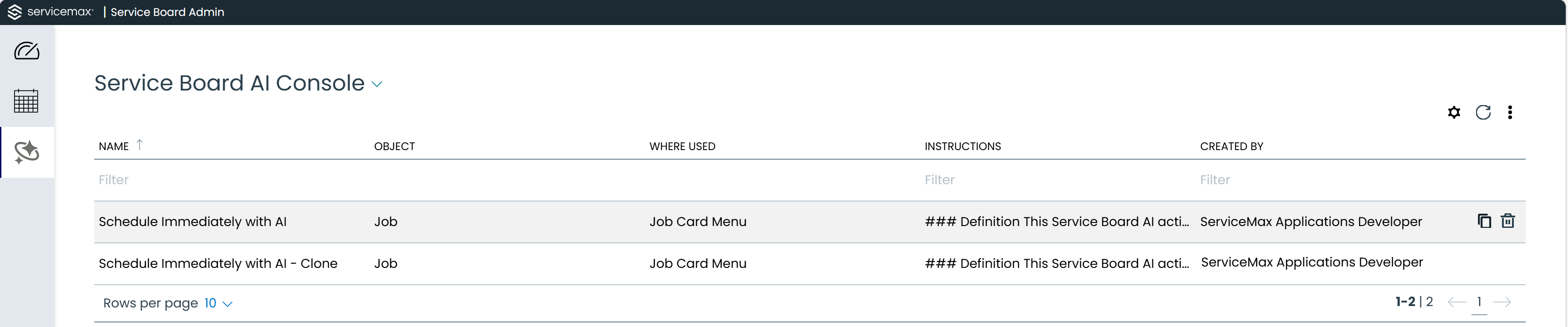
The Service Board AI Console home page displays a table with the following information for each AI action:
|
Field
|
Description
|
|
Name
|
A clear, user-friendly name for the AI action record. This value appears in the Service Board and helps users quickly identify the purpose of the action in the list view and action menus. Consistent naming improves discoverability and reduces selection errors during dispatch and planning workflows.
|
|
Object
|
The object type associated with the AI action, such as Job. Proper object mapping ensures the action is presented only for supported records.
|
|
Where Used
|
The Service Board location where the AI action menu item appears, such as Job Card Menu.
|
|
Instructions
|
A preview of the configured instruction content for the AI action.
|
|
Created By
|
The user who created the AI action record. This value supports ownership tracking, governance, and audit readiness, especially in environments with multiple administrators or frequent configuration updates.
|
|
Copy
|
An action icon available on each row to duplicate an existing AI action record. The copied record retains the original configuration values, which helps administrators create similar actions quickly while reducing manual re-entry and configuration errors. For more information, see Customizing AI Action.
|
|
Delete
|
An action icon available on each row to remove an AI action record from the console.
|
2. Click an action row to open its detail page when you need to review fields before editing.
Related Topics