Viewing Metric Summary Tab in List View
The Metric Summary Tab or Key Performance Indicator (KPI) Headers in List View summarizes important details from the page. This helps end users to view important details quickly. It displays the total count of In queue items assigned to the respective depot location, including the count of Past Due, At Risk, and other details. The unassigned count in this tab is for the unassigned workstations. The count adjusts based on the selected depot location, Technician, and Workstation. For more information, see Viewing Queue Items in List View.
 |
The Metric Summary Tab or KPI Headers are only displayed when you select a depot location from the drop-down.
|
The KPI Headers or Metric Summary Tab for the List View.
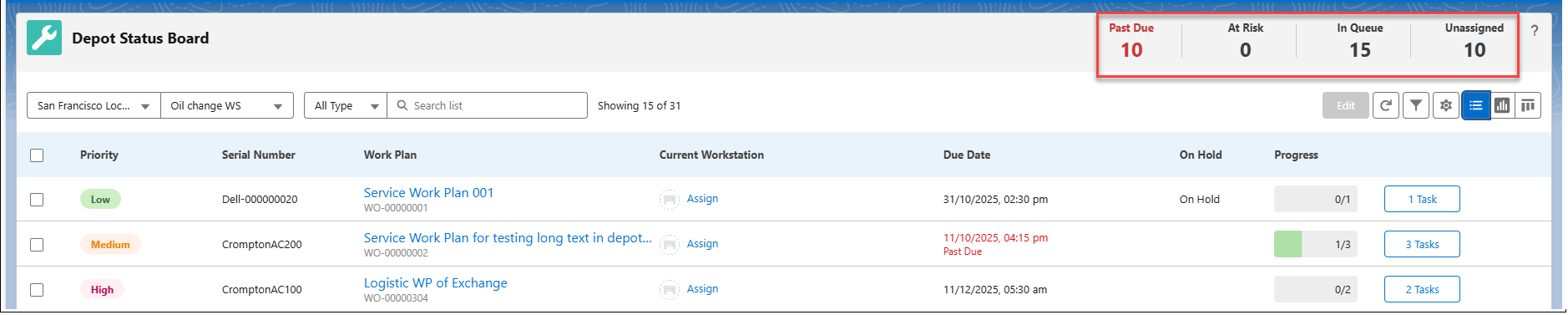
The table below lists the fields and related descriptions for the KPI Headers.
|
Field
|
Description
|
|
Past Due
|
Indicates the due date values are passed by the current date and time. This is highlighted in red.
|
|
At Risk
|
Specifies that the due dates are closer to the time that is configured in the Depot Management rule.
|
|
In Queue
|
Displays the total number of queue items available in the depot location.
|
|
Unassigned
|
Lists the number of work orders that do not have a workstation assigned.
|
Reference Topics