Work Order Rules Tab in 25.1
In the Work Order Rules tab of the Preventive Maintenance Process wizard, you can configure the following:
• Define the number of Work Orders to be generated from the PM Plans when the coverages on that plan are qualified by the PM Engine..
• Assign Work Orders to a specific Team, Technician, Dispatcher, or even specific user.
• Map fields from various source objects such as Installed Product, PM Schedule Definition, and Service Contract to the Work Order and its related objects.
• Create a Case and map fields from the Work Order to the Case.
• If you are using task templates, configure Task Object and map fields for Tasks and Parts. For more information, see Task Templates.
To configure the Work Order Rules tab:
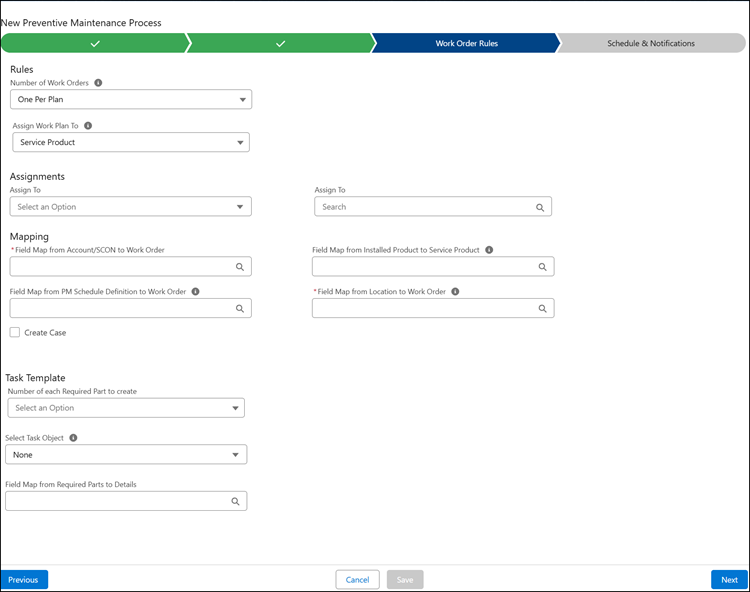
2. Configure the fields as described in the following table:
|
Fields
|
Description
|
||
|---|---|---|---|
|
Rules
|
|||
|
Number of Work Orders
|
This setting determines how Work Orders are generated from PM Plans by the PM Process Engine. Select one of the following:
• One Per Installed Product → One Work Order will be generated for each installed product defined as coverage on the PM Plan.
• One Per Plan → One Work Order will be generated for All the coverage lines, with the installed products defined as either Products Serviced or Service Products (if Work Plans are configured).
|
||
|
Assign Work Plan To
|
Select how the PM Process assigns the Work Plan when generating Work Orders from a PM Plan:
• Service Product: Associates Work Plan details (service tasks, recommended parts, and tools) with the service product(s) on the Work Order.
• Work Order: Associates Work Plan details to the Work Order header.
|
||
|
Assign To
|
Select an option from the drop-down for whom you want to assign Work Orders. This can be Primary Technician, Specific Team, Technician, Queue, or Dispatcher. Based on your selection, select the appropriate name.
|
||
|
Field Map from Installed Product to Work Order
|
Select a mapping to map fields from Installed Product records, identified as coverages in a PM Plan, to Work Orders generated by the plan. This field is visible only when Number of Work Orders is set to One Per Installed Product.
|
||
|
Field Map from Account/SCON to Work Order
|
Select a mapping to map fields from the Account or Service Contract defined on a PM Plan, to Work Orders generated by the plan. This field is visibile only when Number of Work Orders is set to One Per Plan.
|
||
|
Field Map from PM Schedule Definition to Work Order
|
Select a mapping to map fields from PM Schedule Definition to Work Order. The mapped field value will be copied from the PM Schedule Definition to the work order.
|
||
|
Field Map from Installed Product to Service Product
|
Select a mapping to map fields from the Installed Product records identified as coverages on a PM Plan, to the matching Service Product records on the Work Order(s) generated by that PM Plan. This mapping applies when a PM Plan utilizes Work Plans and Service Products.
|
||
|
Field Map from Location to Work Order
|
Select a mapping to map fields from covered location to Work Order. This is applicable when the global setting "Enable Location based PM Plan" is True and PM Plan’s Coverage Type is Location. One Work Order is created per covered location, and can leverage this mapping to populate field values.
|
||
|
Mapping & Rules to create Case
|
|||
|
Create Case
|
Select this check box to create a case. If you select this option, you can map fields and assign Case.
|
||
|
Field Map from Work Order to Case
|
Select a mapping to map fields from generated Work Orders from the PM Plan to the associated Case. This field is only visible if the Create Case checkbox is true.
|
||
|
Assign To
|
Select an option from the drop-down for whom you want to assign the Case. This field is only visible if the Create Case checkbox is true.
|
||
|
Task Template
|
|||
|
Number of each Required Part to create
|
Select the number of Required Parts when creating a PM Work Order. This helps generate the correct number of required parts for PM Work Orders with multiple products serviced. This can be either One per Product or One per Work Order.
One Per Product: For PM Work Orders with multiple products serviced lines, Required Parts are created for each product service line. The list of Required Parts is generated for each Product Serviced Line; therefore, multiple Required Parts will be created for multiple Product Serviced Lines.
One Per Work Order: For PM Work Orders with multiple products serviced lines, only one of each Required Part will be created for the Work Order. The list of Required Parts is generated based on the Work Order; therefore, only one of each will be created for one Work Order.
|
||
|
Select Task object
|
Select a target object to populate Tasks from a PM Plan’s associated Task Template.
|
||
|
Field Map from Task Template to Task Object
|
Select a mapping to map fields from the Task Template to the Task Object defined in the field ‘Select Task Object’.
|
||
|
Field Map from Required Parts to Details
|
Select a mapping to map fields from the Required Parts to the Work Order.
|
||
|
Work Order Reference
|
Select a field that links the selected task object to the generated Work Order.
This option appears only when configuring PM Process for a Task Template and selecting a Task Object other than Task.
|
||

Related Topics
• Finalize Tab