Defining an AI Action for Troubleshooting Work Orders
You can define a new AI action for the Work Order object by referencing the Troubleshooting Agent in the AI Instructions and providing relevant guidance. Technicians can use this AI action to retrieve historical troubleshooting data from similar closed work orders and troubleshoot current work orders more efficiently.
|
Prerequisites
|
|---|
|
To enable this feature, ensure the following:
• Availability of the Work Order object in your org.
|
To define a new action:
1. Go to > > .
The ServiceMax AI Console is launched.
2. On the sidebar, click AI Actions.
The AI Actions page appears with a list of all available AI actions. For more information about each field, see Configuring AI Actions.
3. Click Define AI Action.
The Define AI Action window is displayed.
4. Provide the details for the fields as described in the following table.
|
Field
|
Description
|
||
|---|---|---|---|
|
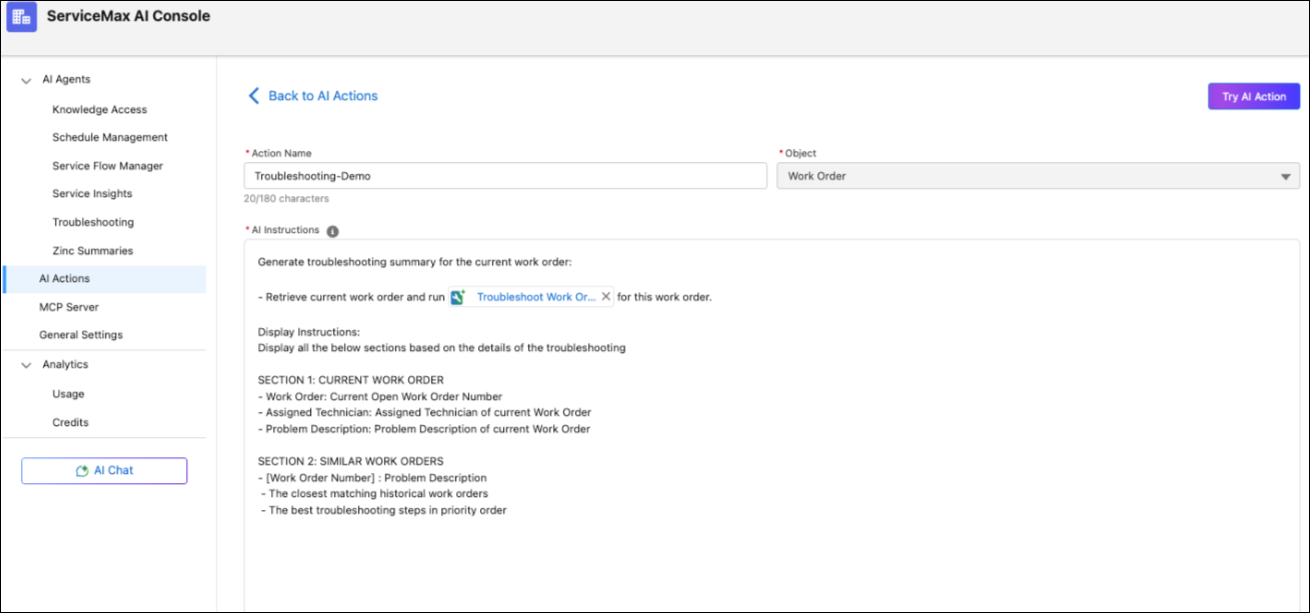
Action Name
|
Specifies the name of the AI action. This name appears in the list and helps users identify the action. For example, Troubleshoot Work Order.
|
||
|
Object
|
Select the Work Order object from the drop-down.
|
||
|
AI Instructions
|
Describes what the AI should do, helping it perform tasks accurately based on user needs. To call the Troubleshooting Agent, type “/” and select Troubleshooting from the list.
|
5. Click Save .
The AI Console saves the action and makes it available in Salesforce web and mobile apps. For more information about using AI Actions, see AI Actions.
 |
You can define multiple AI actions consecutively before saving them.
|
After creating the AI Action, you can use the Run AI Action to troubleshoot open Work Orders directly from the ServiceMax AI Console. For more information, see Using Run AI Action.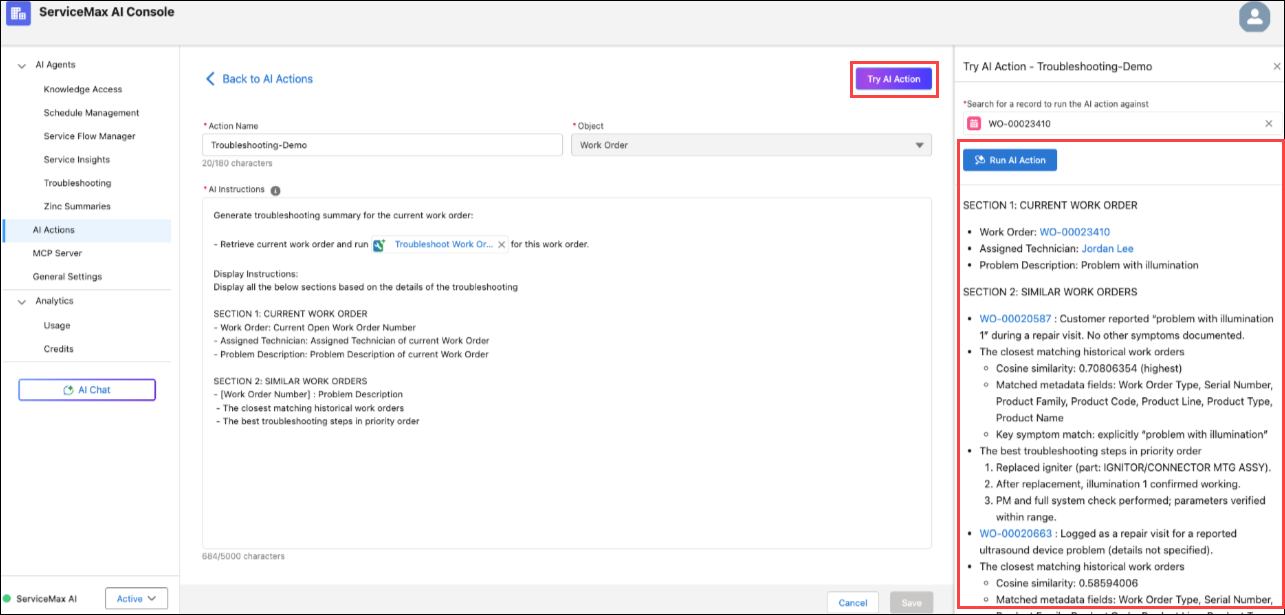
Use Case
Scenario: Troubleshooting Current Work Orders Using Historical Data
A field technician at a medical equipment service organization performs troubleshooting for a malfunctioning diagnostic device at a customer site.
The organization uses an AI-powered Troubleshooting Agent configured on the Work Order object to analyze current issues and retrieve similar past work orders based on problem description, solution, and parts used.
On 12 May 2026, a customer reports that a diagnostic device is intermittently failing during operation.
Technician Actions
Technician reviews the Work Order and capture these details:
Problem description: Device stops during processing with intermittent error messages
Work Order Status: Open
Technician Invokes the Troubleshooting AI Action from the Work Order record.
Outcome
The system retrieves relevant past work orders with matching problem descriptions and solutions.
The system then generates recommended troubleshooting steps in priority order based on successful resolutions in past work orders.
As a result, the current work order is enriched with actionable insights, including validated solutions and required parts.
When the technician reviews the work order, the technician sees a list of similar work orders, their solutions, and suggested troubleshooting steps.
This ensures faster issue resolution, improves first-time fix rates, and reduces dependency on manual knowledge lookup.
Related Topics