Configuring Appointment Rescheduling
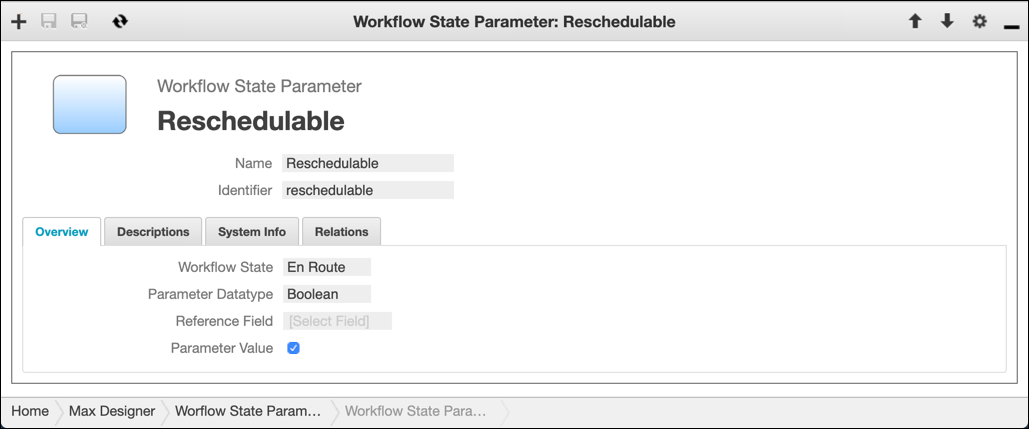
By default, Appointments can be rescheduled after dispatch. Workflow states can be associated with Workflow State Parameter records that control whether Appointments can be rescheduled in the relevant state. For example, you can configure newly created Appointments to be reschedulable when in Pending, Accepted or En Route workflow states, and nonreschedulable when in On-site or later workflow states.
To configure Appointment rescheduling:
1. In Max Designer, click Process Management ( ) > > , and then in the list view, click the Workflow State Parameter record for the state whose rescheduling behavior you want to configure.
) > > , and then in the list view, click the Workflow State Parameter record for the state whose rescheduling behavior you want to configure.2. On the Overview tab, select or clear the Parameter Value check box, and then in the top left corner, click Save and Close ( ).
).
).
3. Click Development Actions ( ) > .
) > .
) > .
 |
Both predefined and custom workflow states are reschedulable by default. To configure a nonreschedulable custom state, you must create or clone a new Workflow Parameter record, associate it with the custom state, and clear the Parameter Value check box in the record. To avoid errors, be sure to leave the value in the Identifier field set to reschedulable.
|