Customizing Queue Columns in List View
The columns in List View are customizable. You can select the columns that you want to show or hide by default.
 |
These changes are saved in User Settings and displayed as default columns the next time you log in to the Depot Queue page.
|
To customize columns in List View:
1. Go to the Depot Queue tab and select List View. For more information, see Viewing Queue Items in List View.
2. Click Settings. The Settings options are displayed with the list of columns to select from. 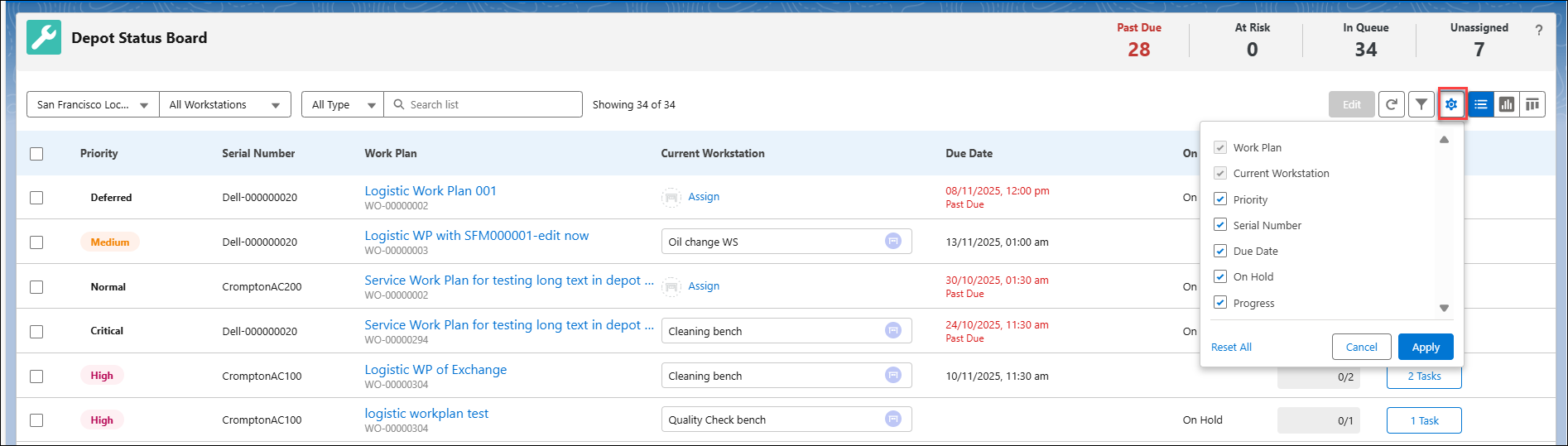
3. Select the checkbox from any of the following columns:
◦ Work Plan
◦ Current Workstation
◦ Priority
◦ Serial Number
◦ Due Date
◦ On Hold
◦ Progress
|
|
Work Plan and Current Workstation are selected by default and cannot be edited.
|
4. Click Apply.
The selected columns are displayed.
|
|
You can also clear your selection and return to the previous state using Reset All.
|
Reference Topics