Viewing Entitlement Coverage for a Service Product
Expand a Service Product in the Assign Entitlement interface to view its warranties, service contracts, entitlement notes, and user notes.
You can view entitlement coverage for a Service Product to see all applicable warranties, service contracts, entitlement notes, and user notes that apply during entitlement review. Expanding a Service Product in the Assign Entitlement interface displays a badge indicating whether it is covered by a warranty or a service contract, and shows the full list of applicable warranties and service contracts, along with expiration indicators, entitlement notes, and user notes.
To view entitlement coverage for a Service Product:
1. From the Home page, go to the Work Order object.
2. Open the Work Order record for which you want to evaluate entitlement coverage for the associated Service Product.
The selected work order is displayed.
3. In the Service Flow Wizard, select Assign Entitlement.
The Assign Entitlement interface displays a list of Service Products, with Work Plans shown beneath each product if configured to display.
4. Expand a Service Product to view its available coverage.
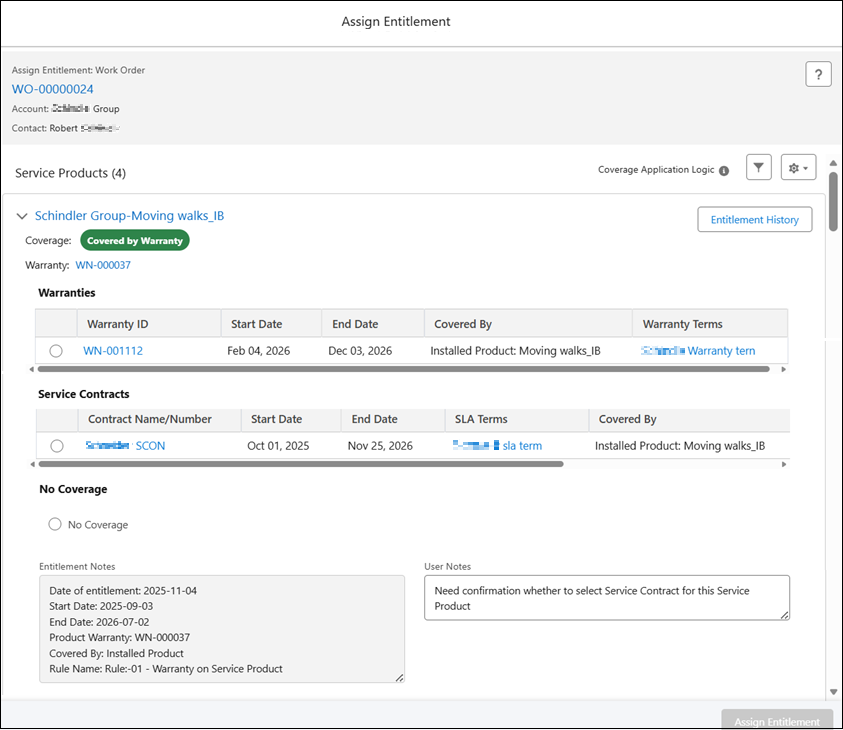
The following table describes the coverage information displayed when you expand a Service Product.
|
Section
|
Description
|
||
|---|---|---|---|
|
Coverage Source
|
Indicates whether coverage is applied from a warranty or a service contract. Displayed directly under the Service Product name as a coverage badge (for example, Covered by Warranty or Covered by Contract).
|
||
|
Warranties
|
Displays a table listing all applicable warranties at the Service Product level, if applicable. If no warranties are available, the message No Warranties Available is displayed. The table includes the default fields:
• Warranty ID: Displays unique identifier for the warranty. Click the link to open the record in a new browser tab.
• Start Date: Displays the date when the warranty coverage begins.
• End Date: Displays the date when the warranty coverage ends.
• Covered By: Displays which installed product the entitlement applies to.
• Warranty Terms: Displays the name of the warranty term condition. Click the link to open the record in a new browser tab.
• Coverage Details: Displays the percentages for Parts, Labor, and Expenses as retrieved from the associated Product Warranty.
Expired/expiring warranties are identified with an Expiration indicator.
|
||
|
Service Contracts
|
Displays a table listing all applicable service contracts at the Service Product level, if applicable. If no service contracts are available, the message No Service Contracts Available is displayed. The table includes the default fields:
• Contract Name/Number: Displays the Service Contract name or number. Click the link to open the record in a new browser tab.
• Start Date: Displays the date when the Service Contract coverage begins.
• End Date: Displays the date when the Service Contract coverage ends.
• SLA Terms: Displays the SLA Term. Click the link to open the record in a new browser tab.
• Covered By: Display if the record is covered by IB/ parent IB/ Top-Level IB/ Work Plan.
Expired/expiring Service Contracts are identified with an Expiration indicator.
|
||
|
No Coverage
|
Displays when no entitlement applies. Users can select this option to confirm that the service is not covered.
|
||
|
Entitlement Notes
|
Displays system-generated notes related to the entitlement evaluation. This field is read-only and updates automatically each time entitlement is assigned. Notes can be expanded to view full details.
When you select No Coverage and assign the entitlement, the note Not Covered is added automatically.
|
||
|
User Notes
|
A text field where you can enter comments or observations for each service product during entitlement assignment. User notes are stored separately from Entitlement Notes and are preserved across assignments.
For more information, see Adding User Notes During Interactive Entitlement.
|

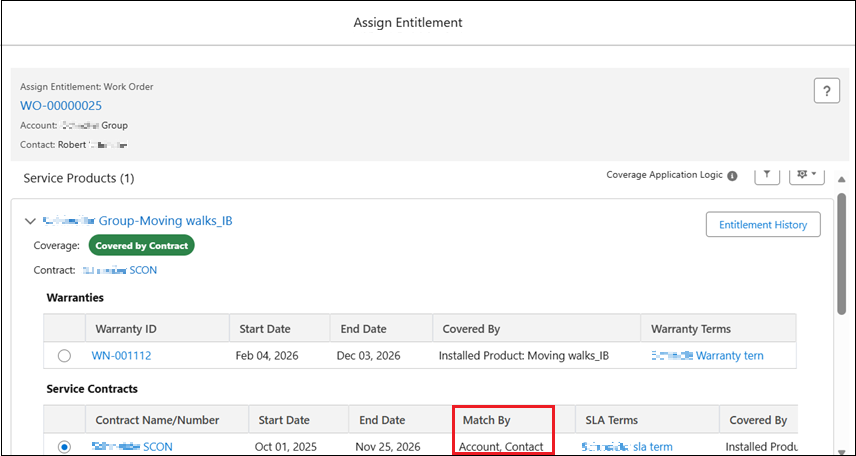
The Service Contracts table supports additional configurable columns.
When the Match By column is added to the Service Contracts table, it displays how each contract matched the entitlement criteria; for example, Account, Contact, Location, or a combination. This column is not applicable for Warranties. For information on adding this column, see Managing Display Fields for Service Contracts and Warranties.
Related Topics