Adding User Notes during Interactive Entitlement
Add user notes to a service product or work plan during interactive entitlement to capture context about the entitlement assignment.
The User Notes field captures your comments and observations when you assign entitlement to a service product or work plan. This field is separate from the Entitlement Notes field, which is read-only and stores system-generated entitlement information.
User notes are saved at the individual record level: each service product and each work plan retains its own user notes independently.
To add user notes during interactive entitlement:
1. Open the Work Order and click Assign Entitlement.
2. Locate the service product or work plan to which you want to add notes.
3. In the User Notes field, enter your notes.
 |
The Entitlement Notes field is read-only. This field is updated automatically each time an entitlement assignment is performed.
|
4. Click Assign Entitlement.
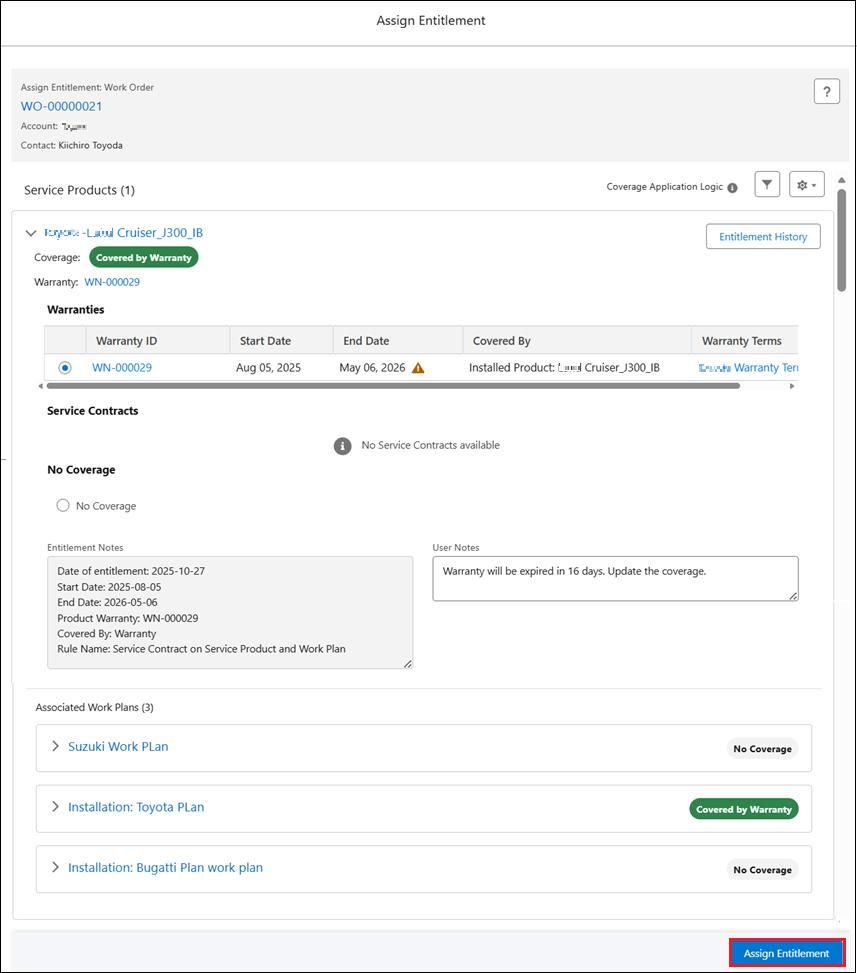
The user notes are saved to the service product or work plan record. You can view previously saved user notes by reopening the entitlement view for the same Work Order.
Use Cases
Tying every entitlement decision back to a customer approval
Role: Service Agent
A service agent at Iniscope International receives a call from Life Line hospital approving premium coverage for an upcoming Soniscape SSI 1000 repair. The agent opens the Work Order, assigns the Platinum Service Plan to the work plan, and enters "Customer approved premium coverage per call ref #4412" in the User Notes field. After clicking Assign Entitlement, the note is saved to the work plan record. When the dispatcher later reviews the entitlement assignment, the authorization context is immediately visible without contacting the agent or searching through call logs.
Preserving the audit trail when entitlement is reassigned
Role: Customer Service Representative
A CSR at Iniscope International discovers that a service contract assigned to a work plan for a Soniscape SSI 800 has expired. The CSR reassigns entitlement to the renewal contract and enters "Original contract SC-2025-0891 expired; reassigned to renewal contract SC-2026-0415" in the User Notes field. After clicking Assign Entitlement, the Entitlement Notes field automatically updates with the new assignment details, while the User Notes field preserves the CSR's reasoning separately. During a quarterly review, the service administrator identifies the new contract assignment in the Entitlement Notes and the reason for the change in the User Notes, all from the same entitlement record.
|
|
For a full list of scenarios where Service Contracts, warranties, and entitlements support service workflows, see Business Use Cases for Contracts, Warranties, and Entitlements.
|
Related Topics