Configuring Interactive Entitlement Settings
Define the default display fields, filters, and behavior of the Interactive Entitlement interface for Service Products and Work Plans on a Work Order.
The Interactive Entitlement Settings page enables administrators to define and manage the default display and behavior of the Interactive Entitlement interface when assigning Service Contract or Warranty coverage for service products and work plans from a Work Order. These settings determine which fields and options are displayed to users during entitlement assignment for Service Products and Work Plans linked to the Work Order. By configuring these defaults, administrators ensure a consistent and streamlined entitlement assignment experience. The settings also define whether users can modify filters and whether Work Plans are shown during entitlement selection. If no configuration is set, system defaults are applied. All changes are applied wherever the Interactive Entitlement interface is accessed.
To configure Interactive Entitlement Settings for Service Products and Work Plans:
1. From the Home page, go to ServiceMax Setup > Work Plan Management > Entitlement Settings.
The Entitlement Settings page is displayed.
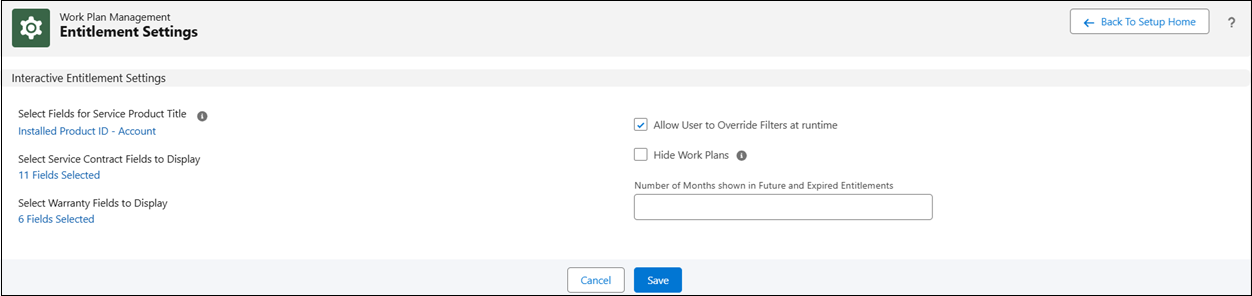
 |
You can also access the Entitlement Settings page from the Entitlement Rules page. For more information, see Creating an Entitlement Rule for Service Contract Coverage.
|
2. Review and update the Interactive Entitlement Settings as needed.
For more information about the fields, see Interactive Entitlement Settings Fields.
|
|
• The Match By field is available in the Service Contract fields configuration. When enabled, the entitlement selection panel displays a Match By column that indicates how each Service Contract matched the entitlement criteria (for example, Account, Contact, Location, or a combination). This column is applicable only for Service Contract coverage. For more information, see Managing Display Fields for Service Contracts and Warranties.
• The Work Plan Price field is available in both the Service Contract and Warranty fields configuration. When enabled, a pricing icon displays on Work Plan entitlement rows. Clicking the icon opens the Work Plan Labor Price window, which shows the price book used for the work plan and its active price book entries. For more information, see Work Plan Price Field in Service Contracts and Product Warranties.
|
3. Click Save to apply your changes.
For more information on using these settings during entitlement assignment on Work Order, see Performing Interactive Entitlement for Service Product and Work Plan from Work Order.