Time Entries and Daily Summary Update from Source Record Updates
The Timesheet engine can process changes made to source records such as Work Detail Lines, Tasks, and Events, and updates the related Time Entries and Daily Summary based on those changes, even after the source records are processed into time entries.
This improves Timesheet accuracy and reporting consistency, while also reducing manual effort for supervisors, Timesheet managers, and technicians.
Timesheet Engine Configuration
Administrator must configure the following for the Timesheet engine to reprocess the source record changes and update corresponding Time Entries, Daily summaries, and re-calculate Business and Non-Business Hour values according to the configured business hours.
• To reprocess source record updates, you must set SET002 (Module: Timesheets; Submodule: Timesheet Engine) to True. When this setting is True, the Timesheet engine assesses any modified source records (work detail lines, tasks, events) associated with time entries in current and open Timesheets. If changes are found between the existing time entry and the source record, the Timesheet Engine reprocesses the time entry and re-run Timesheet total calculations.
This functionality also applies to the Manual Pull action to refresh the timesheet, both on the web and ServiceMax Go app.
• In the Autofill tab of a Timesheet configuration template, you can configure the Timesheet Calculation is Based On field by selecting the specific time tracking field in a Time entry record. The Timesheet engine uses this field to calculate timesheet header totals and summaries.
◦ If the Timesheet Calculation is Based On field is set to Start Date/Time and End Date/Time, the engine calculates the Total Business Hours and Total Non-Business Hours values on the Timesheet Header using the Start Date/Time and End Date/Time of the created or edited time entry.
◦ If the Timesheet Calculation is Based On field is set to Business Hours Duration and Non-Business Hours Duration, the engine calculates the Total Business Hours and Total Non-Business Hours values on the Timesheet Header using the Business Hours Duration and Non-Business Hours Duration values of the created or edited time entry.
For more information, see Configuring Autofill Process to Create Time Entry Records.
 |
If the Timesheet Calculation is Based On field is not configured, the default configuration is Start Date/Time and End Date/Time.
|
Timesheet Engine Execution
You can update source records that are already processed into time entries, and those changes can be automatically reflected in the related time entries. To do this, update the modifying Start Date and Time and End Date and Time, or Duration fields. For example, you want to modify the Start Date and Time and End Date and Time on a Work Detail Line.
Based on the active Timesheet configuration template and if the SET002 is enabled, the scheduled Timesheet engine detects the source record changes and updates the associated Time Entries and Daily summary. It also recalculates Business Hours and Non-Business Hours values on the Timesheet header according to the configured business hours.
You can also refresh Timesheet to update Time Entries and Daily Summary using the Refresh Timesheet in the Go app or Manual Pull SFM in the Web app. For more information, see Manual Timesheet Pull and Refreshing Timesheet On-Demand on Go App.
As child records of the Timesheet header record, the time entries associated with the respective Source Records (Work Detail Lines, Salesforce Event, ServiceMax Event, or Task) are updated, and Business Hours Duration and Non-Business Hours Duration are updated accordingly. 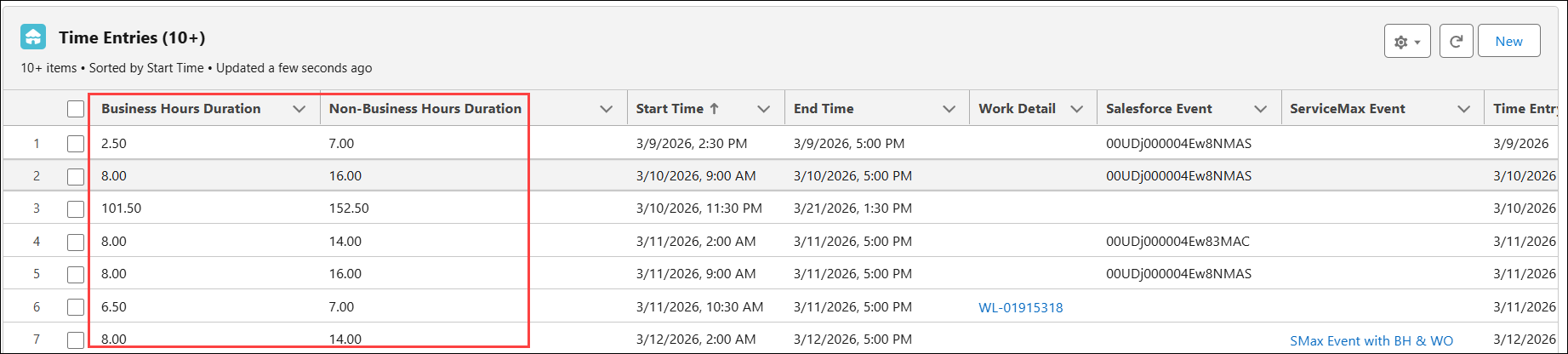
|
|
• When you reduce the number of days in a source record that was initially set for multiple days, the Timesheet engine marks the excess time entries as invalid. These invalid time entries are excluded from Timesheet Daily Summary and Total Business Hours calculation. Also, the invalid time entries are not visible in the Go Timesheet Calendar.
|
Processing Manually Created or Edited Time Entries Associated with Source Records
You can manually create or edit time entries in the Go app using the standard UI, or in the Web app using custom SFM transactions. For more information, see Creating Non-Work Order Time Entry in the Go App and Viewing and Managing Timesheets and Related Records.
When editing time entries that are manually created or processed by the Timesheet engine:
• If you select the User Override checkbox on the time entry record, the Timesheet engine considers the Start Date Time and End Date Time or Business Hour and Non-Business Hour Duration values that you have manually entered instead of any values from the source record. Reprocessing the source record does not update the date or duration values on the time entry in this scenario.
• If you do not select the User Override checkbox on the time entry record, the Timesheet engine retains the Start Date Time, End Date Time, and Duration fields from the associated source record that is reprocessed. The manual edits of time entries are overwritten in this scenario.
The Business and Non-Business Hours Duration is calculated based on the Timesheet Calculation is Based On field configured in the Timesheet configuration template. For more information, see Configuring Autofill Process to Create Time Entry Records.
Timesheet Engine Behavior
The following table describes how the Timesheet engine is executed in various conditions:
|
Timesheet Calculation Based On
|
User Override Selected
|
Source Record Exists
|
User Changes on Time Entry
|
Result
|
|---|---|---|---|---|
|
Business Hours Duration and Non-Business Hours Duration
|
No
|
Yes
|
Changes Business Hours, Non-Business Hours, Start Date, or End Date
|
Reprocessing reflects the values on the source record. Durations are recalculated based on the source record and time entry reprocessing .
|
|
Business Hours Duration and Non-Business Hours Duration
|
Yes
|
Yes
|
Changes Business Hours, Non-Business Hours, Start Date, or End Date
|
User entered values on the time entry are retained. The Timesheet Engine does not update the time entry and the Timesheet totals are recalculated based on the user entered values on the time entry.
|
|
Business Hours Duration and Non-Business Hours Duration
|
Not applicable
|
No
|
Changes Business Hours or Non-Business Hours
|
User entered values on the time entries are retained. Timesheet totals are recalculated based on time entry values.
|
|
Business Hours Duration and Non-Business Hours Duration
|
Not applicable
|
No
|
Changes Business Hours, Non-Business Hours, Start Date, or End Date
|
User entered values are retained. Timesheet totals are recalculated based on time entry values.
|
|
Start Date and Time, and End Date and Time
|
No
|
Yes
|
Changes Business Hours, Non-Business Hours, Start Date, or End Date
|
Reprocessing reflects the values on the source record’s Start Date and End Date. Durations are recalculated based on the source record and time entry reprocessing.
|
|
Start Date and Time, and End Date and Time
|
No
|
No
|
Changes Business Hours or Non-Business Hours only
|
Business Hours and Non-Business Hours are recalculated based on the Start Date and End Date on the time entry. In this scenario, they are reverted back to align with the unchanged Start Date/Time and End Date/Time values.
|
|
Start Date and Time, and End Date and Time
|
No
|
No
|
Changes Business Hours, Non-Business Hours, Start Date, or End Date
|
Business Hours and Non-Business Hours are recalculated based on the Start Date and End Date on the time entry. In this scenario, the Start Date/Time and End Date/Time respect the change, while business hours and non-business hours may adapt to align with those date/time values.
|
|
Start Date and Time, and End Date and Time
|
Yes
|
Yes
|
Changes Start Date, End Date, Business Hours, or Non-Business Hours
|
The engine consider the manually modified Start Date/Time and End Date/Time values on the time entry. The source record does not influence recalculation, and Timesheet totals are recalculated based on time entry values.
|
|
Start Date and Time, and End Date and Time
|
Yes
|
No
|
Changes Business Hours or Non-Business Hours only
|
Business Hours and Non-Business Hours are reverted to align with the Start Date and End Date on the time entry. It is not required for Timesheet header to be recalculated.
|
|
Start Date and Time, and End Date and Time
|
Yes
|
No
|
Changes Business Hours, Non-Business Hours, Start Date, or End Date
|
In this scenario, the Start Date/Time and End Date/Time considers the update, while Business Hours and Non-Business Hours adapt to align with those date or time values. On the Timesheet header, the Total Business Hours and Total Non-Business Hours are recalculated based on the Start Date/Time and End Date/Time on the time entry.
|
Use Case
Reflecting Source Record Changes in Time Entries Automatically
Role: Supervisor
A service supervisor at Iniscope International updates the start and end times on a work detail record after a technician finishes a laser calibration visit for a Soniscape laser system at a research facility. The Timesheet engine reprocesses the linked time entry, honors the User Override flag where supervisors locked manual edits, and refreshes the daily summary. This matters because supervisors correct field data without rebuilding timesheets, technicians keep their manual adjustments intact, and reporting stays consistent with the source of truth.