Processing Manual Time Entries for Daily Summary and Business Hours Calculation
The Timesheet engine processes manually created or edited time entries from the Go app and Web app, and updates the Daily summary and Business Hours calculations accordingly.
This improves Timesheet accuracy and reporting consistency, reduces manual validation effort for supervisors and administrators, and eliminates the need for custom duration fields.
Timesheet Configuration Template
In the Autofill tab of a configuration template, you must configure the Timesheet Calculation is Based On field by selecting the specific time tracking field in a Time entry record. The Timesheet engine uses this field to calculate timesheet header totals and summaries.
• If the Timesheet Calculation is Based On field is set to Start Date/Time and End Date/Time, the engine calculates the Business Hours and Non-Business Hours values using the Start Date/Time and End Date/Time of the created or edited time entry.
• If the Timesheet Calculation is Based On is set to Business Hours Duration and Non-Business Hours Duration, the engine calculates the Business Hours and Non-Business Hours values using the Business Hours Duration and Non-Business Hours Duration values of the created or edited time entry.
For more information, see Configuring Autofill Process to Create Time Entry Records.
Timesheet Engine Execution
You can manually create or edit time entries in the Go app using the standard UI, or in the Web app using custom SFM transactions. For more information, see Creating Non-Work Order Time Entry in the Go App and Viewing and Managing Timesheets and Related Records.
Based on the Timesheet configuration template, the scheduled Timesheet engine automatically processes manually created or edited time entries, updates the corresponding Daily summary, and calculates Business and Non-Business Hours values according to the configured business hours.
You can also refresh time entries to update calculations by using the Refresh Timesheet in the Go app or Manual Pull SFM in the Web app. For more information, see Manual Timesheet Pull and Refreshing Timesheet On-Demand on Go App.
In the Timesheet header record, manually created time entries are reflected, and Business Hours Duration and Non-Business Hours Duration are updated accordingly: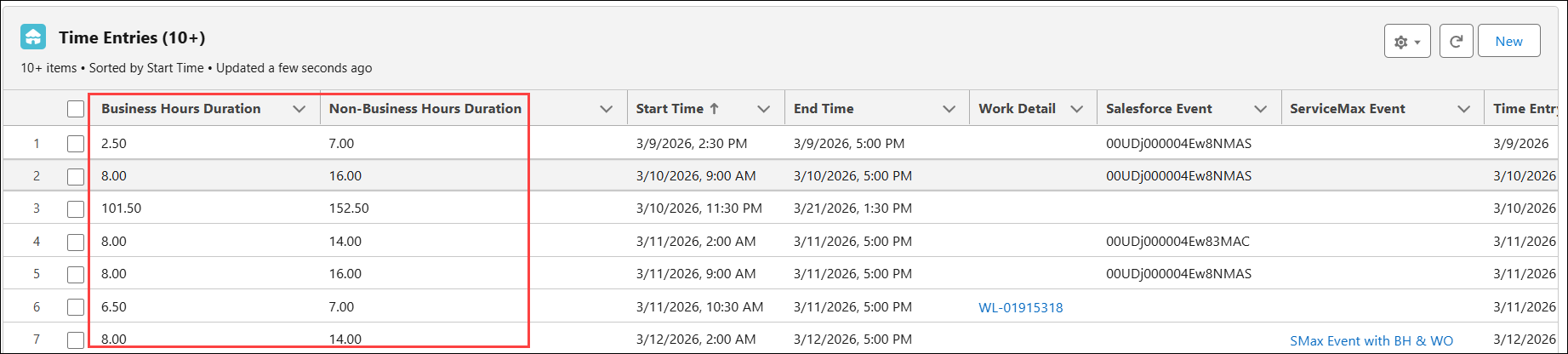
 |
• Multi-day time entries created in the Go app do not support business hours calculation. However, this is supported in the Web app.
• Time entries created outside the Timesheet header’s Start Date and End Date are marked as invalid. The invalid time entries are not included in Daily Summary and Business Hours Calculations. Also, the invalid time entries are not visible in the Go app’s Timesheet Calendar.
|
Use Case
Time Entries Creation with Accurate Business and Non-Business Hour Calculation
Role: Field Service Technician
Scenario
A field technician at Insicope International services industrial equipment such as CNC machines across multiple customer sites.
The Supervisor has configured the Standard Business Hours for a day as 8:00 AM to 4:00 PM.
On 13 March 2026, the technician completes a repair activity that spans both business and non-business hours.
The technician later creates a time entry in the Go app with the following details:
Start Time: 13 March 2026, 10:00 AM,
End time: 13 March 2026, 10:00 AM at 5:00 PM
Timesheet Engine Execution
Once the time entry is saved, the technician can manually refresh the Timesheet in the Go app or the scheduled Timesheet engine reprocesses it based on the configured business hours. From the total 7 hours recorded, the system automatically classifies 6 hours (10:00 AM to 4:00 PM) as business hours and the remaining 1 hour (4:00 PM to 5:00 PM) as non-business hours.
The daily summary is updated to reflect this split accurately, without requiring the technician or supervisor to manually calculate or adjust durations.
When the supervisor reviews the timesheet, the entry already reflects the correct distribution of business and non-business hours, ensuring accurate reporting and reducing validation effort.
Outcome
As a result, the technician’s work is precisely captured, and Insicope maintains consistent and reliable timesheet calculations aligned with configured business hours.
Related Topics