Deleting a Template Match Rule
|
Prerequisite
|
|---|
|
• The Template Match Rules button is not available Out-of-the-Box. You must add this custom button in the Attributes Template object. For more information, see Adding the Template Match Rules Button to the Attribute Templates Page. Alternatively, you can access the Template Match Rules list view from the App Launcher.
• To access Template Match Rules and Product Attributes, users must have Read, Create, Edit, and Delete permissions for the following objects:
◦ Attribute Template Match Rules
◦ Product Attributes
|
To delete a Template Match Rule:
1. From the Home page, go to the Attribute Templates tab.
2. Click Template Match Rules.
The Template Match Rules page is displayed with the list of existing rules.
3. Click the Delete icon next to a Template Match Rule that you want to delete.
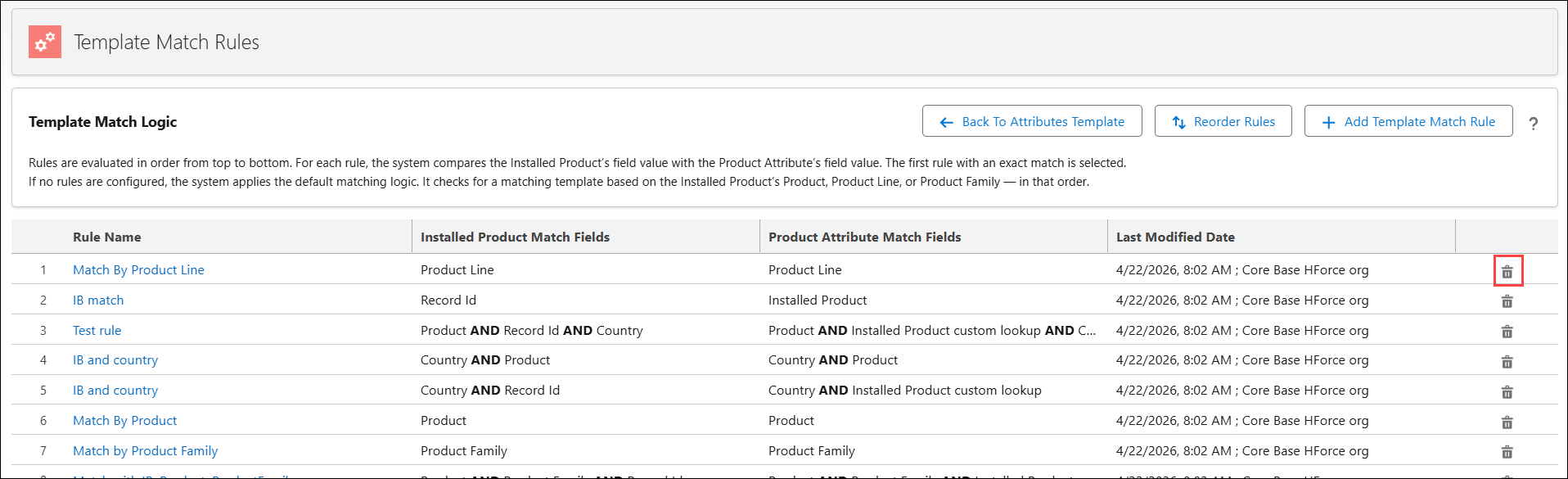
The Confirm Delete pop-up window is displayed.
4. Click Delete.
 |
If all Template Match Rules are deleted, the system applies template based on the default application logic that matches by Product, Product Line, or Product Family in the specified order.
|