Configuring Part Settings
As an administrator, you can configure part settings to manage parts used to service a Service Product or Installed Product. This setup module allows you to:
• Configure the part line creation.
• Enable inventory transactions for the parts.
• Update Installed Product based on the parts used.
• Create Installed Product activities against the parts usage.
• Enable usage of the recommended and replacement parts for the service products.
• Filter the parts added to the work plan based on product structure or expression.
The Part Usage engine leverages these settings to perform the actions listed above.
To configure various aspects of part usage:
1. Navigate to > > .
The Part Settings page is displayed.
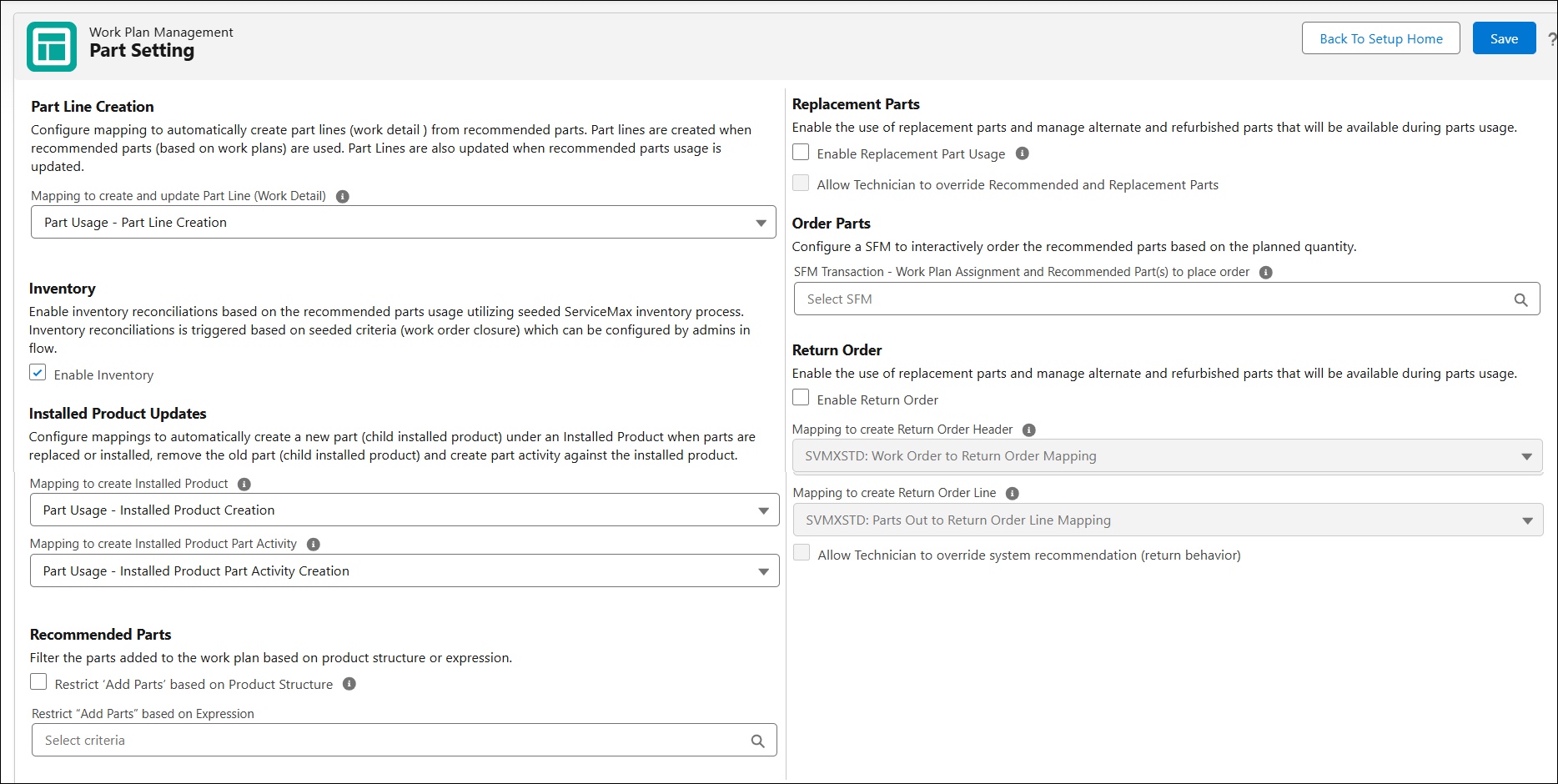
2. Configure the fields in different sections as described in the following table:
|
Field
|
Description
|
||
|---|---|---|---|
|
Part Line Creation
|
|||
|
Mapping to create and update Part Line (Work Detail)
|
Select the mapping to establish work detail creation when part usage is created or updated. For example, when part usage is created on work plans associated with work orders, work details lines are created. The standard mappings are available by default.
|
||
|
Inventory
|
|||
|
Enable Inventory
|
This option enables inventory transactions with part usage. By default, this option is enabled.
|
||
|
Installed Product Updates
|
|||
|
Mapping to create Installed Product
|
Select the mapping to create Installed Product from Parts Usage transaction when the Work Order is closed. The standard mappings are available by default.
|
||
|
Mapping to create Installed Product Part Activity
|
Select the mapping to create Installed Product Part Activity from Parts Usage transaction when the Work Order is closed. The standard mappings are available by default.
|
||
|
Recommended Parts
|
|||
|
Restrict ‘Add Parts’ based on Product Structure
|
Select this option to filter the parts when adding them to the Work Plan based on Product Structure. Product structure represents Service Product (Installed Product) part lists. This allows you to add right parts to the work plan based on the Service Product, avoiding incorrect or unrelated parts. For more information, see Adding Parts to a Work Plan.
|
||
|
Restrict ‘Add Parts’ based on Expression
|
Select an expression criteria to filter parts list based on the expression.
|
||
|
Replacement Parts
|
|||
|
Enable Replacement Usage
|
Select this option to enable the use of replacement parts and manage alternate and refurbished parts that will be available during parts usage. Enable this option only if you have set up replacement parts for your product catalog. For more information, see Add Replacement Parts
When enabled, the available quantity of replacement parts for the selected part is displayed and service engineers can consume replacement parts for consumption. If disabled, the replacement part details are not displayed on the part details screen and service engineers can only consume the recommended parts or parts from the Show All list, not the replacement parts.
|
||
|
Allow Technician to override Recommended and Replacement Parts
|
Select this option to enable technicians to consume parts from the Show All lists that are specific to your inventory location.
|
||
|
Order Parts
|
|||
|
SFM Transaction - Work Plan Assignment and Recommended Part(s) to place order
|
Select an SFM to enable technicians to order the recommended parts from work plan assignments. The available SFMs must follow the condition that its source object is Work Plan Assignment, and the target header is Part Order. If an SFM is not selected, technicians cannot order parts.
|
||
|
Return Order
|
|||
|
Enable Return Order
|
Select this option to enable the use of replacement parts and manage alternate and refurbished parts that are available during parts usage. For more information, see Configuring Returns Order.
|
||

3. Click Save.
Related Topic