Viewing Task Dependencies in a Work Plan
In a Work Plan, you can view dependencies configured between tasks using the Dependencies tab.
To view task dependencies:
1. From the Home page, go to the Work Plan Library tab.
The Work Plan Library page is displayed with the existing Work Plans.
2. Open a Work Plan.
3. Go to the Dependencies tab.
The list of dependent tasks along with related blocking tasks is displayed.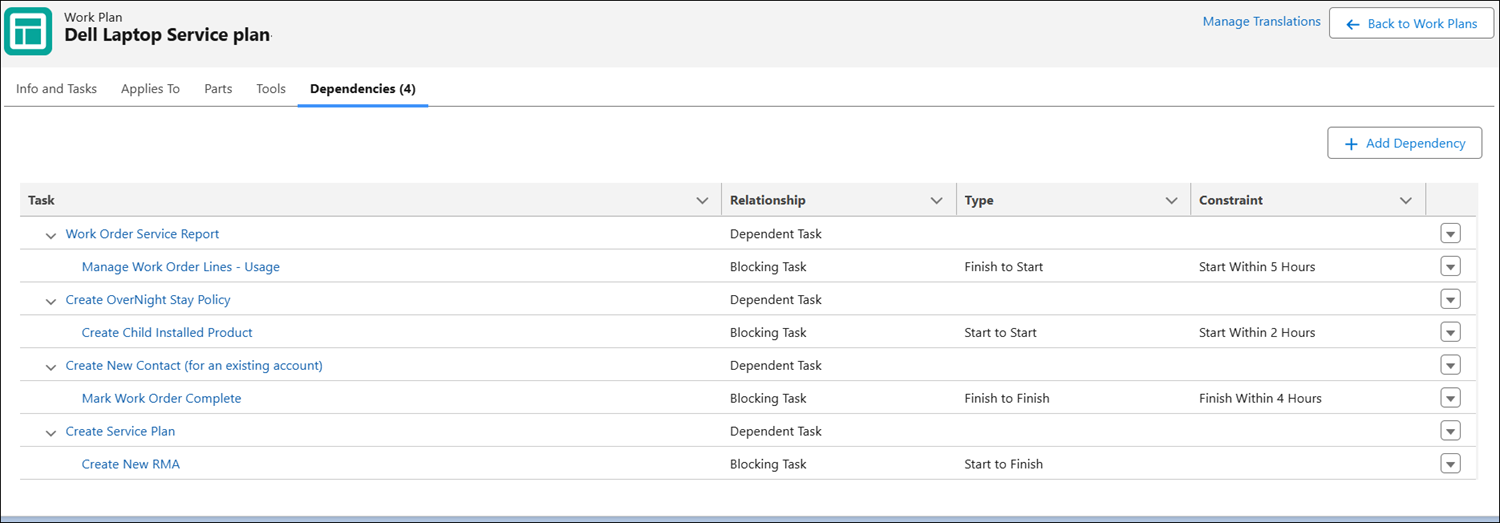
 |
An empty state is displayed if there are no dependencies configured between tasks.
|
The following table describes the columns displayed in the Dependencies tab:
|
Column
|
Description
|
|---|---|
|
Task
|
Displays the dependent or secondary tasks and their related blocking tasks in a hierarchical structure. Dependent tasks can be expanded to view associated blocking tasks.
|
|
Relationship
|
Indicates how the tasks are related.
• Dependent Task: The task that relies on the related blocking task.
• Blocking Task: The task that must be completed or started before the dependent task can proceed.
|
|
Type
|
Specifies the dependency type between tasks. This defines how a secondary or dependent task depends on a primary (blocking) task. The following are the various dependency types:
• Finish to Start: The secondary or dependent task can start after the primary task finishes.
• Start to Start: The secondary or dependent task can start after the primary task starts.
• Finish to Finish: The secondary or dependent task can finish after the primary task finishes.
• Start to Finish: The secondary or dependent task can finish after the primary task starts.
|
|
Constraint
|
Specifies any time-based condition applied to the dependency that controls execution timing. For example, Finish Within 2 Hours indicates the dependent task must be completed within 2 hours of the blocking task’s finish or start time.
|
Available Actions in the Dependencies tab
You can perform the following actions in the Dependencies tab: