Work Plan Library
The Work Plan Library is a collection of work plan templates for specific type of service and/or product combination.
Work plans assigned to the work order or the service product become the actual work plan instances that the service engineer executes.
• Work plan listed in the work plan library is a standardized template for a service type, or for a product/group of products/product category. It contains sequence of tasks, recommends parts, and tools required for the job.
• Service task can be assigned to a service group member or a service team.
• During work plan execution, the end user can view recommended parts, capture consumed part details, confirm whether recommended tools were used, and update task status with optionally adding comments and attachments.
You can create logistic or service work plans based on your requirements. For example, you might want to create work plan for a periodic car maintenance, which consists of five service tasks to cover the end-to-end maintenance of the car and then a Output Document service task to generate the service report.
You can view, create, edit, delete, and clone work plans.
To view the work plan library, click the Work Plan Library tab. All the existing work plans are displayed in the tabular format on the Work Plan Library page. The Work Plan Type indicates whether the Work Plan is of the Logistics or Service type.
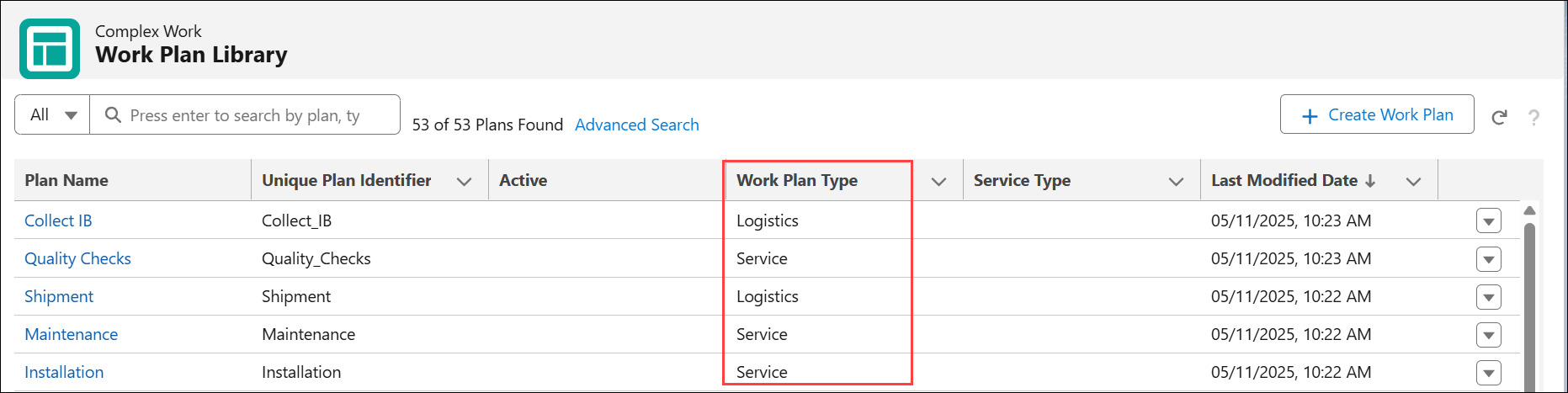
In the view, you can filter Work Plans by either Logistics or Service Type.

 |
Work Plan Library list view loads records incrementally in batches of 200 to improve performance. After 2,200 records are loaded, the system displays a limit message. Use Advanced Search filter or the search bar to narrow the results.
|
You can perform the following tasks on the Work Plan Library list view page: