Task Dependency Management
A Work Plan includes a list of tasks, but successful execution depends on the order in which those tasks are performed. Task dependency provides the structure that converts a simple task list into an executable workflow by defining how tasks relate to and rely on one another.
By defining task relationships, planners and administrators gain clarity, control, and predictability. A system that understands these connections enables:
• Enforced sequencing: The system ensures tasks are executed in the correct order every time.
• Accurate scheduling: Timelines automatically account for prerequisites and timing constraints.
• Proactive visibility: Blocked or dependent tasks are identified early rather than discovered during execution.
• Reduced risk: Execution errors are minimized because tasks cannot be completed out of sequence.
Work Plans and Task Management supports task-level dependencies and scheduling constraints, allowing administrators and planners to define relationships between tasks in a Work Plan. Administrators and planners can define execution sequence and apply time offsets that control when a task must start or finish relative to its blocking task. This ensures tasks are executed in the correct order with controlled timing.
In service workflows, tasks are often interdependent. For example, installation must be completed before testing begins, or diagnostics must start before repair activities. This feature provides a structured way to define such relationships and enforce execution logic.
Task Dependency involves different roles across the service lifecycle:
• Administrators define dependencies in the work plan template to optimize service execution and resource allocation.
• Planners fine-tune execution by linking tasks across work plans and by adding or updating dependencies to reflect real-time priorities. This reduces delays and misalignment and improves productivity.
• Dispatchers schedule tasks using the Service Board by enforcing task dependencies, which reduces errors and improves execution flow. They also adjust dependencies as needed to adapt to operational changes.
• Technicians receive a guided task list with real-time status and blockers, which helps them avoid errors and execute work efficiently.
Task Dependency Workflow
The Task Dependency process flow includes the following stages:
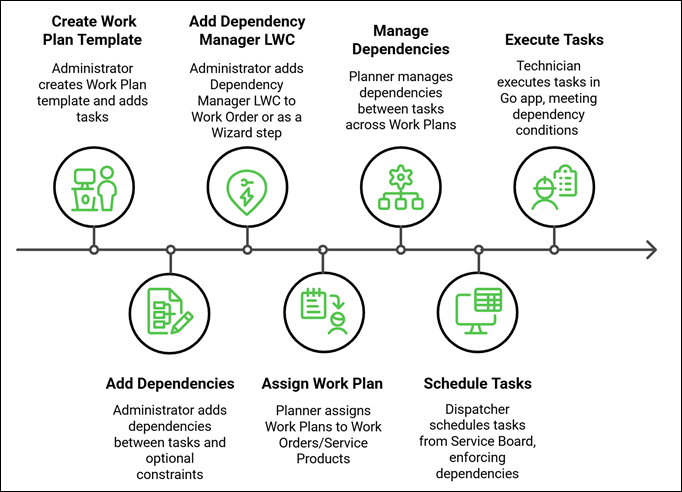
Step 1: Create a Work Plan
In the Work Plan Library, Administrator creates a Work Plan, providing necessary details and add tasks to the Work Plan. For more information, see Creating a Work Plan.
Step 2: Add Task Dependencies between Tasks in a Work Plan
In the Work Plan Library, Administrator performs the following:
• Add dependencies while creating or editing a task, or from the Work Plan Dependencies tab within the Work Plan Template
• Select the blocking task and the dependent task to define task relationships
• Configure dependency types such as Finish to Start, Start to Start, Finish to Finish, or Start to Finish
• Configure optional scheduling constraints and time offsets using duration and unit values
For more information, see Task Dependencies in a Work Plan.
Step 3: Add Dependency Management User Interface in Work Orders
• Administrator adds the Work Order Dependency Manager LWC component to the Work Order layout to enable the Dependency Manager view
• Or, Administrator adds the component as a Wizard step in the Wizard
For more information, see Adding the Work Order Dependency Manager LWC Component to a Work Order and Adding the Work Order Dependency Manager LWC as a Work Order Wizard Step.
Step 4: Assign Work Plans and Inherit Dependencies
Planner assigns Work Plans to Work Orders or Service Products to automatically inherit task dependencies
For more information, see Task Dependencies in Work Orders.
Step 5: Manage Dependencies in Work Order
From the Work Order, Planner manages dependencies across:
• Tasks within the same Work Plan
• Tasks across multiple Work Plans
• Work Plan tasks and general tasks
For more information, see Task Dependencies in Work Orders.
Step 6: Schedule Tasks with Dependencies
From the Service Board, Dispatcher schedule tasks within a Work Order or job while the system enforces dependency constraints automatically.
For more information, see Task Dependencies in Service Board.
Step 7: Execute Tasks Based on Dependencies
In the Go application, Technician performs the following:
• Execute tasks based on defined dependencies
• View dependency indicators and task relationships in the task details
• Start or complete tasks only when dependency conditions are satisfied
For more information, see Task Dependencies in Go App.
Use Case
Enforcing Task Execution Sequence with Dependencies
Role: Service Planner
A service planner at Iniscope International configures the Soniscape SSI 1000 Installation Work Plan with a Finish-to-Start dependency between the Hardware Installation task and the System Calibration task. The planner sets a Start After constraint of two hours to allow hardware components to stabilize before calibration begins. When a technician opens the work order at ClearPath Diagnostics, the calibration task remains blocked until the installation task reaches Complete status. This prevents premature calibration attempts, reduces rework caused by incomplete hardware setup, and ensures the installation meets the clinical accuracy standards required for the Soniscape SSI 1000.