IO flow (dictionary item)
For automation interface information about an IO Flow, see IO flow (automation interface).
IO Flows appears on Activity Diagrams, Class Diagrams, Composite Structure Diagrams, Object Diagrams and Sequence Diagrams.
An IO Flow represents the flow of something (specified by the IO Flow's IO Item) from one item to another item. The items can be Actors, Classes, Data Types, Instances, Interfaces, Signals, Parts, Ports or any of the Activity Diagram items.
An IO Flow must have an IO Item (a Basic Type, Class, Data Type, Interface, Signal, Event or Type Definition) that specifies what it is that flows.
When used on a diagram, an IO Flow's notation is as follows:
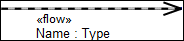
• When shown on a Class Diagram or Object Diagram as an IO Flow Link between items:
• When shown on a Activity Diagram, Class Diagram or Composite Diagram as an IO Flow that is realized by an Association, Control Flow, Exception Handler or Object Flow:
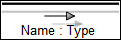
The View Options allow you to show or hide the Name and IO Item.
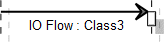
• When shown on a Sequence Diagram as an IO Flow Link between items:
You create an IO Flow as an IO Flow Link or IO Flow that is realized by an Association, Control Flow, Exception Handler or Object Flow: see Creating an io flow.
• To create an IO Flow Link:
◦ On a Class Diagram or Object Diagram, Click the  IO Flow Link button, click the source item, and then click the target item.
IO Flow Link button, click the source item, and then click the target item.◦ On a Sequence Diagram, Click the  IO Flow button, click the source lifeline, and then click the target lifeline.
IO Flow button, click the source lifeline, and then click the target lifeline.• To create an IO Flow that is realized by an Association, Control Flow, Exception Handler or Object Flow: On an Activity Diagram, Class Diagram or Composite Structure Diagram, click the  IO Flow Realization button, and then click the Association, Control Flow, Exception Handler or Object Flow.
IO Flow Realization button, and then click the Association, Control Flow, Exception Handler or Object Flow.An IO Flow can by realized by many Association, Control Flow, Exception Handler, IO Flow or Object Flow items. To specify that an IO Flow is realized by an Association, Control Flow, Exception Handler, IO Flow or Object Flow:
• On the Property Pages of the IO Flow, click the Items tab, in the Show Associated list select Realization, click the  Link button, and then select the Association, Control Flow, Exception Handler, IO Flow or Object Flow.
Link button, and then select the Association, Control Flow, Exception Handler, IO Flow or Object Flow.• On an appropriate diagram:
◦ Drag the IO Flow to the Association, Control Flow, Exception Handler or Object Flow on the diagram.
◦ Click the IO Flow Realization button, right-click the Association, Control Flow, Exception Handler or Object Flow on the diagram. From the context menu, click the command for the IO Flow. If there is not a command for the IO Flow, click Other, and then select the IO Flow.
IO Flow Realization button, right-click the Association, Control Flow, Exception Handler or Object Flow on the diagram. From the context menu, click the command for the IO Flow. If there is not a command for the IO Flow, click Other, and then select the IO Flow.When an IO Flow is shown on a Association, Control Flow, Exception Handler or Object Flow (on a diagram), the IO Flow is realized by that Association, Control Flow, Exception Handler or Object Flow:
• To specify that an IO Flow is no longer realized by the Association, Control Flow, Exception Handler or Object Flow: right-click the IO Flow, and then click Delete IO Flow Realization.
• To change the direction of the IO Flow: right-click the IO Flow, and then click Reverse Direction.
• To set up the source and target items of an IO Flow to that of the Association, Control Flow, Exception Handler or Object Flow: right-click the IO Flow, and then click Set Ends to Realizing Flow Ends.
 | • If an IO Flow is populated on an Association and the IO Flow is not realized by that Association, which can happen on a Composite Structure Diagram, Modeler sets up the IO Flow to be realized by the Association. • In the Relationships pane, Actors, Classes, Data Types, Interfaces, Signals, Parts and Ports have Sent IO Flows and Received IO Flows folders. |
The following sections provide information about how an IO Flow is used in the model. For more information about a property, item, model part or diagram, click it.
Properties
Comprises only the standard properties.
| | The IO Item on the Options tab of an IO Flow's Property Pages shows you the linked IO Item. |
• Source (Information Source association through the automation interface)
• Target (Information Target association through the automation interface)
Owned by
An IO Flow is owned jointly by the two items it links and the IO Item is conveys.
 Accept Event Action —as a linked item.
 Activity Final Node —as a linked item.
 Actor —as a linked item.
 Add Structural Feature Value Action —as a linked item.
 Attribute —as a linked item.
 Basic Type —as an IO Item.
 Call Behavior Action —as a linked item.
 Call Operational Action —as a linked item.
 Central Buffer —as a linked item.
 Class —as a linked item or IO Item.
 Clear Association Action —as a linked item.
 Clear Structural Feature Action —as a linked item.
 Create Link Action —as a linked item.
 Create Object Action —as a linked item.
 Data Store —as a linked item.
 Data Type —as a linked item or IO Item.
 Decision Node —as a linked item.
 Destroy Link Action —as a linked item.
 Destroy Object Action —as a linked item.
 Event —as a IO Item.
 Exception Handler —as a linked item.
 Flow Final Node —as a linked item.
 Fork Node —as a linked item.
 Initial Node —as a linked item.
 Input Pin —as a linked item.
 Instance —as a linked item.
 Interface —as a linked item or IO Item.
 Join Node —as a linked item.
 Merge Node —as a linked item.
 Opaque Action —as a linked item.
 Output Pin —as a linked item.
 Read Extent Action —as a linked item.
 Read Link Action —as a linked item.
 Read Self Action —as a linked item.
 Read Structural Feature Action —as a linked item.
 Remove Structural Feature Value Action —as a linked item.
 Role —as a linked item.
 Send Signal Action —as a linked item.
 Signal —as a linked item or IO Item.
 Structured Activity Node —as a linked item.
 Test Identity Action —as a linked item.
 Type Definition —as an IO Item.
 Value Specification Action —as a linked item.
Owns
 Comment
 Dependency —The Dependency is owned jointly by the IO Flow and the other associated item. The access permissions you have to a Dependency are determined by the access permissions of the dependent item.
Defined in these parts of the model
 Class Model
Shown on these diagrams
 Activity Diagram
 Class Diagram
 Composite Structure Diagram
 Object Diagram
 Sequence Diagram
 Variant Diagram
For information about how the View Options affect the presentation of IO Flows, click a link below:
Can be linked to these dictionary items
 Association —An IO Flow can be realized by an Association.
 Control Flow —An IO Flow can be realized by a Control Flow. Exception Handler —An IO Flow can be realized by an Exception Handler. IO Flow —An IO Flow can be realized by an IO Flow.
 Object Flow —An IO Flow can be realized by an Object Flow.
 Stereotype
| | Like most other items in a Model, an IO Flow can be linked to an Activity Partition, Comment, Frame Box, General Node, General Flow, General Flow Diagram Node, Constraint (applied), General Flow Diagram Flow or Swimlane. |