Input pin (dictionary item)

For automation interface information about an Input Pin, see Object node (automation interface). For automation interface purposes, an Input Pin is an Object Node that has its Node Type set to Input Pin.
An Input Pin receives values from other Actions through Object Flows.
Create an Input Pin on the following ways:
• In a Modeler pane, right-click a valid item (see table that follows), and select > > . From the Select Object dialog:
◦ To create an Input Pin from an existing Attribute or Parameter, select the Attribute or Parameter, and then click OK.
◦ To create an Input Pin and a new Attribute or Parameter, click New.
• On an Activity Diagram, click the  Input Parameter / Pin button, and then click the edge of the item on which you want to add the Input Pin; or right-click the edge of the item on which you want to add the Input Pin:
Input Parameter / Pin button, and then click the edge of the item on which you want to add the Input Pin; or right-click the edge of the item on which you want to add the Input Pin:◦ To create an Input Pin from an existing Attribute or Parameter, point to New Pin, and the click the command for the Attribute or Parameter for which you want to create the command.
◦ To create an Input Pin and a new Attribute or Parameter, point to New Pin, and the click New Attribute or New Parameter.
• Drag the Attribute or Parameter that is to be the Linked Item of the Input Pin from a Modeler pane to the item or frame on the diagram.
Note that if you drag a Parameter that has an 'in and out' mechanism, Modeler creates an Input Pin and an Output Pin.
When you use the New Attribute or New Parameter command, Modeler creates a new Input Pin and a new Parameter or Attribute on the appropriate item (see the table that follows). The Input Pin is scoped to the Activity that owns the Activity Diagram, unless you create the Input Pin on a Structured Activity Node, in which case the Input Pin is scoped to that Structured Activity Node.
When used on an Activity Diagram, an Input Pin's notation is as follows.
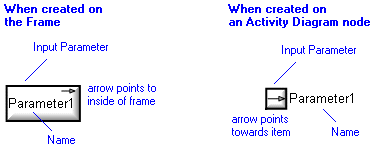
The View Options on an Activity Diagram allow you to show or hide the item type, that is, «Data Store». The view options are set through the Pin entry. See Pin view options - activity diagram.
On an Activity Diagram, you can populate an Input Pin's missing Activity Flows, Comments and Constraints: right-click the Input Pin, point to Populate, and then click the appropriate command.
On a Class Diagram, you can show an Input Pin as an Association between an Activity and a Class, that is, between the Activity that owns the Input Pin and the Class that is that Input Pin's type. To add this Association to a Class Diagram: right-click the Activity, and select > . When shown on a Class Diagram, an Input Pin's notation is as follows.

The View Options on a Class Diagram allows you to show or hide the name of the Input Pin. The View options are set through the Association entry. See Association view options - class diagram.
On a Class Diagram, you can populate an Input Pin's missing Association symbols: right-click the Input Pin, and select > .
An Input Pin represents a Parameter or Attribute (see the table that follows). The item that is represented by an Input Pin is associated with the Input Pin through the Linked Item link, which you can view on the Items tab of an Input Pin's property pages.
If an Activity Diagram symbol has Input Pins that are not shown on an Activity Diagram, you can add an Input Pin to the Activity Diagram symbol in the following ways:
• Right-click the symbol, and select > (populates all pins).
• On an Activity Diagram, click the Input Parameter / Pin button, and then click the edge of the item on which you want to add the Input Pin; or right-click the edge of the item on which you want to add the Input Pin: from the popup menu, click the command for the Input Pin you want to show.
Input Parameter / Pin button, and then click the edge of the item on which you want to add the Input Pin; or right-click the edge of the item on which you want to add the Input Pin: from the popup menu, click the command for the Input Pin you want to show.The type of the item that owns the Input Pin determines what the Input Pin represents. The following table shows you what an Input Pin's Linked Item is for each owning item type.
Symbol on which the Input Pin Appears | Input Pin's Linked Item |
|---|---|
 Activity (Frame) Activity (Frame) | Parameter of Activity that owns the Activity Diagram. Parameter Mechanism must be 'In' or 'In and Out'. |
 Accept Event Action Accept Event Action | Not applicable. Accept Event Actions cannot own Input Pins. |
 Add Structural Feature Value Action Add Structural Feature Value Action | Can own only the default Input Pins (Insert At Pin, Object Pin and Value Pin). These default Input Pins do not have Linked Items. See Add structural feature value action (dictionary item). |
 Call Behavior Action Call Behavior Action | Parameter of the Activity that is the Linked Item for the Call Behavior Action. Parameter Mechanism must be 'In' or 'In and Out'. |
 Call Operation Action Call Operation Action | Parameter of the Operation that is the Linked Item for the Call Operation Action. Parameter Mechanism must be 'In' or 'In and Out'. Also, owns a default Input Pin (Target Pin), which does not have a Linked Item. |
 Clear Association Action Clear Association Action | Can own only the default Input Pin (Object Pin). This default Input Pin does not have a Linked Item. Tell me more... |
 Clear Structural Feature Action Clear Structural Feature Action | Can own only the default Input Pin (Object Pin). This default Input Pin does not have a Linked Item. See Clear structural feature action (dictionary item). |
 Create Link Action Create Link Action | Can own only the two default Input Pins, for which the Linked Items are Roles of the Association that is the Linked Item for the Create Link Action. See Create link action (dictionary item). |
 Create Object Action Create Object Action | Not applicable Create Object Actions cannot own Input Pins. |
 Destroy Link Action Destroy Link Action | Can own only the two default Input Pins, for which the Linked Items are Roles of the Association that is the Linked Item for the Create Link Action. See Destroy link action (dictionary item). |
 Destroy Object Action Destroy Object Action | Can own only the default Input Pin (Target Pin). This default Output Pin does not have a Linked Item. |
 Opaque Action Opaque Action | No Linked Item. |
 Read Extent Action Read Extent Action | Not applicable Read Extent Actions cannot own Input Pins. |
 Read Link Action Read Link Action | Can own only the default Input Pin, for which the Linked Item is the source Role of the Association that is the Linked Item for the Read Link Action. Read link action (dictionary item). |
 Read Self Action Read Self Action | Not applicable Read Select Actions cannot own Input Pins. |
 Remove Structural Feature Value Action Remove Structural Feature Value Action | Can own only the default Input Pins (Object Pin, Remove At Pin and Value Pin). These default Input Pins do not have Linked Items. See Remove structural feature value action (dictionary item). |
 Read Structural Feature Action Read Structural Feature Action | Can own only the default Input Pin (Object Pin). This default Input Pin does not have a Linked Item. Tell me more... |
 Send Signal Action Send Signal Action | Attribute of the Signal that is the Linked Item for the Send Signal Action. Also, owns a default Input Pin (Target Pin), which does not have a Linked Item. |
 Structured Activity Node Structured Activity Node | No Linked Item. |
 Test Identity Action Test Identity Action | Can own only the default Input Pins (First Input Pin and Second Input Pin). These default Input Pins do not have a Linked Item. Test identity action (dictionary item) |
 Value Specification Action Value Specification Action | Not applicable Value Specification Actions cannot own Input Pins. |
Modeler ensures that the name of an Input Pin or Output Pin matches the name of its linked item:
• If you change the name of the Input Pin or Output Pin, Modeler changes the name of the linked item to match.
• If you change the name of an Input Pin's or Output Pin's linked item, Modeler changes the name of the Input Pin or Output Pin to match.
In the Dictionary pane, Input Pins are listed in the UML\Object Nodes folder.
In the Modeler panes, a short-cut symbol  on the Input Pin's icon indicates that the item is a stub.
on the Input Pin's icon indicates that the item is a stub.The following sections provide information about how an Input Pin is used in the model. For more information about a property, item, model part or diagram, click it.
Properties
In addition to the standard properties an Input Pin has these properties:
• Data Type (Type association through the automation interface)
• Ordering
Owned by
 Attribute —The Input Pin is owned jointly by the scoping Activity or Structured Activity Node, and the Attribute that is the Linked Item for the Input Pin.
 Parameter —The Input Pin is owned jointly by the scoping Activity or Structured Activity Node, and the Parameter that is the Linked Item for the Input Pin. Structured Activity Node —Applies only when the Input Pin is scoped directly to a Structured Activity Node.
Owns
 Comment
 Constraint
 Control Flow —The Control Flow is owned jointly by the Input Pin and the associated item. The access permissions you have to a Control Flow are determined by the access permissions you have to its source item.
 Dependency —The Dependency is owned jointly by the Input Pin and the other associated item. The access permissions you have to a Dependency are determined by the access permissions of the dependent item.
 Exception Handler —The Exception Handler is owned jointly by the Input Pin and the associated item. The access permissions you have to an Exception Handler are determined by the access permissions you have to its source item.
 IO Flow —The IO Flow is owned jointly by the Input Pin, the IO Flow's other linked item and the IO Flow's IO Item.
 Object Flow —The Object Flow is owned jointly by the Output Pin and the associated item. The access permissions you have to an Object Flow are determined by the access permissions you have to its source item.
Defined in these parts of the model
 Activity Model
Shown on these diagrams
 Activity Diagram
 Class Diagram
 Variant Diagram
Can be linked to these dictionary items
In addition to the owning item, an Input Pin can be linked to the following items.
 Atomic State —through the in states relationship.
 Concurrent State —through the in states relationship.
 Entry State —through the in states relationship.
 Exit State —through the in states relationship.
 Final State —through the in states relationship.
 Fork State —through the in states relationship.
 History State —through the in states relationship.
 Initial State —through the in states relationship.
 Join State —through the in states relationship.
 Junction State —through the in states relationship.
 Sequential State —through the in states relationship.
 Stereotype —To make an Input Pin valid for a Stereotype, set up Object Node a valid item type.
 Submachine State —through the in states relationship.
 | Like most other items in a Model, an Input Pin can be linked to an Activity Partition, Comment, Frame Box, General Node, General Flow, General Flow Diagram Node, Constraint (applied), General Flow Diagram Flow or Swimlane. |