Actor (dictionary item)

For automation interface information about an Actor, see Actor (automation interface).
An Actor is anything outside the system to which the system interfaces. An Actor can be a person, a group of persons, an organization, another system or a piece of equipment.
• The actors are external to the system and therefore the identification of actors helps to scope the system.
• An actor is said to represent a role. The term role is used to indicate that there is not one actor per user of the system but one actor per class of users of the system. For example, a library system would not have an actor per borrower but would have one actor representing all borrowers.
• An actor can be either a person or a thing. These include users, groups of users, other systems, machines, devices, external bodies or organizations. Given that actors are used to model all interactions with the system then, for example, a piece of equipment that interacts with the system being modeled will be represented as an actor.
• An individual person may interact with the system as different roles over a period of time.
You can create an Actor through the context menu of a Package: right-click the Package, and select > > > . You can also create an Actor through appropriate diagrams.
When used on a diagram, an Actor's notation is as follows:
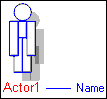
For information about the View Options available for this symbol, see Actor view options - class diagram and Actor view options - sequence diagram.
In the Modeler panes, a short-cut symbol  on the Actor's icon indicates that the item is a stub. For more information, see Stubs.
on the Actor's icon indicates that the item is a stub. For more information, see Stubs.The following sections provide information about how an Actor is used in the model. For more information about a property, item, model part or diagram, click it.
Properties
In addition to the standard properties an Actor has these properties:
 | The Items tab of an Actor's Property Pages allows you to link an Actor with a Use Case. |
Owned by
 Model
Model Package
Owns
 Association - The Association is owned jointly by the Actor and the associated item. The access permissions you have to an Association are determined by the access permissions you have to the item at the start end of the Association.
 Comment
 Constraint
 Dependency - The Dependency is owned jointly by the Actor and the other associated item. The access permissions you have to a Dependency are determined by the access permissions of the dependent item.
 External Connector - The External Connector is owned jointly by the Actor and the associated Subsystem or Interface Device. The access permissions you have to an External Connector are determined by the access permissions you have to the source item.
 Generalization - The Generalization is owned jointly by the Actors it links. The access permissions you have to a Generalization are determined by the access permissions you have to the child Actor.
 IO Flow - The IO Flow is owned jointly by the Actor, the IO Flow's other linked item and the IO Flow's IO Item.
An Actor can own the following diagram:
 General Flow Diagram
Defined in these parts of the model
 Use Case Model
Used in:
Shown on these diagrams
 Class Diagram
 Communication Diagram
 Composite Structure Diagram
 Sequence Diagram
 System Architecture Diagram
 Use Case Diagram
 Variant Diagram
Can be linked to these dictionary items
 Activity - The linked Activity specifies the behavior that is invoked when you create an instance of the Actor, that is, classifier behavior. The linked Activity must be owned by the Actor, either directly or indirectly through inheritance. This link can be made through the Classifier Behaviors association on the Items tab of the Actor's Property Pages.
 State Machine - The linked State Machine specifies the behavior that is invoked when you create an instance of the Actor, that is, classifier behavior. The linked State Machine must be owned by the Actor, either directly or indirectly through inheritance. This link can be made through the Classifier Behaviors association on the Items tab of the Actor's Property Pages.
 Use Case - The Actor performs or exchanges information with the linked Use Case. In addition to using the Links Editor, this link can be made by linking an Actor with a Use Case on a Use Case Diagram, and through the Items tab of an Actor's or Use Case's Property Pages.
 Stereotype
| | Like most other items in a Model, an Actor can be linked to an Activity Partition, Comment, Frame Box, General Node, General Flow, General Flow Diagram Node, Constraint (applied), General Flow Diagram Flow or Swimlane. |