Opaque action (dictionary item)

For automation interface information about an Opaque Action, see Action node (automation interface). For automation interface purposes, an Opaque Action is an Action Node that has its Node Type set to Opaque Action.
An Opaque Action represents a single step within an Activity, that is, one that is not further decomposed within the Activity. An Opaque Action is not executed until all of its input conditions are satisfied.
Create an Opaque Action through a Modeler explorer pane or an Activity Diagram:
• In a Modeler pane, right-click an Activity or Structured Activity Node, and select > > .
• On an Activity Diagram, click the  Opaque Action button, and then click in free space or inside an Activity Partition, Interruptible Activity Region or Structured Activity Node.
Opaque Action button, and then click in free space or inside an Activity Partition, Interruptible Activity Region or Structured Activity Node.When used on an Activity Diagram, an Opaque Action's notation is as follows.
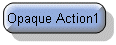
The View Options on an Activity Diagram allow you to show the name and action type. The view options are set through the Action Node entry. See Action node view options - activity diagram.
On an Activity Diagram, you can populate an Opaque Action's missing Activity Flows, Input Pins, Output Pins, Comments and Constraints: right-click the Opaque Action, point to Populate, and then click the appropriate command.
An Opaque Action does not have a Linked Item.
In the Modeler panes, a short-cut symbol  on the Opaque Action's icon indicates that the item is a stub.
on the Opaque Action's icon indicates that the item is a stub.For information about creating Input Pins and Output Pins on an Opaque Action, see Creating an output pin.
 | In the Dictionary pane, Opaque Actions are listed in the Action Node folder. To specify that a Stereotype can be applied to Opaque Actions, set up Action Node as a valid type. |
The following sections provide information about how an Opaque Action is used in the model. For more information about a property, item, model part or diagram, click it.
Properties
In addition to the standard properties an Opaque Action has these properties:
• Body
• Language
Owned by
 Activity —The Activity that scopes the Opaque Action.
 Structured Activity Node —Applies only when the Opaque Action is scoped directly to a Structured Activity Node.
Owns
 Comment
 Constraint
 Control Flow —The Control Flow is owned jointly by the Opaque Action and the associated item. The access permissions you have to a Control Flow are determined by the access permissions you have to its source item.
 Dependency —The Dependency is owned jointly by the Opaque Action and the other associated item. The access permissions you have to a Dependency are determined by the access permissions of the dependent item.
 Exception Handler —The Exception Handler is owned jointly by the Opaque Action and the associated item. The access permissions you have to an Exception Handler are determined by the access permissions you have to its source item.
 Input Pin
 IO Flow —The IO Flow is owned jointly by the Opaque Action, the IO Flow's other linked item and the IO Flow's IO Item.
 Output Pin
Defined in these parts of the model
 Activity Model
Shown on these diagrams
 Activity Diagram
 Variant Diagram
Can be linked to these dictionary items
In addition to the owning Activity, Structured Activity Node or Activity Partition, an Opaque Action can be linked to the following items.
 Stereotype —To make an Opaque Action valid for a Stereotype, set up Action Node a valid item type.
| | Like most other items in a Model, an Opaque Action can be linked to an Activity Partition, Comment, Frame Box, General Node, General Flow, General Flow Diagram Node, Constraint (applied), General Flow Diagram Flow or Swimlane. |