Creo+ Administration and Installation Overview
Creo+ is a SaaS–aware 3D modeling software suite used to create, analyze, view, and share designs using 2D and 3D parametric modeling capabilities.
All installation, deployment, licensing, and software updates are handled via a central Creo+ Portal. The latest version of Creo+ is always available on the Creo+ Portal.
For the Creo+ Portal, a customer is represented as an organization. In order to group Creo+ settings and licenses for users with similar roles within an organization, administrators create profiles based on roles.
PTC creates the organization for the customer and assigns administrative rights to an Organization Administrator designated by the customer. The Organization Administrator adds users to the Portal, with a specified role in the organization—either administrator or user. Administrators set up a global Creo+ configuration for an organization, assign licenses to users, create profiles within the organization, assign configurations to profiles, and assign floating licenses to profiles.
Users download and install the PTC Control Center that installs Creo+ on their computers. The PTC Control Center maintains connectivity with the Portal, downloads and installs software updates, manages usage of licenses, and provides notifications to users.
The following figure shows the different roles, hierarchy and data flow for a Creo+ installation for an organization.
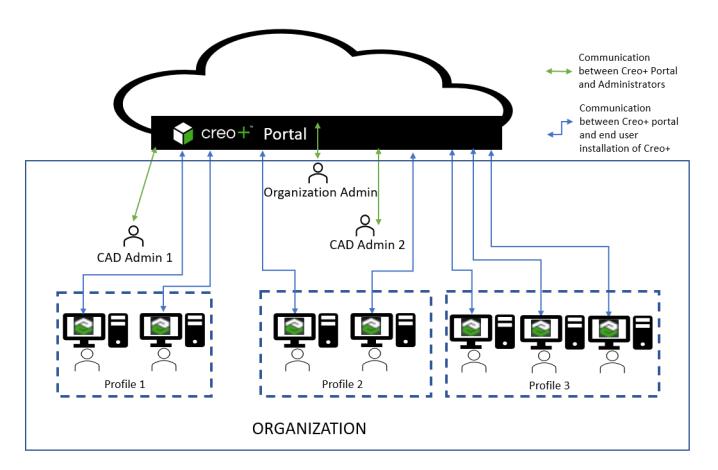
In an organization, Profile 1 could be a manufacturing profile, Profile 2 a simulation profile, and Profile 3 could be a general Engineering profile.
Roles and Responsibilities
An Administrator invites users to an organization via the PTC Admin Center and assigns a role to the user. Depending on the assigned role, the user can perform different tasks on the Creo+ Portal and in Creo+. Initially, an Administrator assigns either Administrator or Author roles to new users. There are also two additional roles of “Viewer” and “Guest” that allow collaboration with users within and outside an organization. See the topic Roles and Permissions for Collaboration to understand the collaboration capabilities granted to a Creo+ user based on their assigned roles.
Capability | Administrator | Author(Creo+ User) | Viewer | Guest |
|---|---|---|---|---|
Invite/add users to an organization on the PTC Admin Center. |  |  | | |
Access the administration capabilities of the Creo+ Portal. | | | | |
Configure Creo+ for an organization. | | | | |
Create and manage profiles. | | | | |
Assign licenses to users. | | | | |
Monitor licenses usage using telemetry. | | | | |
Access the user capabilities of the Creo+ Portal. | | | | |
Download PTC Control Center to install Creo+ | | | | |
Validate or test an early release build of Creo+ | Only if designated as a “validator” | Only if designated as a “validator” | Not applicable | Not applicable |
Collaboration | See Roles and Permissions for Collaboration for details. | See Roles and Permissions for Collaboration for details. | See Roles and Permissions for Collaboration for details. | See Roles and Permissions for Collaboration for details. |
An Administrator can assign an additional role of “validator” to some users. The role of a validator is to test a new early visibility build before it is pushed to all users.
 | In an organization, administrators may carry out some or all of the administrative tasks, based on their role in the organization. For example, the role of the Organization administrator might be confined to adding and managing new users on the PTC Admin Center. |