Accessing Settings
You can access various settings across different modules in both org and group profiles.
To access the settings page:
1. Go to > > . The Group Profiles list view page is displayed.
 |
Alternately, you can also click the Org-Profiles tab to display the org-wide profiles list view.
|
2. Click an existing group profile or org-wide profile. The Information and Assignment tab is displayed.
3. Click the Settings tab. The Settings information is displayed in a tree-grid format where the parent node indicates the Module, the child nodes indicate the Submodule.
4. Expand the Module and Submodule nodes to display the settings list.
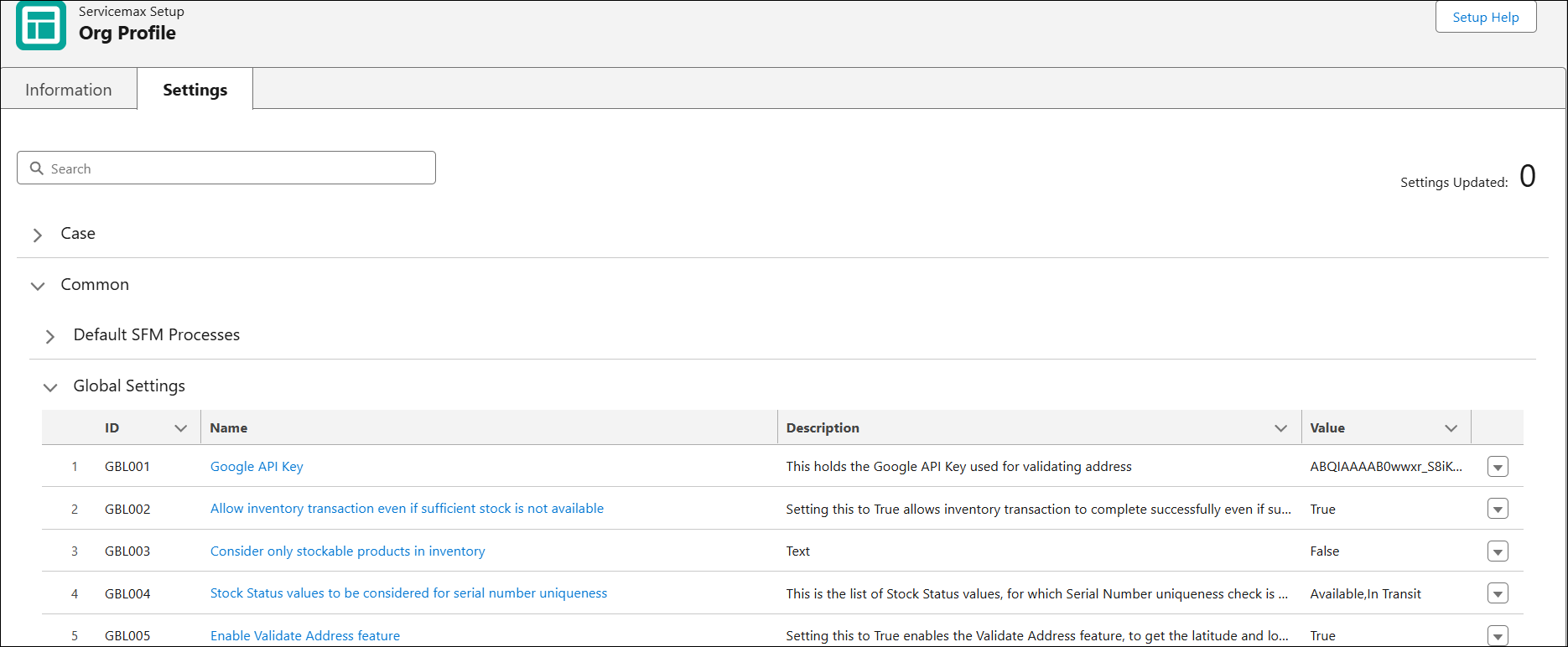
The following information is displayed in the Settings list view.
|
Column
|
Description
|
|---|---|
|
ID
|
Displays the ID number of the setting.
|
|
Name
|
Displays the name of the setting.
|
|
Description
|
Displays the description of the setting.
|
|
Value
|
Displays the current value defined for the setting.
|
|
Settings Updated
|
Displays the number of settings currently updated.
|
You can perform the following actions on the Settings tab:
• Use the Search bar to search for specific settings using keywords. For more information, see Search Configuration Settings