Adjusting PM Schedule Sequence to Align With Existing Maintenance Cycles
You can define the Adjusted Sequence and Adjusted Start Date when you create a new Preventive Maintenance (PM) Plan to control where the PM Engine starts generating PM Schedules. This capability helps you align a new PM Plan with an existing maintenance lifecycle instead of restarting at sequence 1.
Use this feature when the preventive maintenance cycles of previous PM Plans are already in progress. Common scenarios include contract renewals, warranty-to-contract conversions, and adding new Installed Products to an active service agreement. Starting at sequence 1 in these scenarios can cause redundant or misaligned PM visits and you can begin a PM Plan at a later sequence in the frequency of PM visits.
 |
This is applicable only for the Time-Based PM Plans that have non-recurring schedules or have all schedules generated upon creation. For more information, see Generating Full Sequence of PM Schedule.
|
The following topics are covered in this article:
Business Use Case
A customer renews a service contract while an existing PM Plan is already partway through its lifecycle. Newly installed Products are added to the contract, and the planner needs the new PM Plan to follow the same maintenance sequence as the existing assets in the previous PM Plan, without starting over from the beginning.
The planner uses the Adjusted Sequence and Adjusted Start Date to begin the new PM Plan’s schedule at the specific point in the frequency cycle and maintain maintenance visit alignment across all Installed Products.
Configuring Adjusted Schedule
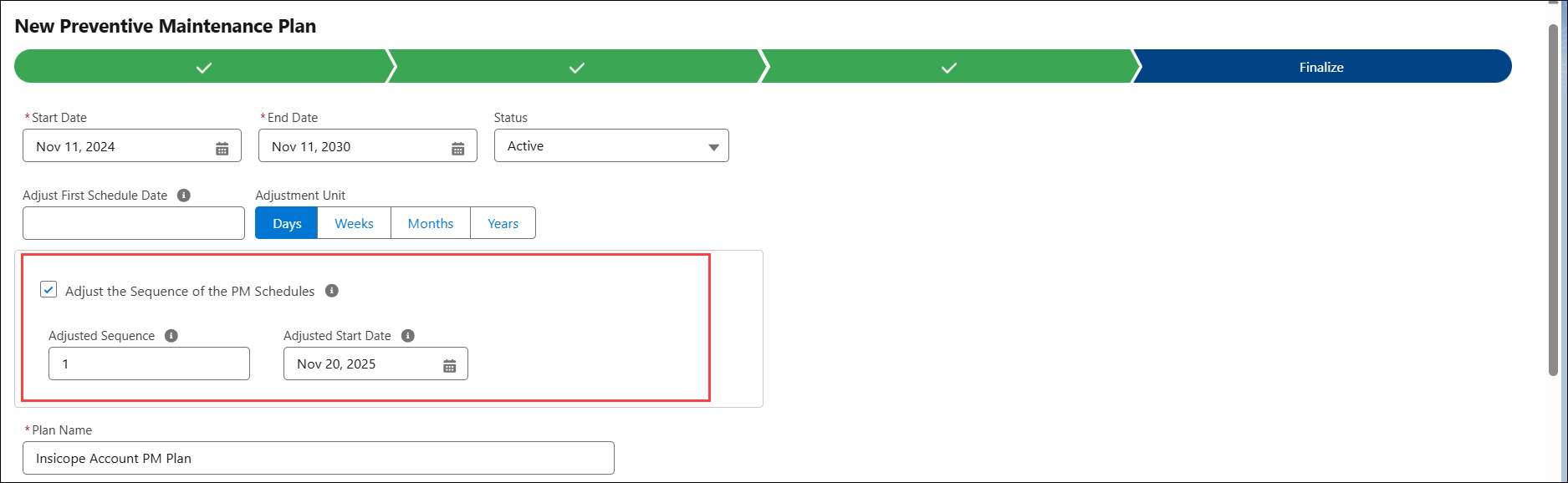
In the Finalize stage of a new PM Plan creation wizard, you can configure the following fields:
• Adjust Schedule Sequence: Select this option to enable settings that control the starting sequence of PM Schedule generation. When you enable this option, the Adjusted Sequence and Adjusted Start Date fields appear.
• Adjusted Sequence: Enter the sequence number that the PM Engine should consider as the first milestone of the plan’s frequency. Use this when you need to skip one or more initial PM Schedules in the Plan’s sequence.
|
|
Adjusted Sequence values 0 and 1 behave the same way. When you enter 0 or 1 in the Adjusted Sequence field, the PM Engine skips the first PM Schedule and starts generating schedules from the next sequence based on the Adjusted Start Date and the plan frequency
|
• Adjusted Start Date: Enter the reference date from which the PM Engine starts the PM Schedule based on the selected Adjusted Sequence. The engine consider this date as the Scheduled On Date for the starting milestone and all future milestones.
For more information, see Finalizing the PM Plan.
Configuration Example
Consider you create a non-recurring PM Plan with the following configuration:
• Generate All Recurrence Upon Creation: True
• Frequency: 1 Year
• PM Plan Start Date: 11-Nov-2024
• PM Plan End Date: 11-Nov-2030
• Adjusted Sequence: 1
|
|
Adjusted Sequence values 0 and 1 behave the same way. When you enter 0 or 1 in the Adjusted Sequence field, the PM Engine skips the first PM Schedule and starts generating schedules from the next sequence based on the Adjusted Start Date and the plan frequency
|
• Adjusted Start Date: 20-Nov-2024
For more information, see Finalizing the PM Plan.
PM Engine Behavior
• Adjusted Sequence = 1 tells the PM Engine to skip the first milestone and begin scheduling from the next milestone in the PM cycle.
|
|
Adjusted Sequence values 0 and 1 behave the same way. When you enter 0 or 1 in the Adjusted Sequence field, the PM Engine skips the first PM Schedule and starts generating schedules from the next sequence based on the Adjusted Start Date and the plan frequency
|
• Adjusted Start Date = 20-Nov-2024 provides the reference date for calculating the first Scheduled On milestone.
The following are the key adjustments as per the configuration:
• The first PM milestone for this plan, which should start on 11-Nov-2024, is skipped as the Adjusted Sequence = 1.
• The PM Engine calculates the first Scheduled On Date by applying the frequency to the Adjusted Start Date:
Adjusted Start Date + Frequency
= 20-Nov-2024 + 1 year= 20-Nov-2025
• The PM Engine creates the first PM Schedule on 20-Nov-2026.
• All subsequent PM Schedules continue at the defined yearly frequency. For example, 20-Nov-2026, 20-Nov-2027, 20-Nov-2028, and so on, until the plan end date.