Finalizing the PM Plan
To configure the Finalize stage:
1. In the New Preventive Maintenance PM Plan Wizard, go to Finalize tab.
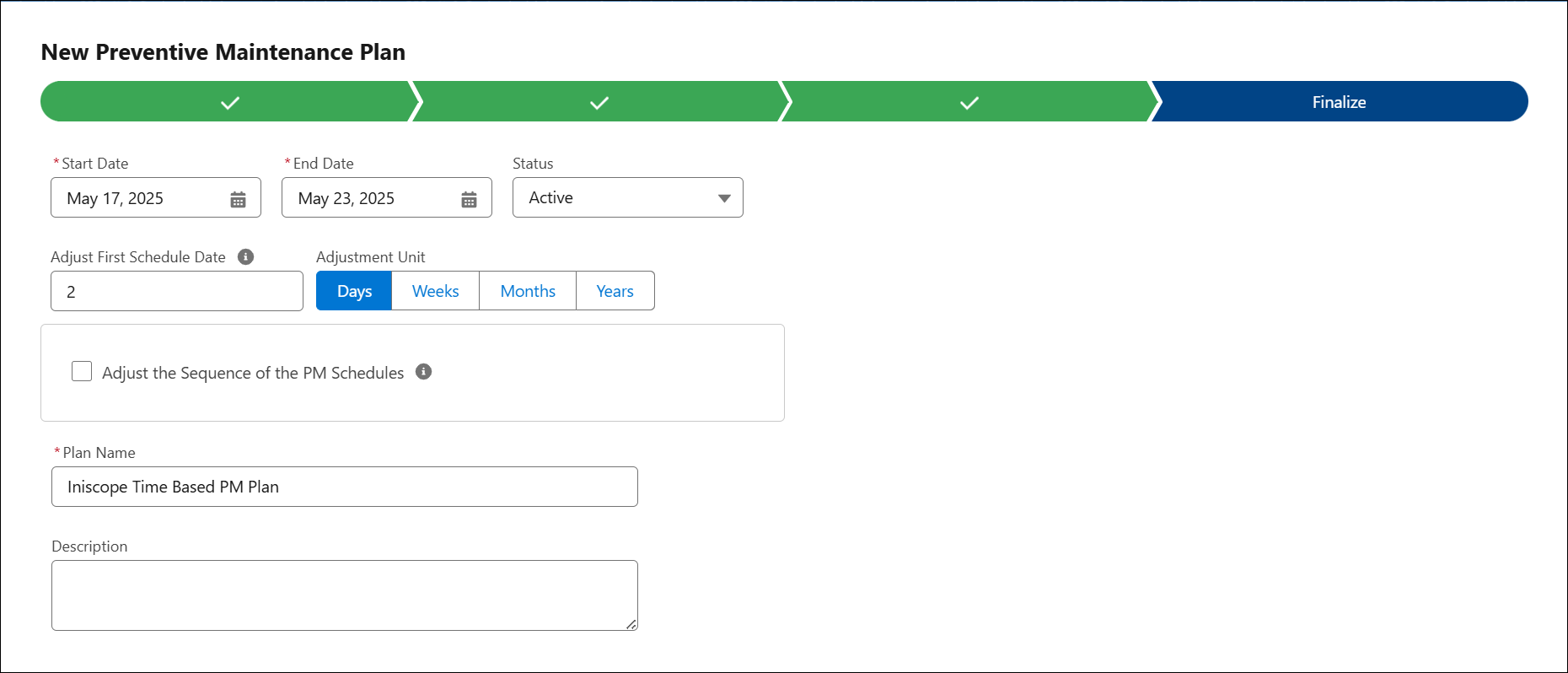
2. Provide the details for the fields as described in the following table:
|
Fields
|
Description
|
|---|---|
|
Start Date
|
The Start Date is auto-populated for the current date. You can modify it based on your requirements.
|
|
End Date
|
Select the End Date of the plan. It should be a future date. The scheduled date should not go beyond the Start and End Date.
|
|
Status
|
Select the required status of the PM Plan. For example, Active.
|
|
Adjusted First Schedule Date
|
Specify the Adjusted First Schedule Date to change the starting PM Scheduled On date as part of the PM Plan creation web service.
When a new PM Plan is created, the web service creates the corresponding PM Schedules for the PM Schedule Definitions equal to or greater than the defined Adjusted Sequence. When the web service creates PM Schedule lines, it starts from the Adjusted Sequence and calculates the Scheduled On date based on the Adjusted First Schedule Date value instead of the PM Plan Start Date.
|
|
Adjustment Unit
|
Select the unit for the Adjusted First Schedule Date. This can be Days, Weeks, Months, or Years.
|
|
Adjust the Sequence of the PM Schedules
In a PM Plan that either uses non-recurring schedules or has all its schedules generated upon creation, you can adjust where the PM Engine will begin the sequence of the PM Schedules. Enable this checkbox to see fields for defining what sequence the PM Schedules should be processed in and when to adjust the PM Plan’s start date.
For more information, see Adjusting PM Schedule Sequence to Align With Existing Maintenance Cycles.
|
|
|
Adjusted Sequence
|
Enter the Adjusted Sequence to change the starting PM Schedule sequence as part of the PM Plan creation web service.
In a PM Plan with non-recurring Schedules, this field can be used to define the sequence number of which PM schedule should be considered the first milestone of the Plan’s frequency. This is only relevant when one or more of the first PM Schedules need to be skipped.
If you set the Adjusted Sequence to 0 or 1, the system skips the first PM Schedule milestone and starts with the second milestone. If you set the Adjusted Sequence to 2, the system skips the first and second PM Schedule milestones and starts with the third milestone.
For more information, see Adjusting PM Schedule Sequence to Align With Existing Maintenance Cycles.
|
|
Adjusted Start Date
|
Enter the starting date to create PM schedules, provided that the Adjusted Sequence field is populated.
|
|
PM Plan Name
|
Enter a name for the PM Plan.
|
|
Description
|
Enter a description for the PM Plan.
|
3. Click Save.
In the Schedule tab, you can configure the following:
• Adding a Schedule
• Enabling and Configuring Dynamic Adjustment