About Lightning Theme UI
Lightning Theme UI is a reskinned version of Classic SFM Delivery with a modern visual appearance. Despite the updated look, it retains the older JavaScript-based architecture and does not use React or the Salesforce Lightning Design System (SLDS). It uses a JavaScript framework and standard components to support reusable components and limited customization of the Lightning experience. It does not support the capabilities available in SFM Lightning Delivery.
 |
Lightning Theme UI is available but unsupported. No enhancements or platform fixes are provided.
|
Known Limitations
• SFM Search and Checklists are not available
• Not recommended on Internet Explorer 11
• Some UI components may not render properly above 60% page resolution
• Uses older JavaScript components (not React)
• Does not include any of the capabilities listed in SFM Lightning Delivery Capabilities.
|
|
The Lightning Theme is supported by Salesforce Lightning Community and Service Console. For more information, see Lightning Community
|
Lightning Theme UI Capabilities
• Anchored header section: The header section remains visible as users scroll through the transaction form.
• Invoke Linked SFM: Users can launch a linked SFM transaction directly from within the current transaction.
• Tooltip for truncated text: A tooltip displays the full text when a field value is too long to display in the available space.
• Modal window for long text field entry: A modal window opens to provide a larger input area when entering long text values.
• Quick find filter in child line sections: Users can search and filter records within child line sections without leaving the transaction.
• Launch SFM Designer from the UI: Administrators can open SFM Designer directly from the Lightning Theme UI for quick access to transaction configuration.
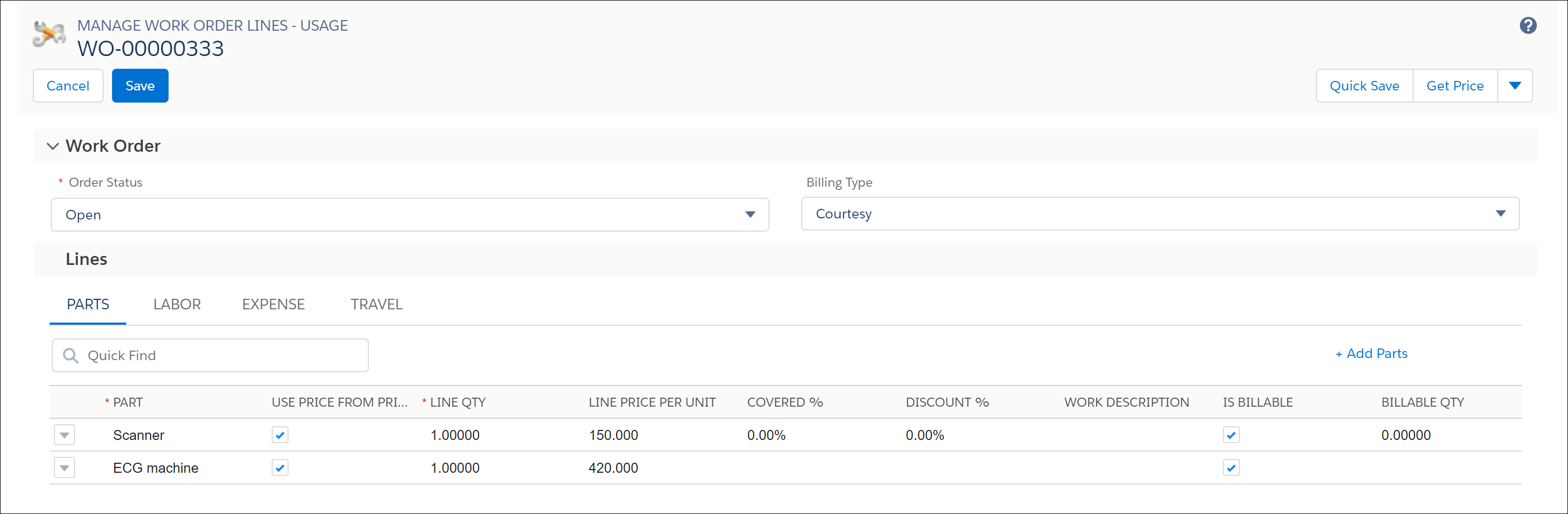
Example of an SFM transaction displayed in Lightning Theme UI.
Related Topics