Viewing and Editing Knowledge Articles
You can view and edit AI knowledge articles created from a hotline request conversation. All conversation participants can view articles; only hotline staffers can edit or delete them.
 |
The viewing and editing interface is available on web and desktop apps only.
|
To view and edit a knowledge article:
1. Open the hotline request conversation.
2. Open the Conversation Info panel.
|
|
A knowledge articles section lists all articles created from this conversation. If no articles have been created, the section does not appear. If the request is still open, an indicator on the request banner also confirms that articles exist.
|
3. Click the article you want to view.
The article opens in read mode. The conversation transcript panel is collapsed by default.
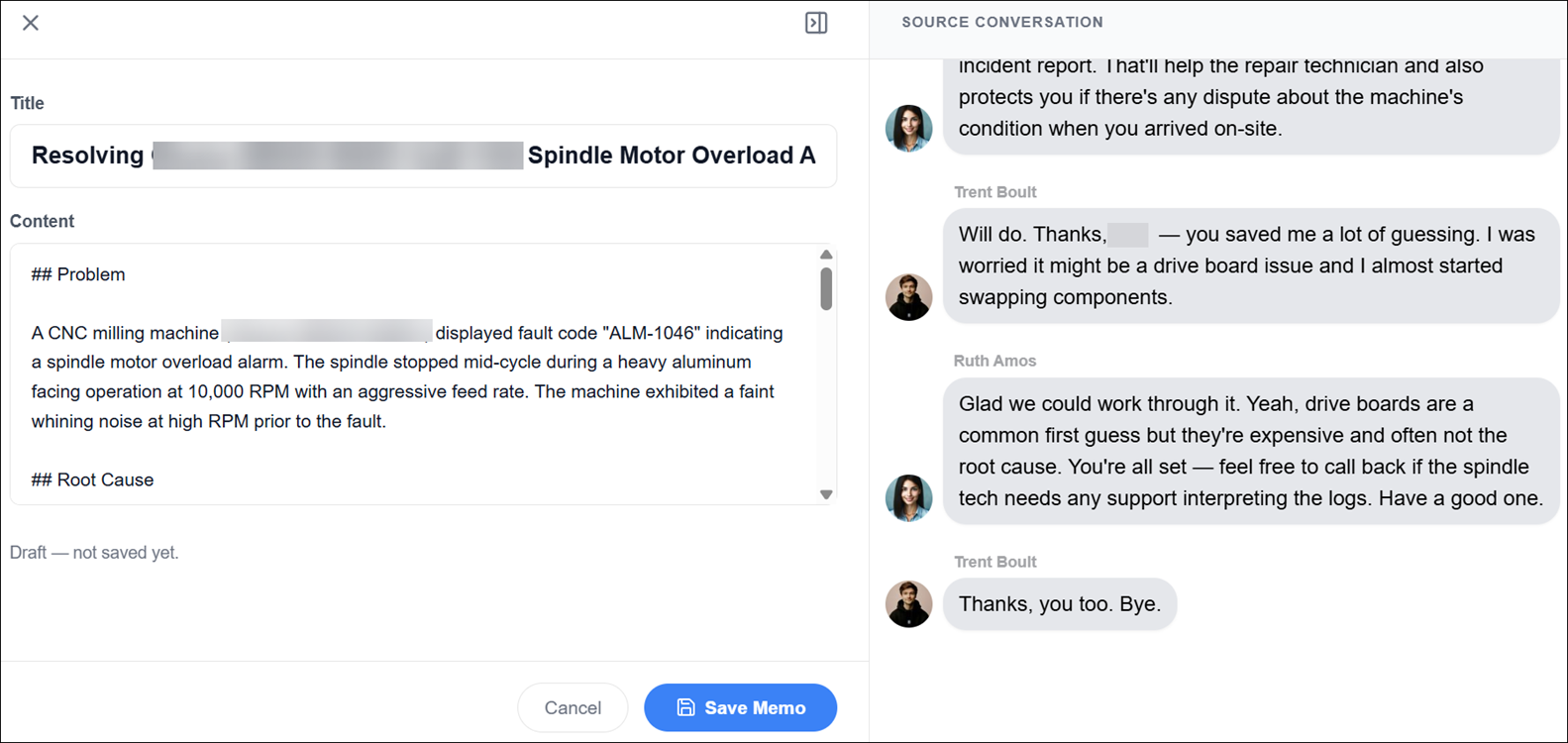
4. To review the source conversation, click to expand the transcript panel.
5. To edit the article, click Edit.
|
|
The Edit and Delete options are visible to hotline staffers only. Non-staffer participants can view articles but do not see these options.
|
6. Make changes to the article title or body, and then click Save Memo.
|
|
To exit without saving, click Cancel. A confirmation dialog appears warning that unsaved changes will be lost. Confirming returns the article to read mode with the original content unchanged.
|
The updated article replaces the previous version in the Zinc data store and in the ServiceMax AI Knowledge Access system. The sync status indicator reflects the upload result. If the sync fails, click Retry from the article view.