Viewing Task Dependencies on the Blocked By tab
The Blocked By tab displays any other tasks that need to be finished or started before the technician can work on or complete the current task. This tab only appears on tasks that have dependencies and are still active.
Android and iOS
To view and track task dependencies on the Blocked By tab:
1. Open a work order and tap a task that displays the dependency icon on the My Tasks or All Tasks screen.
The Task Detail screen displays. A dependency summary appears below the task name, and the Blocked By tab is visible alongside the Task Detail tab.
2. Tap the Blocked By tab.
The tab displays two sub-tabs: To Start and To Complete. Each sub-tab displays a count of active dependencies next to its label.
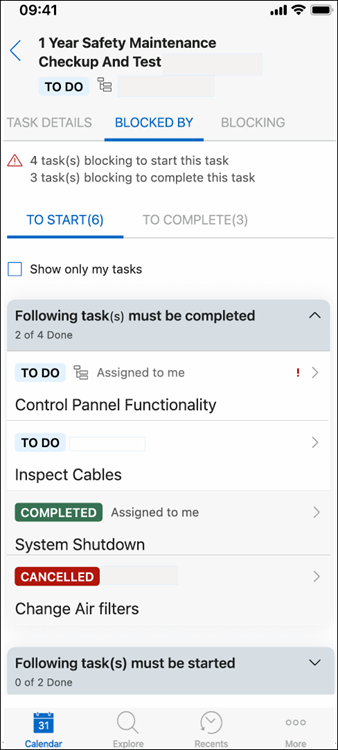
 |
The To Start sub-tab is displayed only when there are tasks blocking the start of the current task. The To Complete sub-tab is displayed only when there are tasks blocking the completion of the current task.
|
3. Tap the To Start sub-tab to review tasks that must be finished or started before you can begin the current task.
|
|
• The Following Tasks Must Be Completed section lists tasks that must be finished before you can start the current task. The Following Tasks Must Be Started section lists tasks that must be started before you can start the current task.
• Tasks appear in order: your tasks first, then tasks assigned to others, then unassigned tasks. Within each group, tasks are sorted by dependency icon presence, then by status: To Do, In Progress, Completed, Canceled.
|
A green indicator appears next to a section heading when all tasks in that section meet the required condition.
4. Tap the To Complete sub-tab to review tasks that must be finished or started before you can mark the current task as complete.
|
|
The same ordering rules apply as in the To Start sub-tab.
|
A green indicator appears next to a section heading when all tasks in that section meet the required condition.
5. Enable the Show Only My Tasks toggle at the top of the Blocked By tab to display only dependencies assigned to you.
|
|
This filter is not persistent. Navigating away from the tab resets the toggle.
|
6. Review the progress indicator at the top of the tab to track how many dependencies have been resolved.
|
|
The indicator updates after data sync when blocking tasks change status.
|
Once every dependency in both the To Start and To Complete sub-tabs displays a green indicator, the task is fully unblocked. ServiceMax Go re-enables status options, time entry, and action buttons on the task. After the current task reaches Complete or Canceled status, the Blocked By tab is removed from the Task Detail screen.
Windows
To view and track task dependencies on the Blocked By tab:
1. Open a work order and click a task that displays the dependency icon on the My Tasks or All Tasks screen.
The Task Detail screen displays. A dependency summary appears below the task name, and the Blocked By tab is visible alongside the Task Detail tab.
2. Click the Blocked By tab.
The tab displays two sub-tabs: To Start and To Complete. Each sub-tab displays a count of active dependencies next to its label.
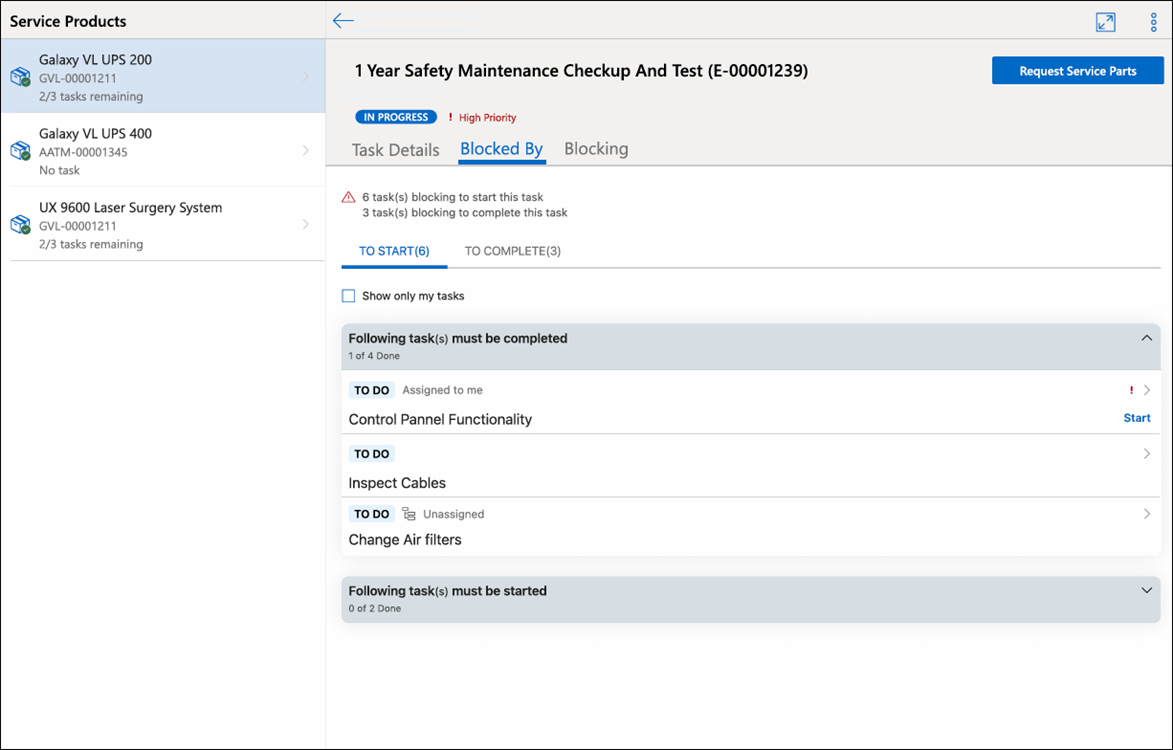
|
|
The To Start sub-tab is displayed only when there are tasks blocking the start of the current task. The To Complete sub-tab is displayed only when there are tasks blocking the completion of the current task.
|
3. Click the To Start sub-tab to review tasks that must be finished or started before you can begin the current task.
|
|
• The Following Tasks Must Be Completed section lists tasks that must be finished before you can start the current task. The Following Tasks Must Be Started section lists tasks that must be started before you can start the current task.
• Tasks appear in order: your tasks first, then tasks assigned to others, then unassigned tasks. Within each group, tasks are sorted by dependency icon presence, then by status: To Do, In Progress, Completed, Canceled.
|
A green indicator appears next to a section heading when all tasks in that section meet the required condition.
4. Click the To Complete sub-tab to review tasks that must be finished or started before you can mark the current task as complete.
|
|
The same ordering rules apply as in the To Start sub-tab.
|
A green indicator appears next to a section heading when all tasks in that section meet the required condition.
5. Enable the Show Only My Tasks toggle to display only dependencies assigned to you.
|
|
This filter is not persistent. Navigating away from the tab resets the toggle.
|
6. Review the progress indicator at the top of the tab to track how many dependencies have been resolved.
|
|
The indicator updates after data sync when blocking tasks change status.
|
Once every dependency in both the To Start and To Complete sub-tabs displays a green indicator, the task is fully unblocked. ServiceMax Go re-enables status options, time entry, and action buttons. After the current task reaches Complete or Canceled status, the Blocked By tab is removed from the Task Detail screen.
Related Topics