Updating Parts Consumption for Serialized Parts
As a technician, you can update parts consumption during your service of serialized parts from your stock. A serialized part is an individual inventory item that is tracked using a unique serial number or identifier. Unlike non-serialized parts, serialized parts are managed and tracked on a per-unit basis, allowing precise identification, history tracking, and lifecycle management of each item.
You can perform replacement of parts in the Go app.
Perform the following steps to update part consumption of serialized parts.
1. Open the Go app with your valid credentials, and then navigate to Appointment Detail > Work Order record.
The Work Order Detail screen is displayed.
2. From the Actions menu, tap the View Service Task option.
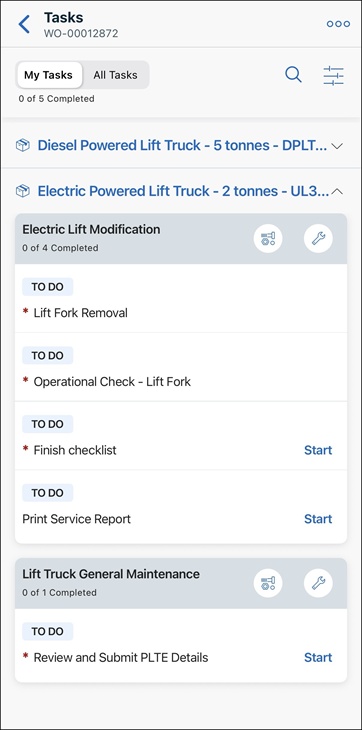
The list of associated tasks is displayed.
 |
By default, My Tasks view is displayed to show the list of tasks that are assigned only to you.
|
3. For the required task, tap the parts icon. The Parts screen is displayed with the list of parts. The list displays the planned and used quantities for each part. It also displays the total count of the planned and used parts on top of the list.
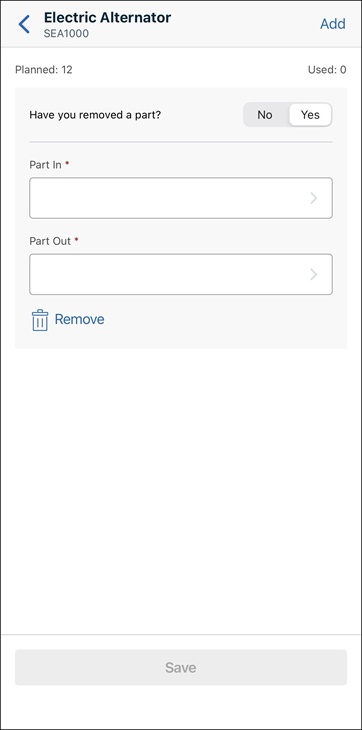
4. Tap a part whose planned quantity is more than the used quantity. The Part Details screen is displayed.
|
|
By default, the Have you removed a part toggle is Yes. You can select the Part Out if you remove a part.
|
5. If the Add to Return Order toggle is available, set it to Yes to add the removed part to a return order.
|
|
The Add to Return Order toggle appears based on the following administrator settings:
• The Enable Return Order setting must be enabled.
• If Allow Technician Override is enabled, you can toggle the return order option. If it is disabled, the toggle is read-only and its default value is determined by the Part Repairable flag on the product.
|
6. Toggle the Have you removed a part option to No if you have not removed an existing part. In this scenario, you must select the parent item of the installed part.
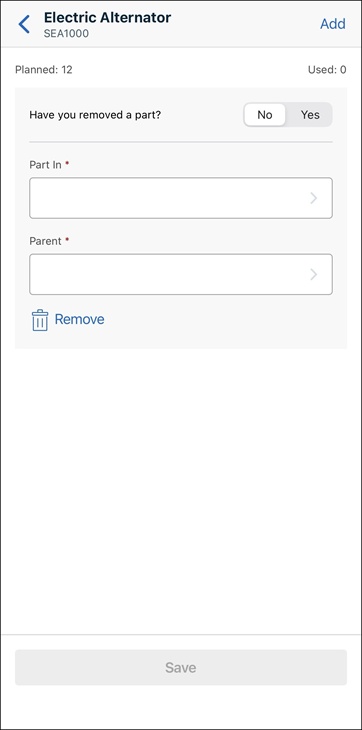
7. Tap the Part In field to search and select the serial number of the part that you have installed.
|
|
You can tap the filter icon next to the search box on the top of the part list and select any of the following options:
• Recommended Parts: To get the list of parts configured to be recommended for the original part.
• Replacement Parts: To get the list of parts configured to be the replacement of the original part.
• All: To get the list of all parts.
|

8. Tap the Part Out field to search and select the serial number of the part that you have removed.
|
|
You can tap the filter icon next to the search box to enable Include Online Results to display parts from the server.
|

|
|
The top-level IB is not displayed in the Part Out list of parts.
|
9. To add another part, tap Add from the upper-right corner of the screen, and then update its replaced and removed parts.
10. To remove a replacement part, tap Remove.
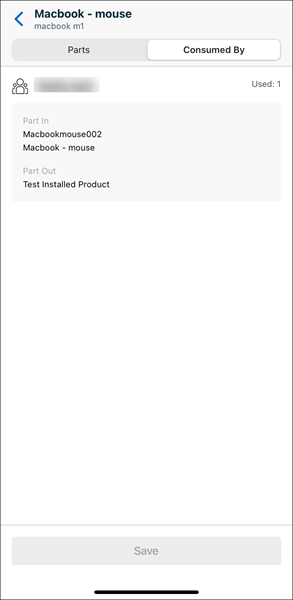
11. If the part is consumed by other technicians as a part of the same work plan, a Consumed By tab is displayed. Tap the tab to see the details about parts consumed by other technicians.
|
|
The list is sorted by technicians’ names in an alphabetical order.
|
12. Tap Save.
A confirmation message is displayed that the part is updated, and you are redirected to the parts list. The list is updated with the used quantity based on your updates on the Quantity field.
|
|
It is recommended for you not to log in to your Go app on multiple devices and consume parts. It may result in bad data and cause inventory updates to fail.
|
Reference Topics