Managing Logistic-Specific Queue Items
After a customer or call center agent submits a Depot Service Request, the system automatically creates Work Orders along with the associated Logistic Work Plan. These Work Orders appear as queue items in the Depot Queue under Logistic section for a specific Depot.
In the Depot Queue, supervisors can review logistic-specific queue items and assign technicians based on their expertise and availability to perform logistic tasks specified in the associated Work Plans. For more information, see Assigning or Self-Assigning Queue Items.
Technicians can monitor the assigned queue items and complete tasks based on the priority.
The logistic tasks typically involve collecting faulty products or assets from the customer’s location and deliver them to the specified Depot for repair. After service, return it back to the customer’s location. For more information, see Key Services.
Use Case
A hospital contacts the call center to report a faulty ultrasound machine. The agent submits a Depot Service Request, and the system automatically creates a Work Order with a Logistic Work Plan. The plan includes collecting the machine from the hospital and delivering it to a certified medical equipment depot. The Work Order appears in the Logistic section of the Depot Queue, where a Supervisor assigns the task to a technician trained in handling sensitive medical devices. The technician picks up the machine, ensures it is securely packed, and transports it to the depot. After the repair is completed, the technician is reassigned to return the equipment to the hospital, ensuring minimal downtime for critical medical operations.
Viewing Logistic-Specific Queue Items
To view logistic-specific queue items:
1. In the Depot Queue, select the Depot where you want to view logistic-specific queue items. For more information, see Viewing Depot Queue.
2. From the drop-down, select the Logistic type.
The Depot Queue page displays all logistics-specific Work Orders associated with the depot. You can view the corresponding Logistics Work Plan under each Work Order entry.
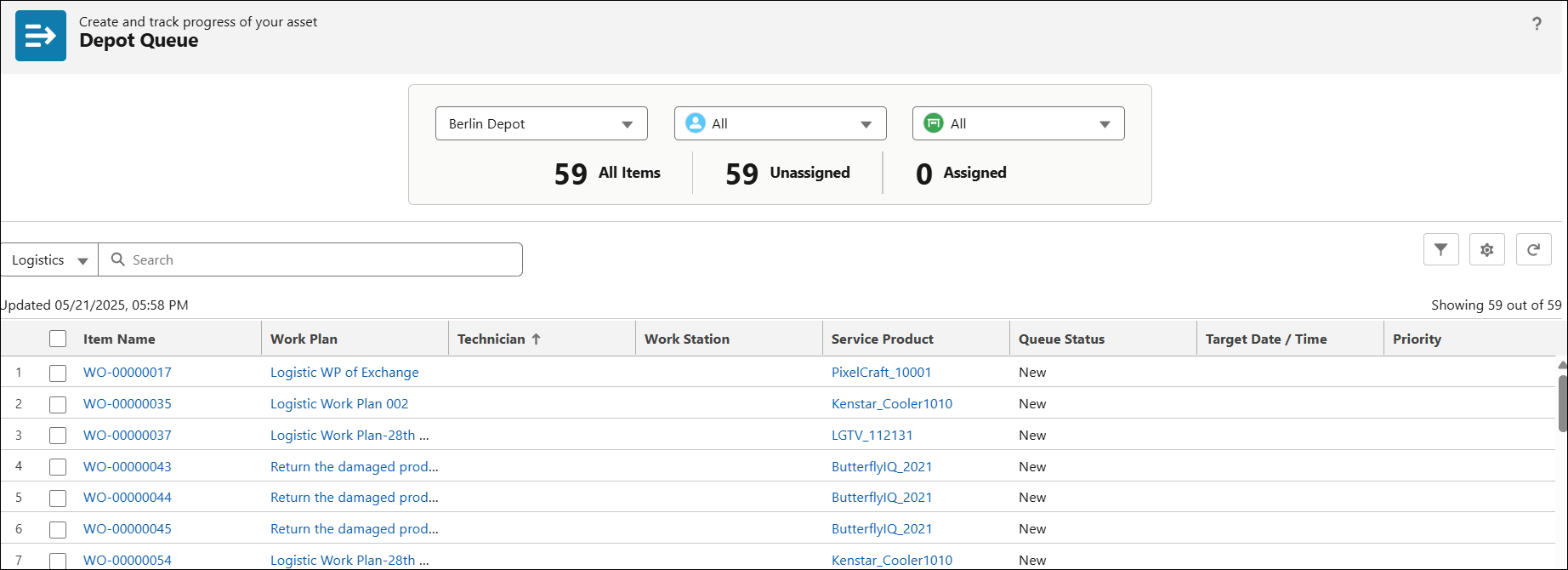
In the Depot Queue, you can perform the following actions for logistic-specific queue items:
• Monitor and process queue items based on Target Date/Time and Priority
Once a logistics task is completed, the technician can update the Work Order status to Complete, indicating that the item has been successfully delivered to the depot or returned to the customer. After the Work Order is complete, the queue item will be cleared from the Depot Queue.
Related Topics