Depot Match Considerations
After configuring attributes for a Depot using Depot Qualifier, the engine matches the product or address data retrieved based on the Depot Locator Match Settings with the attributes configured in the Depot Qualifier, and automatically assign the most suitable depot for faulty products added in the Depot Service Request.
The depot engine evaluates and assigns the appropriate depot to a product in the following sequence:
1. Product and Geographical Match: If the combination of Product attributes and Geographical attributes configured for a depot matches the faulty Product added in the Depot Service Request, the depot is assigned.
2. Product Match: If the combination is not found, the engine attempts to match the product attributes configured for a depot with the faulty Product added in the Depot Service Request and assigns the depot.
3. Geographical Match: If the Product attributes match is not found, the engine attempts to match the geographical attributes in the following sequence:
◦ Zip Range: The engine attempts to match the defined zip range.
◦ Exact Zip Code: If the zip range does not match, it attempts an exact zip code match.
◦ City: If no zip code is configured, it attempts to match the city.
◦ State: If the city does not match, it evaluates the state.
◦ Country: If no state match is found, the engine matches based on the country.
Depot Qualification Results
The Depot Qualification Results field on the Service Request Line Item page shows how matching criteria were applied. It also indicates whether the depot matched by product, geolocation, or both. The following details are displayed on the Depot Qualification Results field after the engine evaluates the product and geographical attributes:
• Depot Qualifier Run: Displays a unique alphanumeric identifier in which DQ indicates Depot Qualifier, 20251016 indicates 16th October, 2025, and 001 indicates the sequence number in which the engine is run.
• Timestamp: Indicates Date and Time in UTC format
• Result: Indicates whether a Depot location was found
• Id: Indicates the unique identifier for the depot matching process
• Geo Match: Displays the geographical attribute that matched
• Notes: Indicates the results of the depot qualification matching process
An example for the Depot Qualification Result field.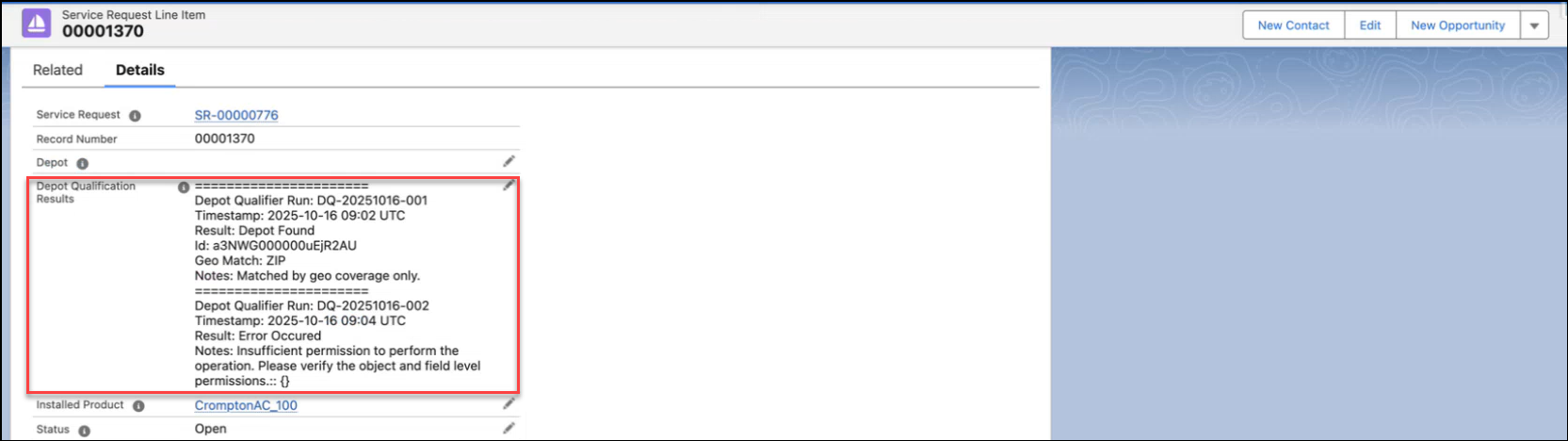
 |
If both the Product and Geographical attributes are matched by the engine, then the Notes field displays Matched by both geo and product specialization.
|