Work Plan as a Service
Work Plans can be added to contracts and warranties as entitled services. Each Work Plan supports its own pricing model and coverage rules, allowing organizations to control how service work is priced and billed.
Work Plans can be offered as standalone services or linked to an Installed Product, Product, Product Family, Product Line, or Location. Organizations can configure independent pricing and coverage for each Work Plan to support different service scenarios.
Applying a Work Plan to a work order or service product triggers a comparison with the customer’s entitled Work Plans through manual or automatic entitlement checks. The results of these checks determine pricing and provide clear audit visibility into coverage and pricing decisions.
If multiple Work Plans are associated with a service product, each Work Plan can have separate coverage and pricing under different service contracts or warranty terms. Work detail lines created from these Work Plans automatically inherit the correct coverage percentage and unit price during billing.
The following stages describe how Work Plans are configured in Service Contract and Product Warranty, and how pricing, entitlement, and billing are executed during the Work Order lifecycle.
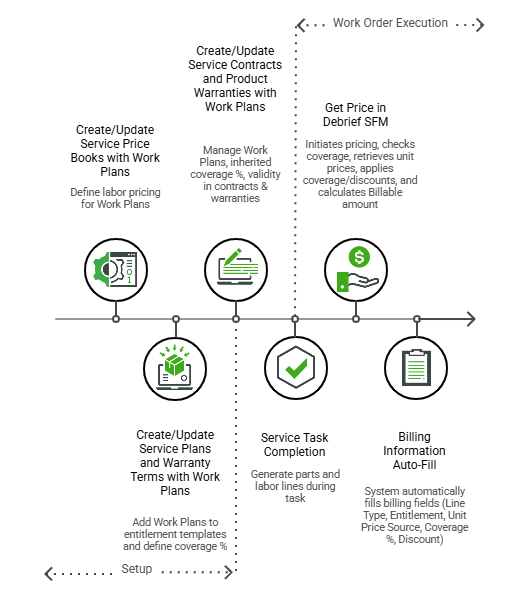
1. Create/Update Service Price Books with Work Plans: Configure pricing in the Service Price Book using the Edit Service Price Book SFM, and define it for a Work Plan or for a Work Plan and Product combination. For more information, see Adding Labor for Work Plan.
2. Create/Update Service Plans and Warranty Terms with Work Plans: At the entitlement level, you can define coverage for Work Plans, and downstream records automatically inherit it. The following sections describe how coverage flows through Warranty Terms, Service Plans, and Service Contracts.
◦ On Warranty Terms: Add Work Plans as covered services on a Warranty Term and define coverage percentages for parts, labor, and expenses. For more information, see Adding Covered Work Plans to a Warranty Term.
◦ On Service Plans and Service Contracts: Add Work Plan offerings to a Service Plan as part of the service offering definition. For more information, see Adding Work Plan Offering.
◦ Entitlements created from templates inherit the defined Work Plan coverage. Coverage can also be added or modified directly at the Service/Maintenance Contract or Product Warranty level for specific customer needs or when templates are not used. For more information, see Creating Warranty on Installed Product Automatically and Editing Covered Work Plan from a Service/Maintenance Contract.
3. Service Task Completion: During Work Order execution, entitlement determines which coverage applies to the Work Plan and from which source it is derived. The system applies coverage and pricing to Work Detail lines and records billing details when you run Get Price.
◦ Complete a service task to create a Labor Work Detail, and consume parts to create a Part Work Detail.
◦ Run Get Price to apply entitlement-based coverage and retrieve unit pricing from the Service Price Book or from Service Contract Special Pricing. The system automatically applies coverage for parts and expenses from the Covered Work Plan. If the Work Plan linked to a Work Detail is not entitled or not covered, the system evaluates entitlement at the Service Product level and applies the corresponding pricing. For more information, see Get Price and Work Plan as Service Pricing Guide.
◦ Review the Billing Information field on the Work Detail to view the price source, coverage source, discounts, and final billable price. For more information, see Initiating Price Calculation.
For the detailed workflow that describes how Work Plans are configured and how coverage, pricing, entitlement, and billing are processed across Service Contracts and Product Warranties during the Work Order lifecycle, see Work Plan Coverage and Pricing Workflow.
Related Topics