Viewing the Work Plan Labor Price
View the price book and pricing entries associated with a Work Plan entitlement from the entitlement interface.
|
Prerequisites
|
|---|
|
Ensure that the Work Plan Price field is added to the Service Contract and Product Warranty columns in the entitlement view. For more information, see Managing Display Fields for Service Contracts and Warranties.
|
You can view the labor pricing details for a Work Plan entitlement directly from the entitlement view.
To view the labor pricing details for a Work Plan entitlement:
1. Open the Work Order and click Assign Entitlement.
2. Locate the Work Plan in the entitlement view.
3. In the Work Plan Price column, select the Work Plan Price icon.
The Work Plan Labor Price pop-up window is displayed.
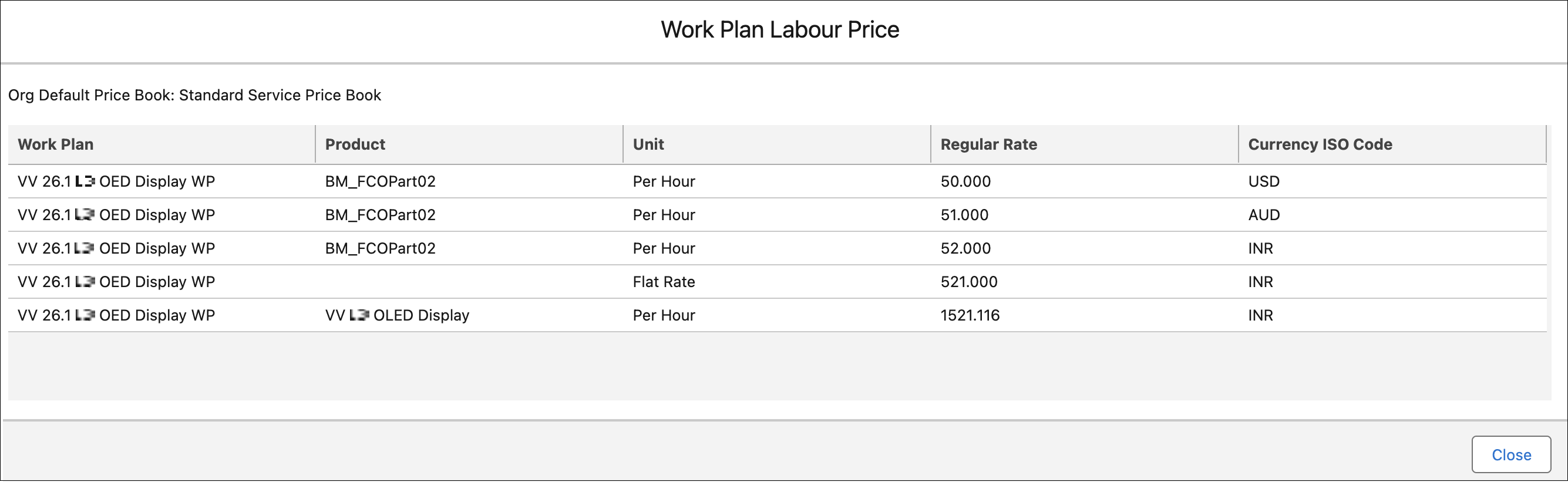
It displays the name and source of the price book used for the work plan. The source label indicates where the price book originates: Service Contract Price Book, Work Order Price Book, or Org Default Price Book.
The following table describes the columns in the window:
|
Column Name
|
Description
|
|---|---|
|
Work Plan
|
Displays the name of the work plan for which pricing is defined. This identifies which work plan the price book entry belongs to.
|
|
Product
|
Displays the product associated with the work plan price entry.
|
|
Unit
|
Displays the pricing unit used for the work plan entry. This indicates how the price is calculated. For example: Flat Rate or Per Hour. Multiple units can exist for the same work plan within the same price book.
|
|
Regular Rate
|
Displays the regular price of the work plan in the resolved price book, displayed in currency format. This rate is read‑only and sourced directly from the active price book entry.
|
|
Currency ISO Code
|
Displays the currency of the price entry, displayed as the ISO currency name. For example: U.S. Dollar. Multiple currencies can be listed if available in the price book.
|
 |
If no price book entry exists for the work plan, the window displays the message “This work plan has no price book entries”.
|
4. Select Close to return to the entitlement view.