Creating a Warranty Term
A Warranty Term is a contract type where you can define the coverage percentages for parts, labor, expenses, and travel for different services within a specified time period. When Product Warranty record gets created from Warranty Term, the system automatically applies the predefined coverage percentages for materials, labor, and expenses. This ensures consistent and accurate application of warranty coverage during service delivery.
You can also associate Covered Work Plans with a warranty term.This allows you to specify the various work plans offered as service under the warranty term. By defining coverage at the Work Plan level, an organization gains greater control in specifying different services (Work Plans) and assigning individual coverage percentages for each service, instead of applying a single blanket coverage percentage to all services for a given period. For more information, see Adding Covered Work Plans to a Warranty Term.
To create a warranty term:
1. Go to ServiceMax Setup > Warranties & Contracts > Warranty Terms.
The Warranty Terms page is displayed.
 |
You can also select the App Launcher, type Warranty Terms in the search bar, and select it from the results.
|
2. Click New.
The New Warranty Term pop-up window is displayed.
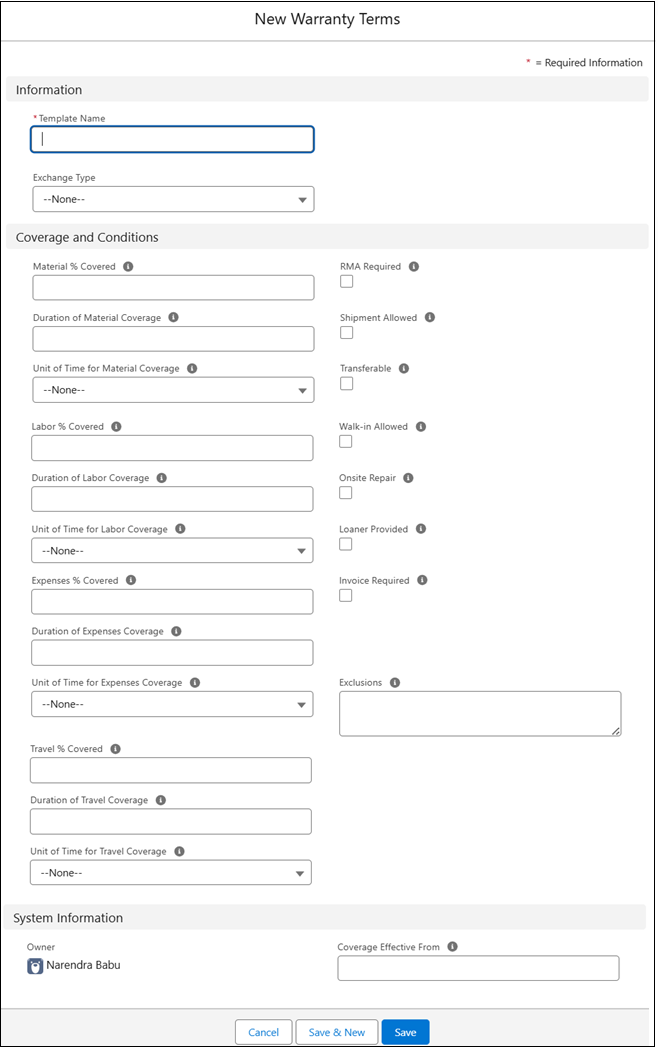
Provide the details for the fields as described in the following table.
|
Field
|
Description
|
|---|---|
|
Template Name
|
Displays the name of the warranty terms template. Enter a unique and descriptive name for the template.
|
|
Template Type
|
Indicates if this template is used for warranty calculation or referred to in service/maintenance contracts. When creating warranty for installed products, only templates with type Warranty are considered. Select the appropriate type: Warranty or Contract.
|
|
Material % Covered
|
Displays the percentage of material (parts) covered under warranty. Enter a value between 1 and 100 indicating the percentage of coverage on parts. If Material coverage % is specified, duration and unit of time should be specified too.
|
|
Duration of Material Coverage
|
Displays duration for which material coverage is valid. Enter the number indicating the duration of coverage for parts.
|
|
Unit of Time for Material Coverage
|
Displays the time unit for material coverage duration (e.g., days, months). Select a value that qualifies the material coverage duration in days, weeks, months or years.
|
|
Labor % Covered
|
Displays the percentage of labor covered under warranty. Enter a number between 1 and 100 indicating the percentage of coverage on labor. If Labor coverage % is specified, duration and unit of time should be specified too.
|
|
Duration of Labor Coverage
|
Displays the duration for which labor coverage is valid. Enter a number indicating the duration of coverage for labor.
|
|
Unit of Time for Labor Coverage
|
Displays the time unit for labor coverage duration. Select a value that qualifies the labor coverage duration in days, weeks, months or years.
|
|
Expenses % Covered
|
Displays the percentage of expenses covered under warranty. Enter a number between 1 and 100 indicating the percentage of coverage on expenses. If Expenses coverage % is specified, duration and unit of time should be specified too.
|
|
Duration of Expenses Coverage
|
Displays the duration for which expenses coverage is valid. Enter a number indicating the duration of coverage for expenses.
|
|
Unit of Time for Expenses Coverage
|
Displays the time unit for expenses coverage duration. Select a value that qualifies the expenses coverage duration in days, weeks, months or years.
|
|
Travel % Covered
|
Indicates the percentage of travel costs covered under the warranty. Enter a value between 1 and 100 to define the coverage percentage.
|
|
Duration of Travel Coverage
|
Specifies how long travel coverage is valid. Enter the duration for which travel costs are covered.
|
|
Unit of Time for Travel Coverage
|
Defines the time unit for travel coverage duration (e.g., days, months). Select the appropriate time unit to qualify the duration.
|
|
RMA Required
|
Flag indicates if an RMA is always required or an RMA is implied when this warranty is used to entitle a customer. This flag does not drive any functionality in ServiceMax and is for informational purposes only.
|
|
Shipment Allowed
|
Flag indicates if customer shipments are covered by the warranty. This flag does not drive any functionality in ServiceMax and is for informational purposes only.
|
|
Transferable
|
Flag indicates if this warranty is transferable to other products under special circumstances. This flag does not drive any functionality in ServiceMax and is for informational purposes only.
|
|
Walk-in Allowed
|
Flag indicates if the customer is authorized to walk into a service center for service. This flag does not drive any functionality in ServiceMax and is for informational purposes only.
|
|
Onsite Repair
|
Flag indicates if customer is eligible for onsite repair when entitled by this warranty. This flag does not drive any functionality in ServiceMax and is for informational purposes only.
|
|
Loaner Provided
|
Flag indicates if customer is given a temporary replacement product when the covered product is under repair. This flag does not drive any functionality in ServiceMax and is for informational purposes only.
|
|
Invoice Required
|
Flag indicates if an invoice is always raised at the end of service delivery. This flag does not drive any functionality in ServiceMax and is for informational purposes only.
|
|
Exclusions
|
Defines exceptions not covered by the warranty. Enter a free format text to define any exceptions not covered by the standard coverage of the template.
|
|
Coverage Effective From
|
Identifies how to calculate the warranty start date for installed products. It can be any Date field on the installed product record. For more information, see Configuring Coverage Start Date.
|
3. To save the changes, click Save.
A success message is displayed when the warranty term is created.
Related Topics