Adding a Schedule
In the Schedule tab of a Time-Based PM Plan, you can add single or multiple schedule to determine the frequency of work order creation and whether the schedule is recurring or non-recurring.
Also, you can associate either Work Plan or Task Template to the schedule template to automatically generate PM Work Orders with recommended parts, service tasks, and tools. This ensures that PM Work Orders are consistently generated from PM Plans with accurate information, which are aligned with predefined parameters and processes.
To add a schedule for a Time-Based PM Plan:
1. In the New Preventive Maintenance Plan wizard, go to the Schedule tab.

2. Click Add Schedule.
The Schedule pop-up window is displayed.
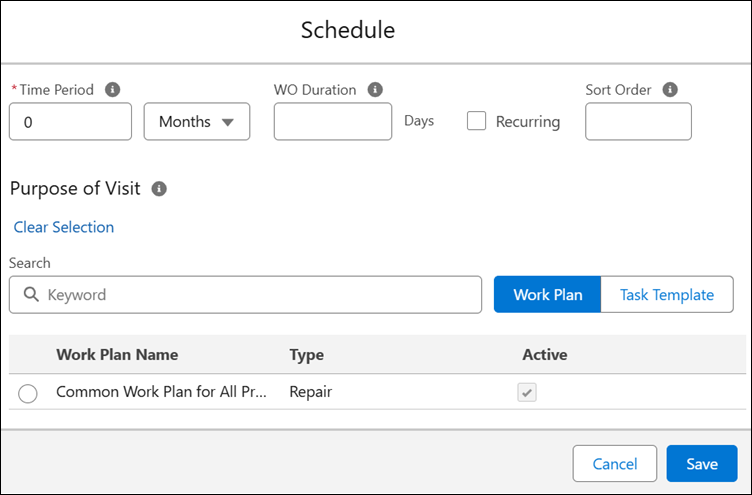
3. Enter the details for the following fields:
|
Field
|
Description
|
|---|---|
|
Time Period
|
Enter the time period for scheduling PM by specifying a fixed interval for maintenance visits.
In the drop-down, select the frequency. This can be weekly, monthly, or yearly.
|
|
WO Duration
|
Indicates the duration (in days) of any Work Order generated from the PM Schedule Definition. It is used by the PM Engine to populate the Preferred End Date on the Work Order Record by combining the Work Order Duration with the Preferred Start Date. For more information, see Configuring Work Order Duration for PM Work Orders.
|
|
Recurring
|
Select this checkbox for the defined frequency to recur. If you do not select this checkbox, the sequence occurs only once.
|
|
Sort Order
|
Indicates the priority of a schedule template when multiple schedule templates exist in a PM Plan Template. This information is mapped to the PM Plan’s Schedules when a Plan is created using the template.
|
|
Purpose of Visit
|
In the Purpose of Visit section, assign one of the following:
• Work Plan: In the Work Plan tab, search for and select the Work Plan to automatically generate service tasks, recommended parts, and tools for the PM Work Orders generated from the PM Schedule. The list of Work Plans displayed in the search table is based on the Products, product families, and/or product lines added in the Applicable Products tab. For more information, see Work Plan.
• Task Template: In the Task Template tab, search for and select the Task Template to assign specific tasks to the owner of the PM Work Orders generated from the associated PM Schedule. For more information, see Task Templates.
|
4. Click Save.
The configured Schedule template is added to the table on the Schedule tab.