Processing PM to Add Installed Products to Work Orders by Location Coverage
|
Prerequisite
|
|---|
|
To use this functionality, you must enable the Advanced PM engine. For more information, see Enabling and Configuring Advanced PM Engine Settings.
|
If you have created Time-based Preventive Maintenance Plans with the coverage type of Location, you can configure the PM Process to automatically add the applicable installed products from the Plans’ covered locations to their generated PM Work Orders as Service Products or Product Serviced (Work Detail) lines.
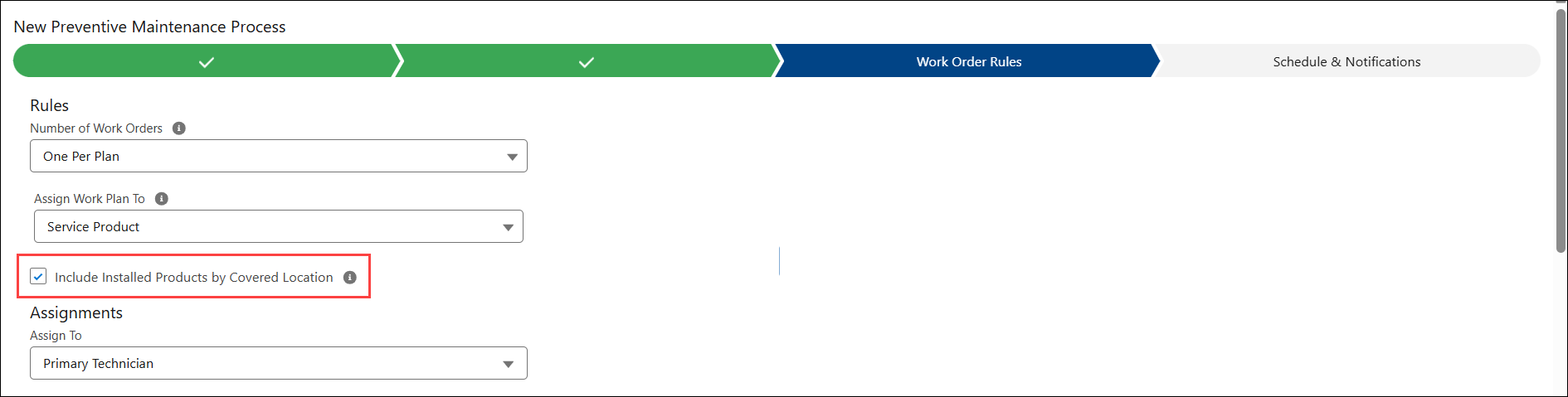
In the PM Process configuration, you can enable this functionality by selecting the Include Installed Products by Location option in the Work Order Rules tab. For more information, see Configuring Work Order Rules.
The following are the key benefits:
• Automatically include all valid Installed Products related to the covered location, based on applicable product information and installed product criteria.
• Eliminates the need to manually maintain covered product lists.
• Streamlines work and reduces manual effort.
• Ensures accuracy and prevents Installed Products from being missed if they are recently added to the location.
To generate PM Work Orders from Time-Based PM Plans with location coverage and include installed products from covered locations, you must perform the following:
Step 1: Create a Time-Based PM Plan template with Location Coverage Type
1. In the Criteria stage of the PM Plan Template wizard, configure the following:
◦ Select Basis as Time.
◦ Select Coverage Type as Location.
◦ Select the Installed Product Criteria and Location Criteria based on your requirements.
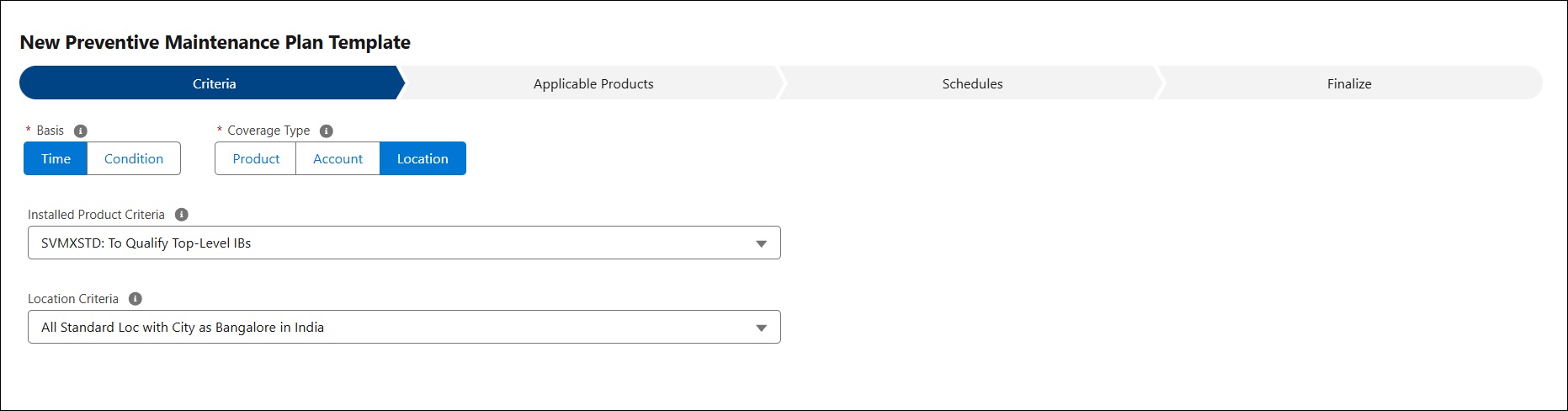
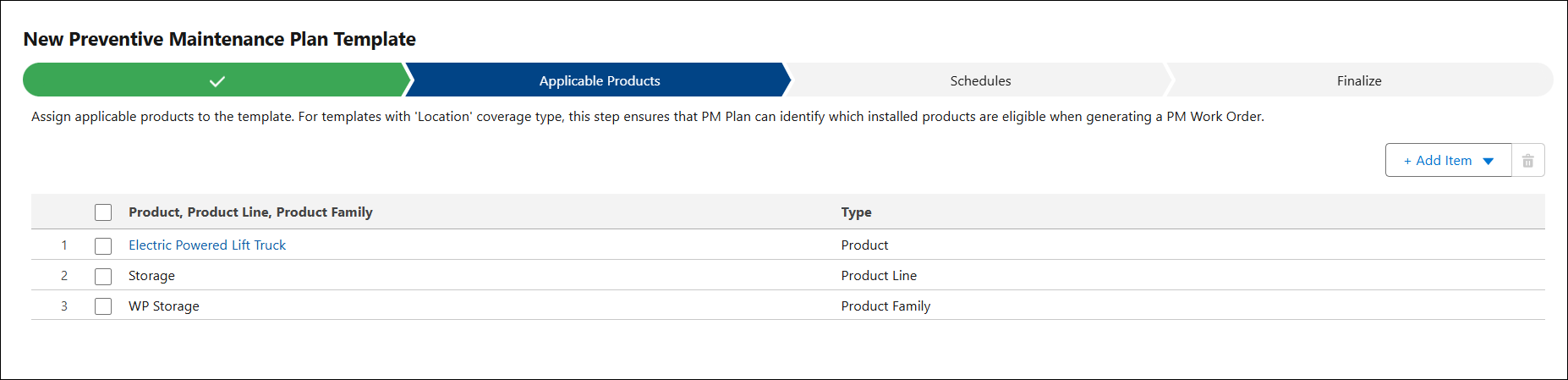
2. In the Applicable Products stage of the PM Plan Template wizard, add the applicable Products, Product Line, or Product Family. This allows the PM engine identify which installed products at a covered location should be included in the generated PM Work Orders as Service Products or Work Detail lines.
Step 2: Configure PM Process
In the Time-Based PM Process Configuration, select the Include Installed Products by Location option in the Work Order Rules tab. This option is available irrespective of the option selected in the Number of Work Orders. For more information, see Configuring Work Order Rules.
Step 3: Create a Time-Based PM Plan
Create a Time-Based PM Plan from a Service Contract, Account, or other source records using the Time-Based PM Plan template with location coverage. For more information, see Creating Time-Based PM Plans.
In the PM Plan, the location coverage is filtered based on the location criteria specified in the PM Plan Template.

 |
Ensure to save and activate the PM Plan.
|
PM Engine Execution
Based on this PM Process configuration, the Advanced PM engine runs on schedule. If the PM Plan qualifies, it creates Work Orders for each covered location.
If the PM Plan’s Purpose of Visit is assigned with a Work Plan, the Work Order includes Installed Products as related service products, as well as work plan assignments, parts, and tools. The service products added to the Work Order are qualified based on the covered location, along with the Applicable Products and Installed Product Criteria configured in the PM Plan’s Template.
In the Related tab of the Work Order record, you can view added Service Products, Work Plan Assignment, and Parts.
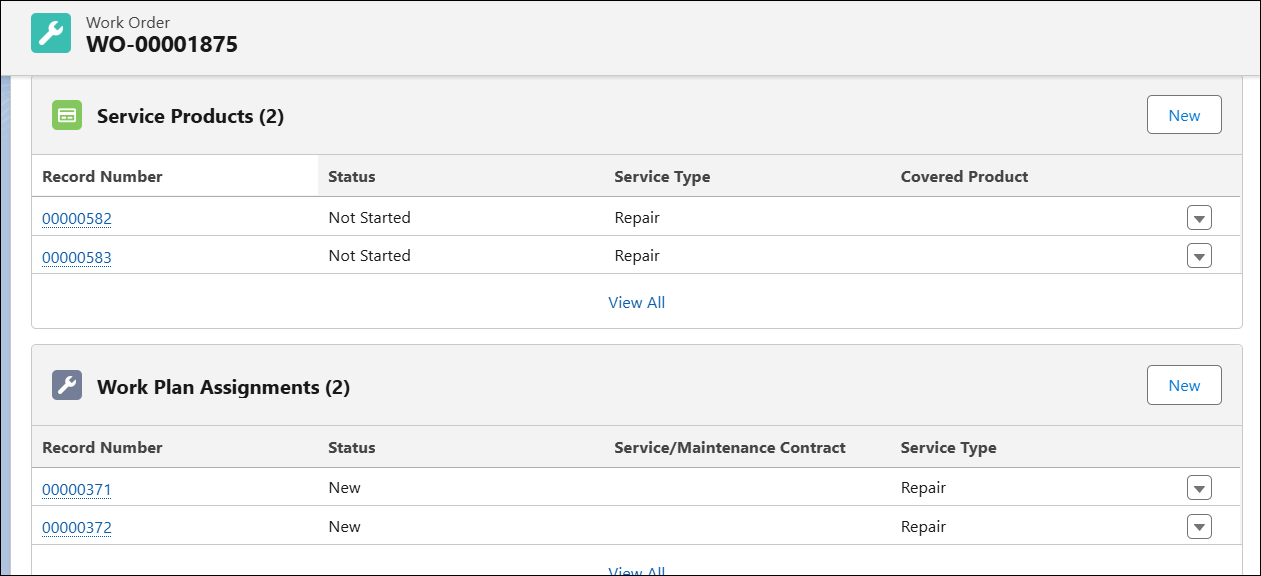
If the PM Plan’s Purpose of Visit is assigned with Task Template, the Work Order includes Installed Products as related Work Detail lines. The Installed Products related to covered locations are added as Products Serviced in the Work Detail lines. The Installed Products are qualified based on the covered location, along with the Applicable Products and Installed Product criteria configured in the PM Plan Template.
In the Related tab of the Work Order record, you can view the Products Serviced lines in the Work Details.

|
|
When you add coverage locations to an existing PM Plan, the PM engine includes them in the next run. It creates work orders for those locations and adds related installed products as Service Products or Work Detail lines.
|
Use Case
A facilities maintenance organization manages preventive maintenance (PM) for equipment installed across multiple customer locations. Each location may have different sets of installed products, such as HVAC systems, water purifiers, or generators. To improve efficiency and reduce errors, the organization wants the PM process to automatically generate Work Orders for each covered location and include all applicable installed products as service products or Work Detail lines. This ensures accurate maintenance execution without manual effort, while fully leveraging the Time-Based PM Plans with location coverage.
Reference Video