Repeating a Service Task in a Work Order
You can repeat a service task in a Work Order to create a new task with the same details and configuration as the existing task. This avoids manual re-entry when the same task must be performed again.
You can repeat a task in the following scenarios:
• The task has failed
• The task must be retried after a specific time interval
• The task must be executed again after completing certain actions
When you repeat a task:
• A copy of the current task is created with the Status set to New. The field values such as Task Name, Status Options, Estimated Duration, Mandatory Task, Create labor line on Work Order when status is changed to complete, Instructions, Reference Files, Linked Activity and Priority are copied to the new task.
• Scheduling and execution-related details are not copied to the new task. This includes fields such as Comments, Attachments, Start Date Time, Actual Duration, and so on.
• The new task is placed immediately after the current task in the sequence.
• The new task functions as a fresh task with the same configuration.
 |
The Repeat Task option is available only to users who have permission to create a service task..
|
To repeat a task:
1. From the Home page, go to the Work Order.
2. Open a Work Order record.
3. Go to the Service Products & Tasks tab.
4. Go to the required task, click the drop-down icon next to the task, and then click Repeat Task.
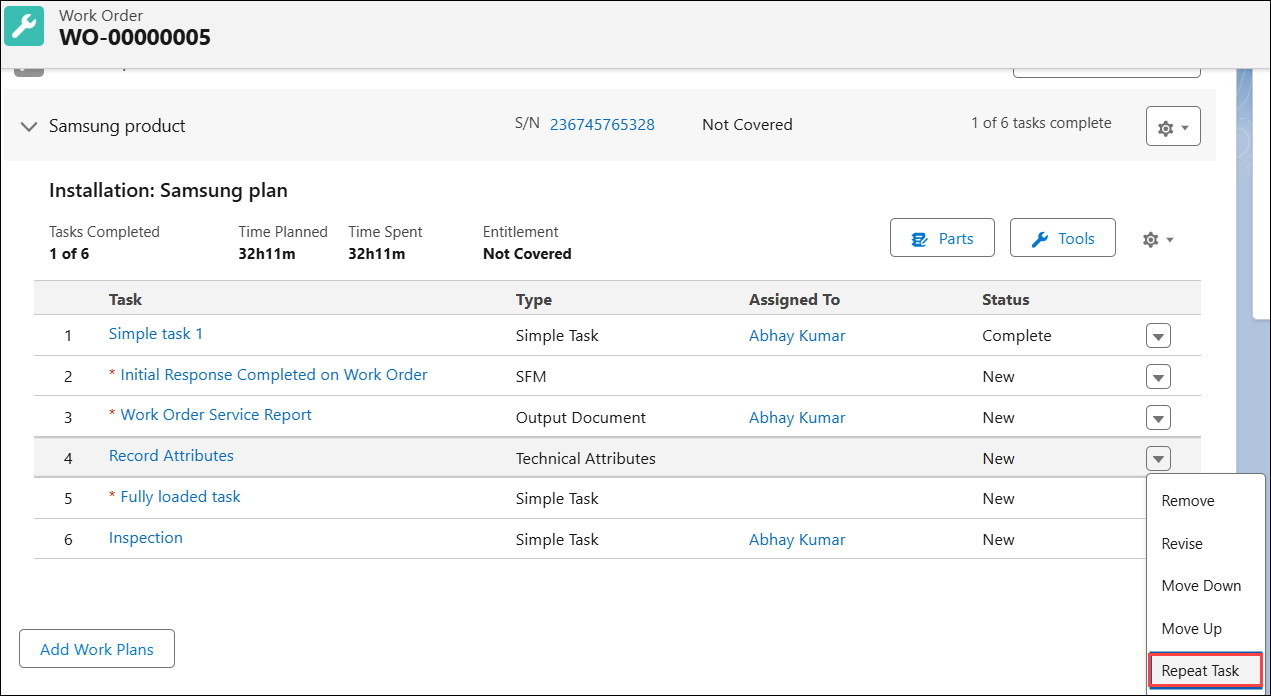
The task is displayed with pre-populated fields.
5. Modify the required fields and click Save.
The task is created and is placed immediately after the current task in sequence.
Use Case
Repeating a failed calibration task without manual re-entry
Role: Technician
A field service engineer at Iniscope International performs a transducer calibration task on a Soniscape SSI 800 at Nexus Medical Center. The calibration test fails because the ambient room temperature falls outside the required range. After the room environment stabilizes, the engineer uses Repeat Task to create a copy of the calibration task with the same instructions, estimated duration, and mandatory task settings already populated. The engineer performs the test again and records the updated result.
Related Topics