Performing Entitlement Check for Work Plans in 25.1
You can perform entitlement check on work plans added to a Work Order or Service Product to check Service Contract coverages that customers are entitled to for the work plan. After performing the entitlement, you can apply the appropriate service contract to the Work Plan based on the available coverages.
The coverages are displayed based on the entitlement rule configured for the Work Order object. For more information see, Creating an Entitlement Rule for Work Order
To perform entitlement check on a Work Plan:
1. From the Home page, go to the Work Order object.
2. Open a Work Order record for which you want to perform entitlement check for a associated work plan.
3. Go to the Service Products & Tasks tab.
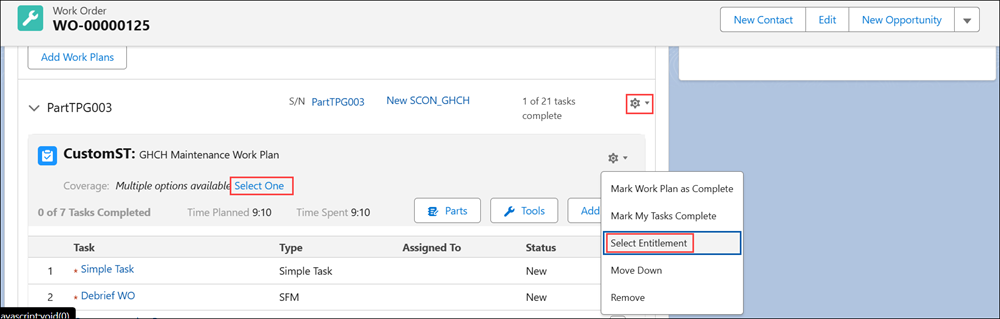
4. For a Work Plan, click the Settings icon and select Select Entitlement. Also, you can click Select One in the Coverage.
 |
When the auto-entitlement engine runs on the work plan and finds multiple matching coverages, theMultiple options available, Select One option is displayed. Clicking this ption displays the service contracts that match the work plan.
|
|
|
You cannot perform entitlement check on completed work plans.
|
The Select Contract pop-up is displayed with the list of Service Contract coverages the Work Plan is entitled to.
Each Service Contract is shown in the format: “Service Contract Name - Covered Work Plan Name - No. of units of covered work plan pending for coverage. For example, “ SCON_GHCH - New_GHCH_CoveredWorkPlan - 97 Count remaining”.
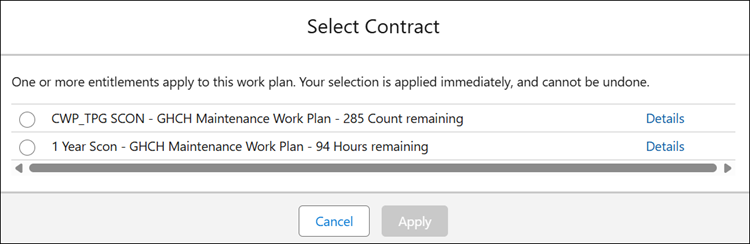
5. Select a Service Contract you want to apply to the Work Plan.
6. Click Apply.
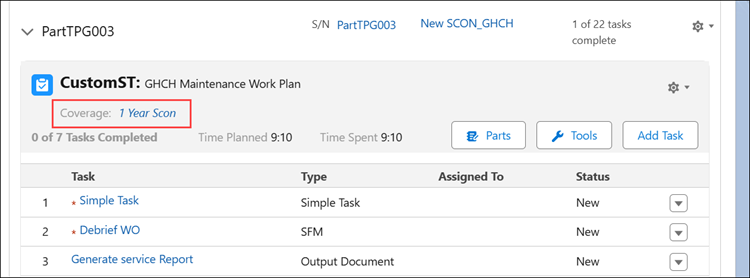
The applied coverage is displayed in the Work Plan.
|
|
When you perform entitlement and there are no matching coverages, the Not Covered option is displayed. Selecting this option and clicking Apply will perform the entitlement check, but the status will be shown as Not Covered.
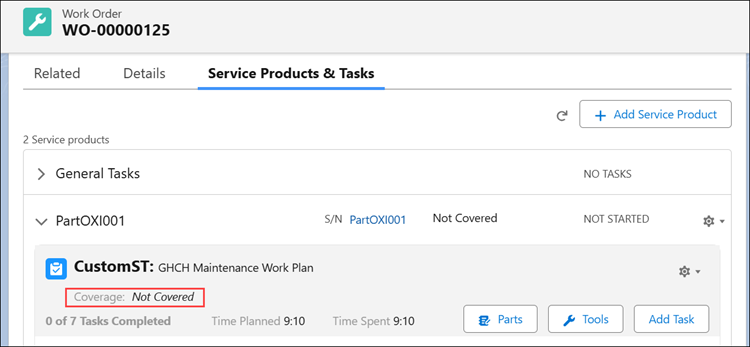 On successful entitlement selection , Is Entitlement Performed will be set to true and entitlement notes will be captured on the Work Plan assignment record. For Not Covered Entitlements, the Entitlement History record will not be created
|