Adding a Task
To add a service task of type Simple to work order:
1. Launch the Add Service Task modal window by performing the steps in Adding a Service Task to Work Order.
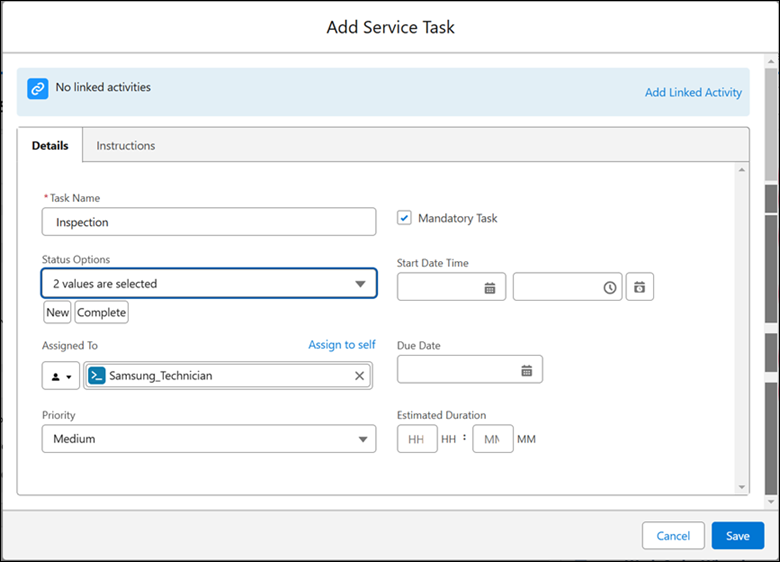
2. Enter the information in the details tab as described in the following table.
|
Field
|
Description
|
|---|---|
|
Fields with * are mandatory.
|
|
|
Task Name*
|
Enter a name for the Simple task.
|
|
Mandatory Task
|
Select this checkbox if you want this task to be completed mandatorily as a part of the completion of work order.
|
|
Status Options
|
Select additional statuses based on the life cycle of the task. For example, In Progress.
Two values - New and Complete - are selected by default. You cannot remove these values.
|
|
Start Date Time
|
You can set the Start Date time of the task, or leave it blank.
|
|
Assign To
|
Assign the task to a service group member or a service team. The following are the options:
• Assign the task to yourself: Click Assign to self to assign the task to yourself. This option can be used by the service engineer executing the task.
• Assign to a service engineer: Select Service Group Member/ Technician in the dropdown menu and then select a service engineer.
• Assign to a service team: Select Service Team in the dropdown menu and then select a service team.
|
|
Due Date
|
Select an intended completion date for the task.
|
|
Priority
|
Select the priority for the task.
|
|
Estimated Duration
|
Enter the estimated duration for the task in hours and minutes.
|
|
Create labor line on work order when status is changed to complete
|
Select this checkbox to create labor lines after the task is completed. The Labor Lines are the Work Detail Lines of the Line Type, Labor, which include information about the service tasks and time consumed by technicians to complete those tasks.
|
3. Click the Instructions tab.
4. Add instructions for the task and upload attachments in the same way as you do in Adding Simple Task to the Work Plan.
5. Click Save to save the task.