AI Insight Data Unavailability
ServiceMax AI generates insights based on the service data available at the time an AI request runs. In some situations, AI cannot generate an insight because required data is unavailable, inaccessible, or does not meet the configured criteria. ServiceMax AI displays a clear message explaining why the insight is unavailable instead of returning incomplete or misleading information.
AI insight data unavailability can occur in the following situations:
• Required fields do not contain values
• Relevant objects or fields are not configured as AI data sources
• Filter criteria exclude all applicable records
• The AI request runs on an unsupported object or context
• The data has not yet been saved or synchronized
This topic includes the following sections related to AI Insight Data Unavailability:
• Examples
Location Where the Message Appears
AI Insight data unavailability messages appear in the same location where the AI response are displayed.
|
Feature
|
Location where the message appears
|
|---|---|
|
AI Chat
|
Inline response in the chat panel
|
|
AI Actions (Salesforce Web)
|
AI response panel
|
|
AI Actions (Go / Windows Go)
|
AI response view or notification
|
|
Automated AI Actions
|
Target output field or automation log
|
|
Service Board AI Actions
|
AI response dialog
|
|
Run AI Action
|
Output section in the AI Console
|
Error Scenarios, Outcomes, and Recommended Actions
This table summarizes AI Insight data unavailability messages and the recommended actions.
|
Scenarios
|
Outcome
|
Recommended Actions for End Users
|
Best Practices for Administrators
|
|---|---|---|---|
|
ServiceMax AI cannot retrieve required data due to missing records, unavailable objects, or restricted access.
|
ServiceMax AI displays a data unavailability message instead of an insight or response.
|
Review the request and confirm that the referenced data exists and is relevant. Retry the request if the data becomes available.
|
Ensure required ServiceMax objects and fields are enabled as data sources for AI insights.
|
|
The AI request references historical or transactional data that is not present in the system.
|
The AI response indicates that it cannot generate insights due to missing data.
|
Verify that the asset, work order, or related record exists and contains data.
|
Validate data completeness for commonly queried objects and maintain consistent data entry standards.
|
|
The user does not have permission to access one or more required data sources.
|
ServiceMax AI does not return insights and shows a data access–related message.
|
Contact an administrator to request access to the required records or features.
|
Assign appropriate user permissions and profiles for AI insight consumption.
|
|
Data sources for AI insights are not configured or are partially configured.
|
ServiceMax AI fails to generate insights and surfaces a configuration-related message.
|
Retry the request after configuration updates are completed.
|
Configure and test AI data sources in the ServiceMax AI Console before enabling insights for users.
|
|
The requested insight depends on external or historical data that is temporarily unavailable.
|
ServiceMax AI displays a temporary unavailability message.
|
Retry the request at a later time.
|
Monitor data source availability and review system health for dependent services.
|
Examples
The table lists a few examples of AI request, error messages, and reason for the error.
|
Example
|
User Question or AI Request
|
Error Message Displayed
|
Reason for the Error
|
|---|---|---|---|
|
Example 1 – Missing required data
|
A technician runs an AI Action to summarize a Work Order.
|
Insight unavailable because required record details are missing. Add the missing information and try again.
|
The Work Order does not contain values for required fields such as Problem Description or Work Details.
|
|
Example 2 – Data source not configured
|
An administrator runs an AI Action that relies on Installed Product data.
|
Insight unavailable because the required data is not accessible to AI.
|
The Installed Product object is not configured as a data source in the AI Console.
|
|
Example 3 – No matching records
|
A user runs an AI Action with filter expressions applied.
|
Insight unavailable because no records match the current criteria.
|
The configured filters exclude all relevant records, so no data is available for the insight.
|
Sample Error Messages
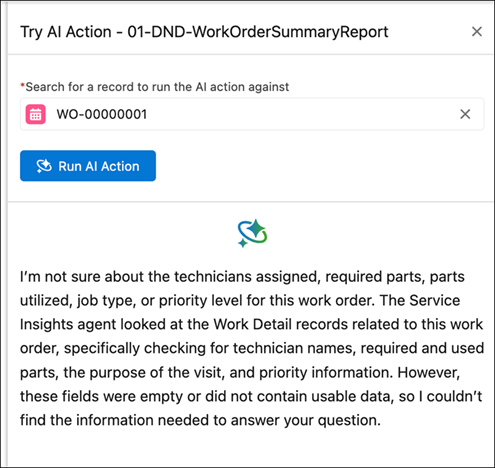
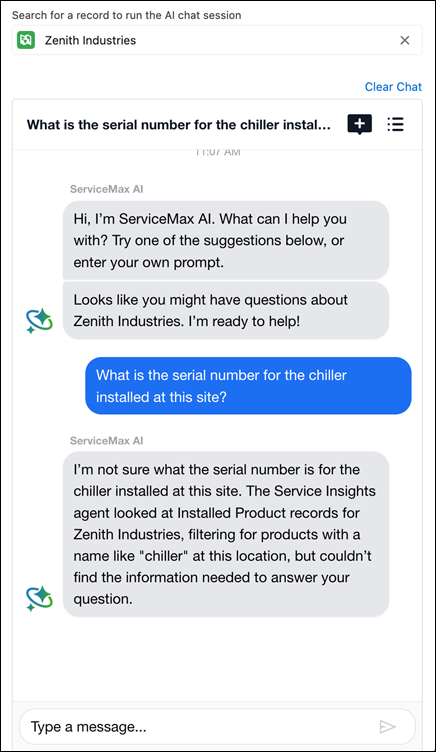
The following illustration describes how ServiceMax AI uses clear, explanatory messages to communicate why an insight is unavailable.
• AI Insight error message displayed when required Work Order data is missing.
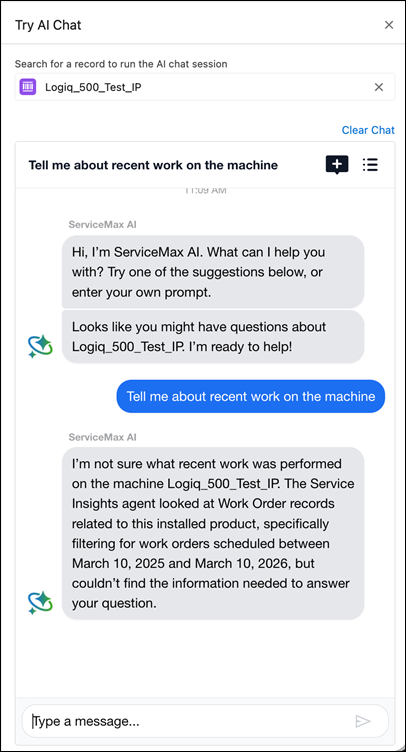
• AI Insight error message displayed when Installed Product data is not accessible
• AI Insight error message displayed when no records match the criteria.
Related Topics