About the PTC Control Center
The PTC Control Center is an executable that is installed on each Creo+ user’s computer and acts as a conduit between the Creo+ Portal and the user’s computer. The PTC Control Center performs the following tasks:
• Installs Creo+.
• Checks connectivity between the Creo+ Portal and the user’s computer.
• Checks license entitlement for a user.
• Starts Creo+.
• Installs software updates for Creo+ as well as the PTC Control Center.
• Provides notifications about updates.
• Provides critical error messages.
When the PTC Control Center is successfully installed it displays in the system tray. Click  to open the PTC Control Center as shown in the figure below.
to open the PTC Control Center as shown in the figure below.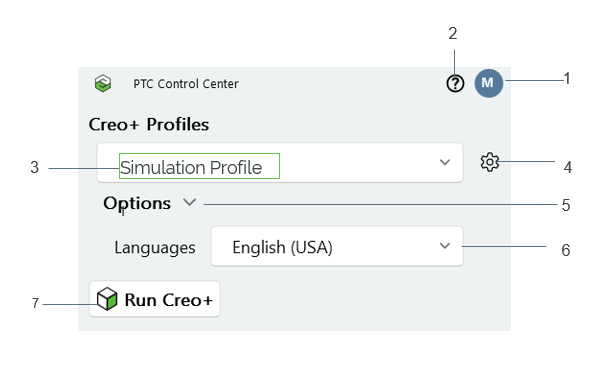
1. Displays user information such as user name, email ID, license entitlement.
2. Links to Help Center, Creo+ Portal, Troubleshooter, Technical Support, PTC Community.
3. Selects a Creo+ profile
4. Displays details for the selected profile.
5. Expands additional options.
6. Selects language for Creo+.
7. Starts Creo+.