Enabling AI Knowledge Capture for a Hotline
|
Prerequisites
|
|---|
|
• You must have administrator rights over the hotline.
• ServiceMax AI access must be enabled for your organization.
|
Enable AI knowledge capture for a hotline so that staffers can generate knowledge articles from request conversations.
To enable AI knowledge capture for a hotline:
1. In the Admin Console, click the Hotlines tab.
2. Click the hotline you want to configure.
3. Scroll to the ServiceMax AI section.
 |
The ServiceMax AI section is visible only when ServiceMax AI access is enabled for the organization.
|
4. Toggle Enable AI Knowledge Capture to On.
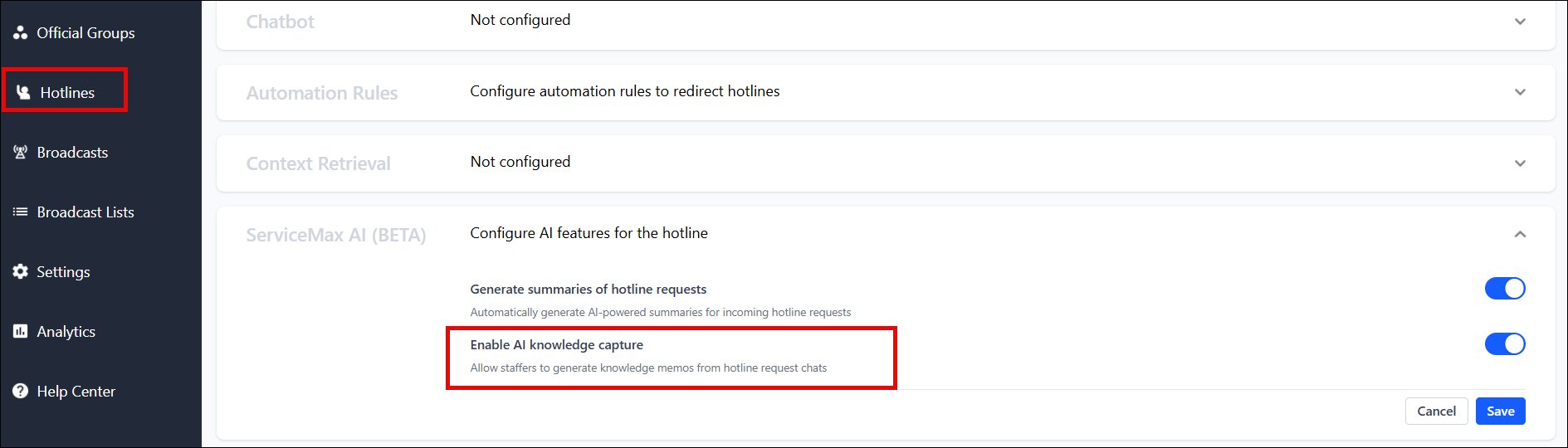
5. Click Save.
Hotline staffers assigned to this hotline now see a Create New Memo button on the request banner and a Generate New Memo button on the conversation info screen. To disable knowledge capture, return to the ServiceMax AI section and toggle Enable AI Knowledge Capture to Off.