Enabling UI Personalization for Dispatchers
Turn dispatcher UI personalization on or off from Max Admin.
Administrators can use the following procedure to enable or restrict dispatcher access to the Service Board UI switcher.
 |
The Classic user interface retires on November 8, 2026. All features are available in the Service Board Modern interface. We recommend switching to Service Board Modern at your earliest convenience to access the latest features.
|
1. Go to > > .
2. Locate and click Enable Service Board UI Personalization.
3. In the Overview tab, enable Default Value.
Enable the setting to let dispatchers switch interfaces. Disable to hide the dispatcher switch and keep interface control in Service Board Administrator.
4. Click Save Setting and Close.
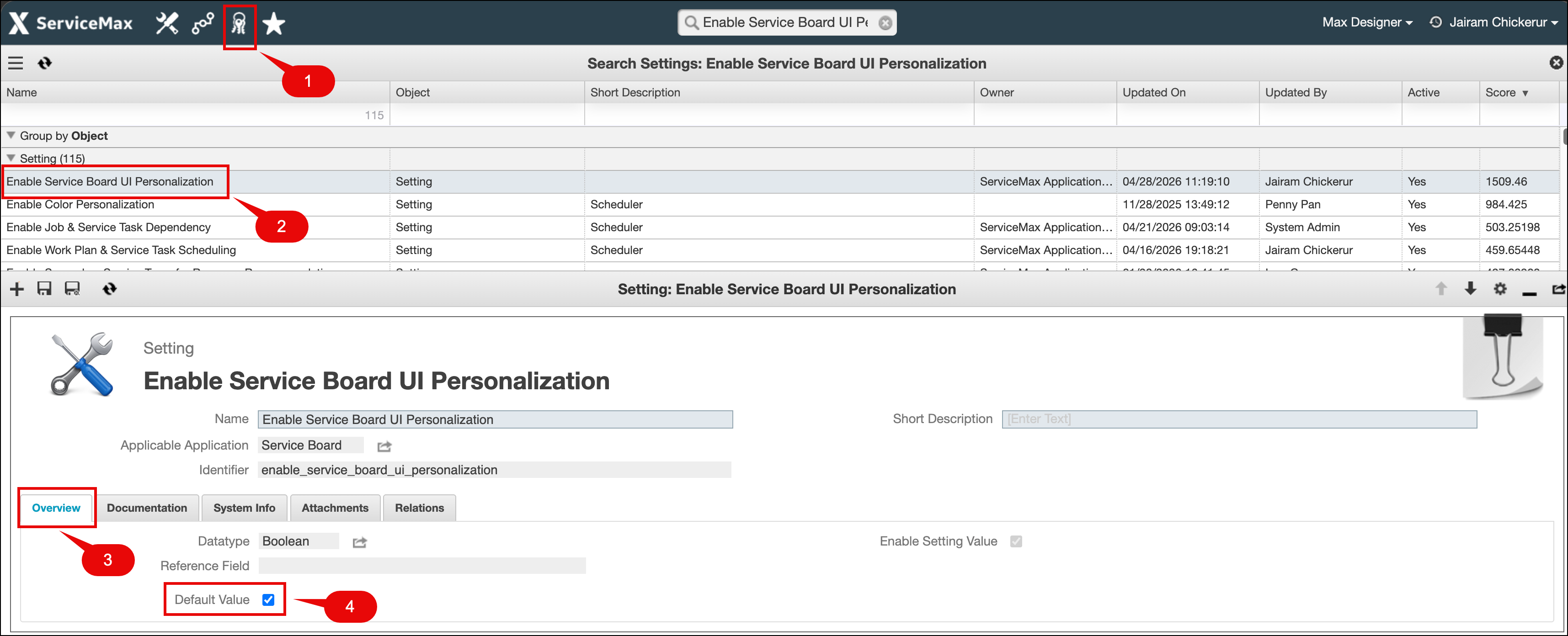
|
Callout Number
|
Description
|
|---|---|
|
1
|
Administrator section on Max Admin
|
|
2
|
Enable Service Board UI Personalization setting
|
|
3
|
Overview tab
|
|
4
|
Setting to enable or disable
|
Related Topics