General Info Tab in 24.2
The following screen displays the General Info tab.
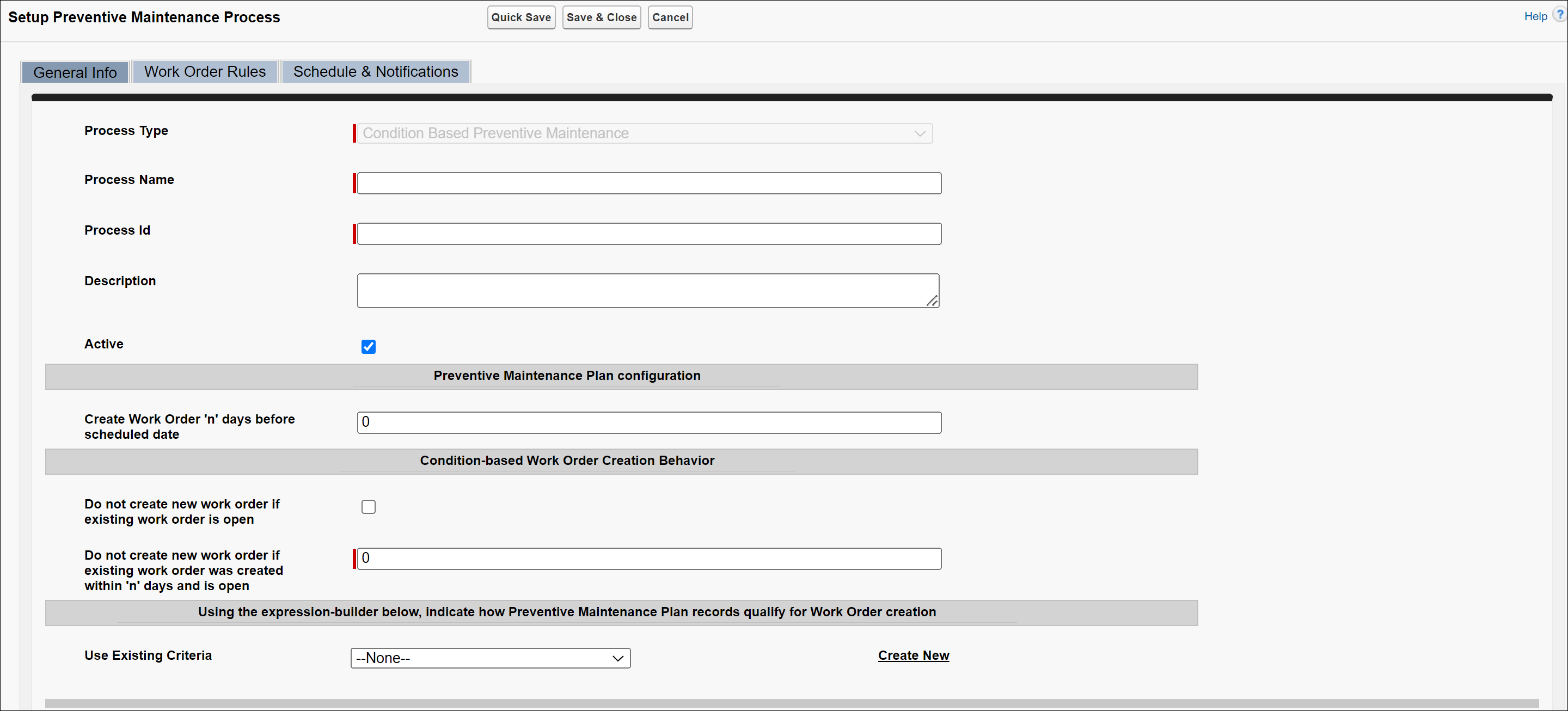
Enter the details for the fields as described in the following table.
|
Fields
|
Description
|
||
|---|---|---|---|
|
Process Name
|
Enter the Process Name for the custom PM Process.
|
||
|
Process ID
|
Enter the Process ID for the custom PM Process.
|
||
|
Description
|
Enter the Description for the custom PM Process.
|
||
|
Active
|
Select this checkbox to activate the PM Process. Note: The PM Process engine only considers that are active processes.
|
||
|
Preventive Maintenance Plan Configuration
|
|||
|
Create Work Order 'n' days before the scheduled date
|
Enter the days before the scheduled date you want the PM engine to create the Work Order. Note: The date represents the date you have scheduled the PM engine to run to create the preventive maintenance process.
|
||
|
Condition-based Work Order Creation Behavior
|
|||
|
Do not create new Work Order if the existing Work Order is open
|
Select this option if you do not want the engine to create a new work order when the already scheduled (existing PM work order) Work Order is not closed. This option applies to the Criteria/Condition and Usage/Frequency type of the Condition-Based PM Processes.
If you want to retain the old behavior (22.1 and below), for the Usage/Frequency type of Condition-Based PM Processes, a new Work Order is created even though the existing Work Order is open, then you need to define the following fields:
• Clear the checkbox "Do not create new Work Order if the existing Work Order is open."
• Enter the value 0 for the field "Do not create new Work Order if an existing work order was created within 'n' days and is open."
|
||
|
Do not create new Work Order if an existing work order was created within 'n' days and is open.
|
Select this option if the work order is created within some specific period and is still open. These are Criteria/Comparison or Usage/Frequency type configurations and are valid in the case of Equal to, Greater than, and Less than operators.
|
||
|
Using the expression builder below, indicate how Preventive Maintenance Plan records qualify for Work Order creation.
|
|||
|
Use Existing Criteria
|
Use the expression builder to select the criteria to determine how the PM plan records will qualify when creating Work Orders. For detailed steps, see Use Existing Criteria.
|
||

Use Existing Criteria
To build an expression:
1. Select an option from the Use Existing Criteria picklist.
2. Click View to view the existing criteria. OR Click Edit to edit the criteria by entering an Advanced Expression.
3. Create new criteria by clicking Create New.
4. In the Expression Name field, enter an expression name.
5. In the Expression Id field, enter an expression Id.
6. In the Field Name picklist, select a field name.
7. Select an operator in the Operator picklist.
8. Enter a value in the Value field.
9. Use the + and - icons to add or delete expressions.
10. Enter an Advanced Expression using AND or OR options, if applicable to your process.