Creating Wizard Step for Interactive Entitlement
You can create wizard steps in the SFM to access the Interactive Entitlement as a custom action.
To create a wizard step for the Interactive Entitlement:
1. Navigate to ServiceMax Setup > Service Flow Manager > Wizards.
2. Click the Select Object dropdown menu.
3. Select an object. Example: Work Order. A list of wizards is displayed.
4. Click Add Wizard.
5. Provide the following information.
|
Fields
|
Description
|
||
|---|---|---|---|
|
Fields marked with * are mandatory.
|
|||
|
Wizard Name*
|
Enter a name for the wizard. The wizard name is displayed under the Service Flow Wizard section in a Work Order.
|
||
|
Wizard ID*
|
Enter a unique id for the wizard, using alphanumeric and underscore characters.
|
||
|
Description
|
Enter a detailed description of the wizard. The description is displayed by hovering over the wizard title.
|
||
|
Criteria To display wizard. Blank to always display
|
None. For more information on configuring the criteria, see General Information Tab.
|
||
|
Profile-Wizard will be shown to selected profiles
|
Select the ServiceMax profiles that have permission to use this wizard. Select the group profiles from Available ServiceMax Group Profiles. Click the arrow mark to move the profiles to Selected ServiceMax Group Profiles.
|
||
|
Copy profile permissions from
|
You can select any profile from the dropdown list to replicate its permissions for the selected wizard.
|
||

6. In the Active tab, expand the newly created wizard, and then click the plus icon.
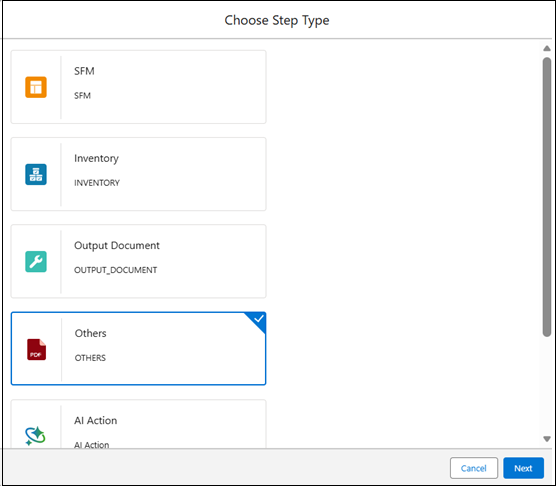
The Choose Step Type pop-up window is displayed.
7. Select Others as the step type, and click Next.
The Step Properties-Others pop-up window is displayed.
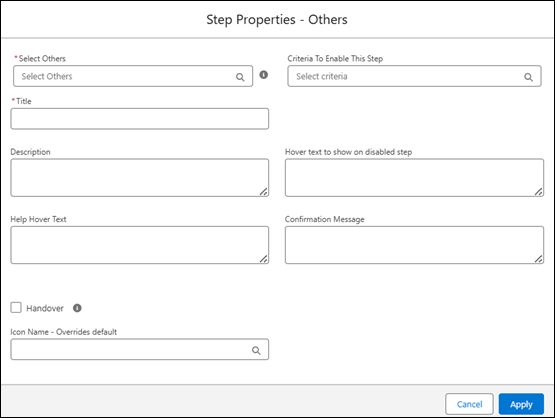
8. Provide the following information.
|
Fields
|
Description
|
|---|---|
|
Fields marked with * are mandatory.
|
|
|
Select Others*
|
Select Interactive Entitlement.
|
|
Title*
|
Edit the auto-populated value, if required.
|
|
Description
|
Enter a detailed description of the wizard step.
|
|
Criteria To Enable This Step
|
None. For more information on configuring the criteria, see Manage Wizard Steps.
|
9. Click Apply.
10. Click Save .